
Product guide · Inside a site · SEO Intelligence
Live SERP Check
Live SERP Check runs a client’s keywords through Google right now and shows what the results page holds: whether an AI Overview answers the search and which sites it cites, who has the featured snippet, the People Also Ask questions, the local pack, the top ten results, and where the client’s site appears among them. The same scan can pull search volume, cost per click and difficulty.
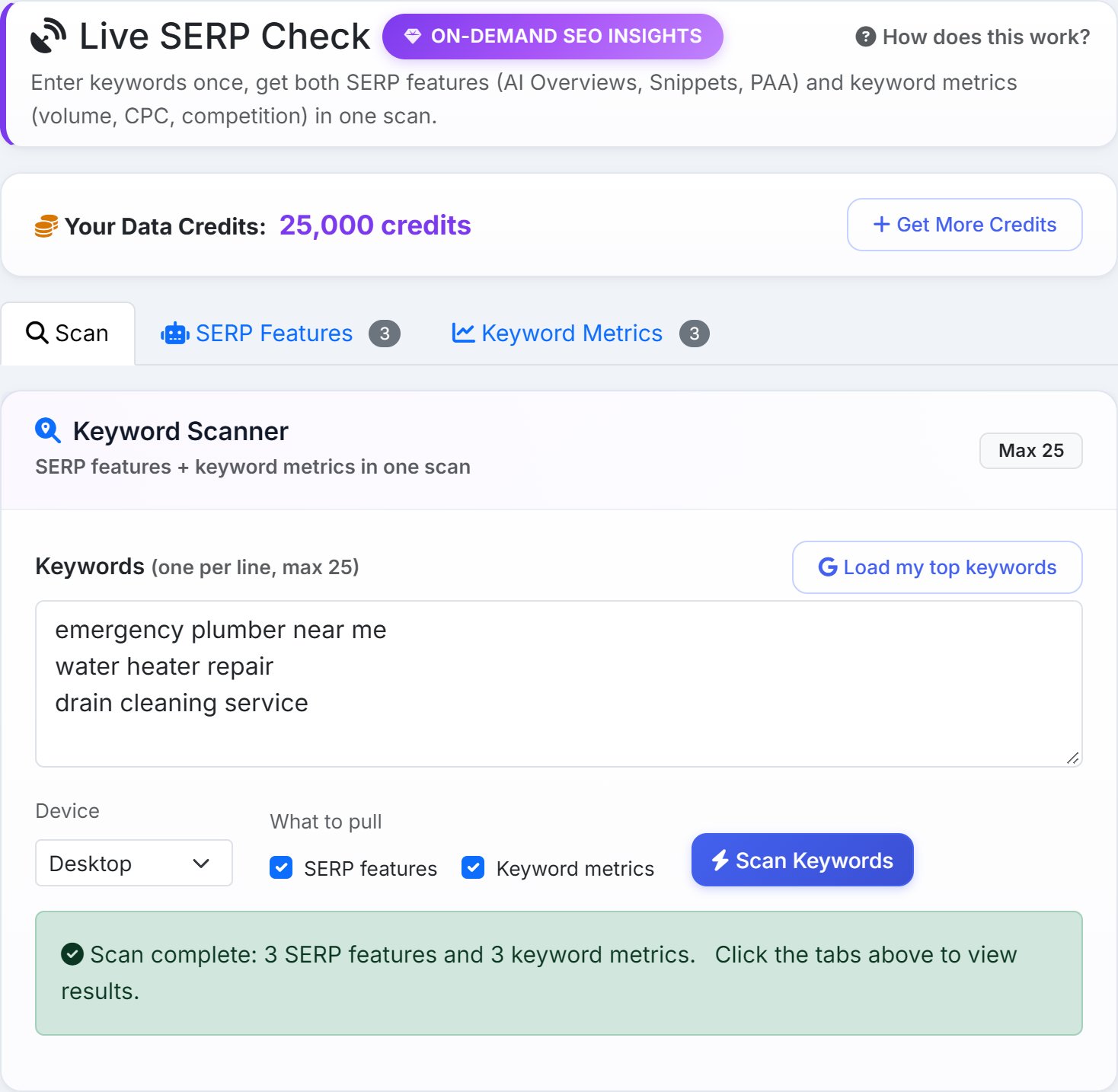
Search Console tells you how a site does in Google, on average, over weeks. It doesn’t show you the page a customer sees today: whether Google answers the question itself before anyone scrolls, or whether a competitor holds the box at the top. Live SERP Check shows you that page, for up to 25 keywords at a time.
Run a scan
- Keywords
- Type or paste them, one per line. Load my top keywords fills the box from Search Console instead: the site’s searches with the most impressions, the ones already putting it in front of people, up to 25. A note under the box says how many it loaded and what scanning them all would cost, so you can trim the list first.
- Device
- Desktop or Mobile. Google often lays the page out differently on a phone, so for a local business it’s worth scanning both.
- What to pull
- SERP features is the results page itself. Keyword metrics is volume, cost per click, competition and difficulty. Each one is priced separately, so untick the one you don’t need.
- Scan Keywords
- Shows the cost and asks you to confirm, then runs. A long list can take a few minutes. When it finishes, the results open in the SERP Features tab.
Each keyword is searched on Google for the site’s own country, in its language. AlmaSEO judges the country from the domain, so a .co.uk site is scanned on UK Google. The scan is country-wide; for rankings from a client’s city, use Keyword Tracker.
You can also start from Keyword Research: its Check SERP button opens this tab with the keyword already in the box.
What a scan costs
The bar at the top shows your Data Credits balance. Before anything runs, AlmaSEO shows the cost of each half, the total, your balance and what’s left after. If the balance isn’t enough, the dialog offers Get Credits instead of Confirm & Use Credits. AlmaSEO shows the exact figures on screen; see Data Credits.
- Only what came back
- You’re charged for SERP features only on keywords Google answered for. A keyword that took too long is listed under the results with a note to try again, and costs nothing.
- The same scan again is free
- Scan the same keywords on the same site and device again within a few hours, and AlmaSEO serves the saved result at no cost, marked From cache (free).
- When live data is paused
- If fresh results can’t be fetched for a while, a banner says so before you start, and the Scan button stays off.
SERP Features
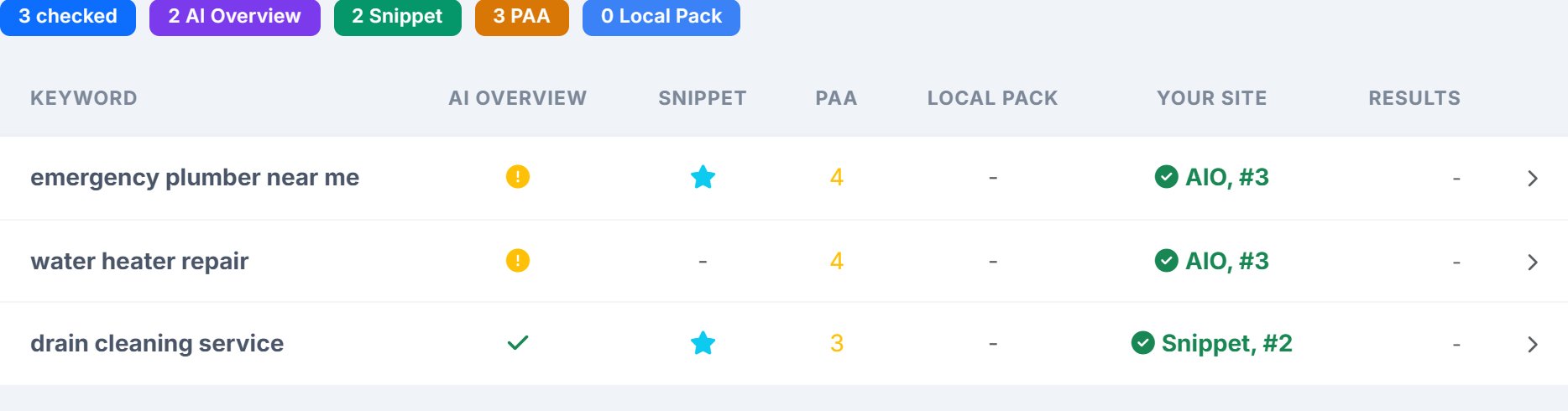
The badges along the top count the keywords that have each feature. Then one row per keyword:
- AI Overview
- An amber mark means Google answers this search with an AI Overview at the top of the page; a green tick means it doesn’t.
- Snippet
- A star means a featured snippet, the boxed answer above the normal results, is on the page.
- PAA
- How many People Also Ask questions Google shows.
- Local Pack
- How many businesses the map pack lists, when there is one.
- Your Site
- Where the client’s site appears: Snippet if it holds the snippet, AIO if the AI Overview cites it, and #3 for its place in the top ten. When the site isn’t in the top ten and you loaded the keywords from Search Console, it shows the site’s Search Console position instead, such as GSC #14. Otherwise, Not found.
- Results
- How many results Google reports for the search.
One keyword in detail
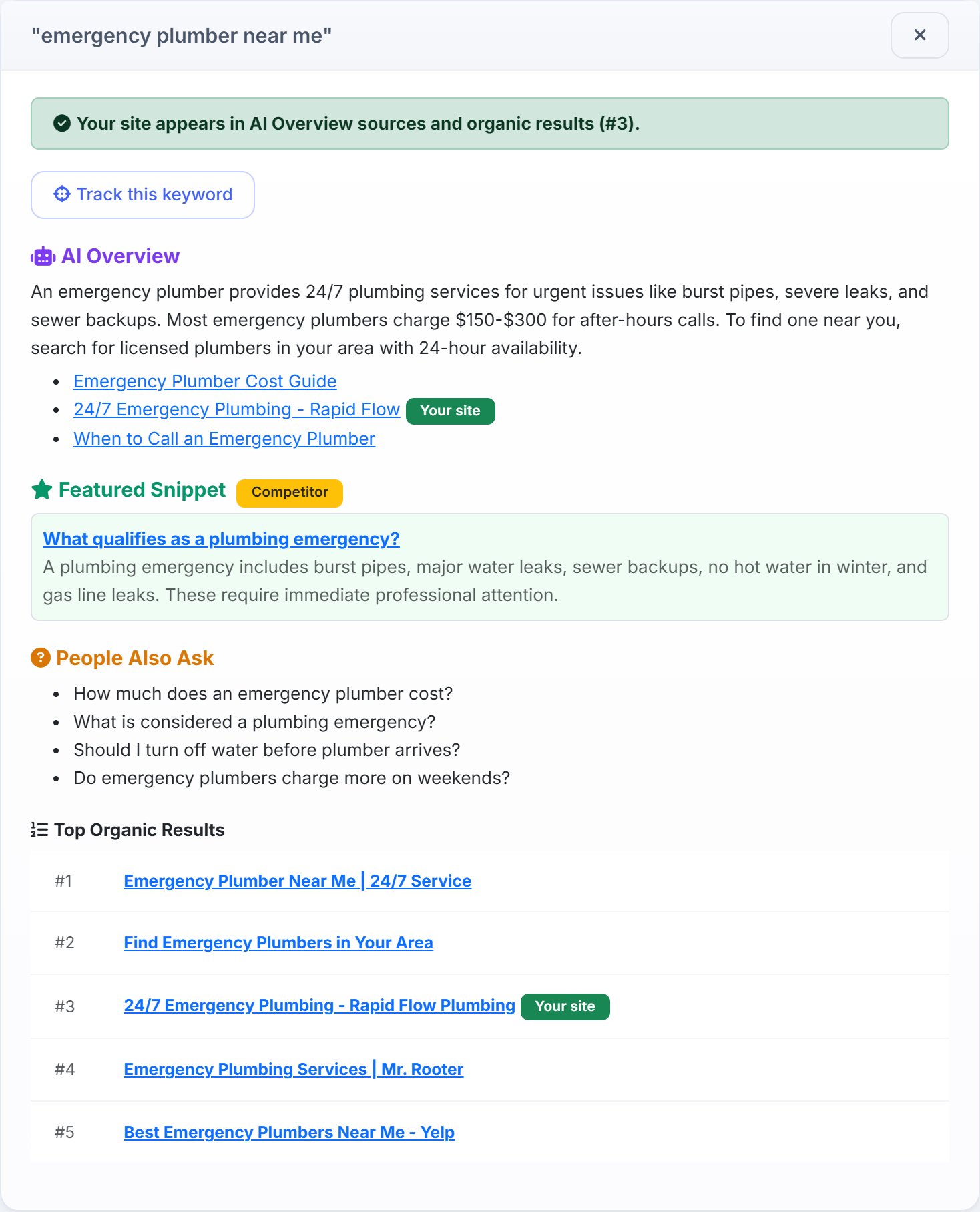
Click a row to open everything the scan found for that keyword:
- Where the site stands
- A green line when the site appears, naming where. Otherwise an amber line saying it isn’t in the top results, what’s taking the click (an AI Overview, a competitor’s snippet), and its Search Console position if you loaded the keywords from there.
- Track this keyword
- Adds the keyword to Keyword Tracker, so its ranking is checked every week from now on. The plan’s keyword limit applies.
- AI Overview
- The answer Google wrote, and up to five pages it cites. The client’s page carries a Your site badge.
- Featured Snippet
- The page that holds it and the text Google shows, marked Your site or Competitor.
- People Also Ask
- The questions in the box, word for word. Each is a question real searchers ask, and a heading a page could answer.
- Local Pack
- Up to five businesses in the map pack, with their phone numbers.
- Top Organic Results
- The top ten, with title, domain and description. The client’s row is highlighted.
- Discussions, Related Searches, all features
- Forum threads Google shows, the related searches at the foot of the page, and a list of every feature on the page.
Keyword Metrics
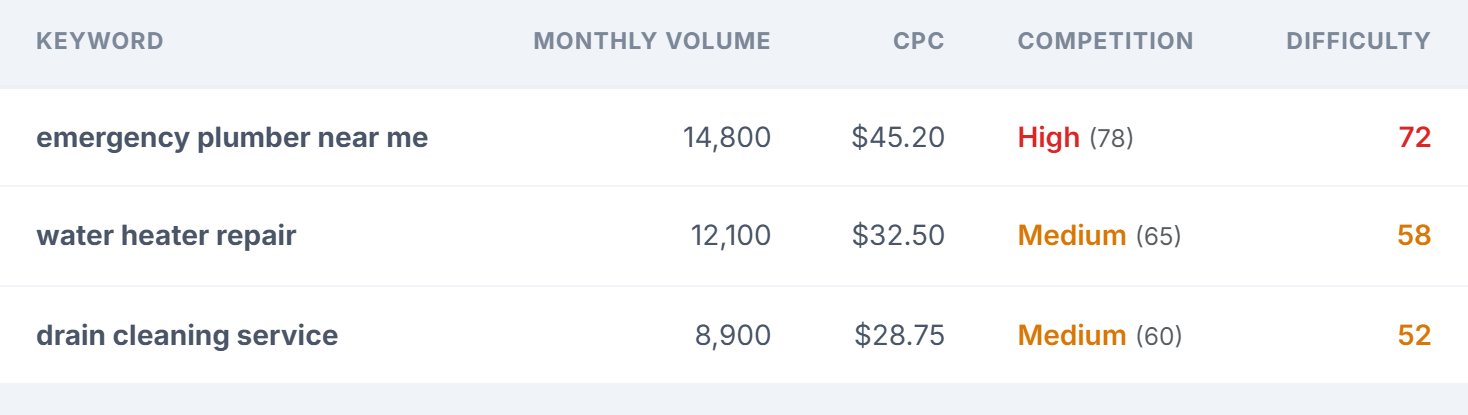
- Monthly Volume
- About how many times a month people search for the keyword in the site’s country.
- CPC
- What advertisers pay per click on Google Ads for it. A high CPC means the search tends to turn into customers.
- Competition
- How crowded the ads are: Low, Medium or High, with a score out of 100.
- Difficulty
- How hard it is to rank in the top ten without ads, out of 100. Green is within reach, red is a long fight.
Where results are kept
Every SERP features scan is saved with the site. When anyone on your team opens the tab, the site’s latest scan is there, with a line saying how long ago it ran. Run a new scan to refresh it. Keyword metrics show for the scan you just ran; run the scan again to see them later.
Saved scans also feed two other parts of AlmaSEO, at no extra cost: the AI Overview Tracker, which follows whether Google’s AI answers cite the client over time, and the SEO Recovery audit.
Plans and team access
- Plans
- Live SERP Check is on every plan. Scans spend Data Credits.
- Your team
- Anyone on your team who can open the site can run a scan and see the last one. Scans spend the account owner’s Data Credits.