A free WordPress SEO plugin where the free version is the whole plugin.
Schema, XML sitemaps, redirects, 404 tracking, readability, bulk meta editing and a one-click import from Yoast, Rank Math or AIOSEO — all of it running on your own server, with no account and nothing held back for a paid tier.
You install it, you start working, and somewhere around the third useful thing you try to do — the redirect, the bulk edit, the second focus keyword — a panel slides in explaining that this part is premium. The plugin isn’t really a tool at that point. It’s a sales funnel with a settings page attached, and you spend the next year working around the parts you can’t reach.
The AlmaSEO plugin has no premium tier, because there is nothing to sell you inside it. Every feature on this page runs locally on your own site, works on its own, and stays reachable whether or not you ever hear from us again. There is exactly one line in the plugin that asks about your account, and it governs a short list of things that genuinely cannot run inside WordPress — the analysis that needs a language model, or data that lives in our service and not on your server. That list is printed in full further down, because a page that claims “everything’s free” without showing you the exceptions isn’t worth much.
What you get instead of the upgrade prompt is the whole surface: the on-page work, the structured data, the technical plumbing, and the unglamorous maintenance tools — orphan pages, stale dates, links that need auditing — that usually live in four more plugins.
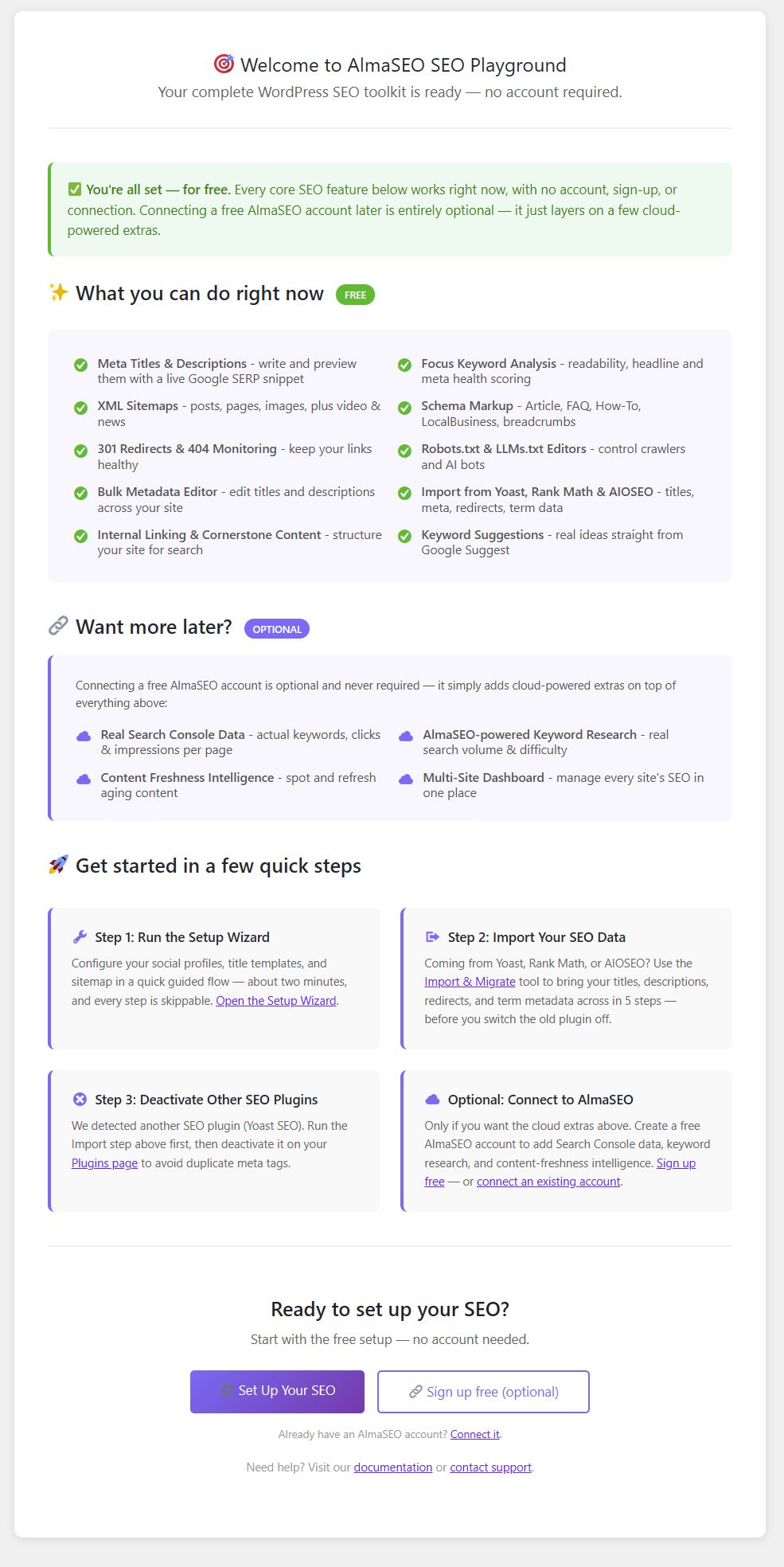
The first screen the plugin shows you, and the reason this page can make the claim it does. “Your complete WordPress SEO toolkit is ready — no account required.” One column headed FREE lists what works immediately: meta titles and descriptions with a live SERP snippet, XML sitemaps, 301 redirects and 404 monitoring, the bulk metadata editor, internal linking and cornerstone content, focus-keyword analysis, schema markup, robots.txt and LLMs.txt editors, import from Yoast, Rank Math and AIOSEO, and keyword suggestions. A second column, marked OPTIONAL, is the short list that needs an account — Search Console data, keyword research, content-freshness intelligence and the multi-site dashboard. Nothing in the first column is a trial.
For the one site you run, and the thirty you inherited.
For the site owner
You want the SEO basics done, without a subscription to find out what they are.
You’re not trying to become an SEO. You want the titles and descriptions right, the sitemap submitted, the schema present, and something to tell you when a page is drifting — without a monthly bill and without a settings screen that assumes you already know what a canonical is.
A setup wizard that configures the site on first run
One health score per page instead of a wall of jargon
Plain-language readability and headline feedback as you write
For the freelancer or agency
You install the same plugin on every client site and pay for it every time.
The per-site licence is the tax on doing this professionally. So is the migration: every site you take over arrives carrying somebody else’s SEO plugin, with the meta in their schema and the redirects in their table, and moving it is a day you don’t bill for.
No per-site licence key, on any number of sites
A five-step import that carries meta, terms, settings and redirects across
Role-based access, so the client can edit copy without touching robots.txt
Six areas, and everything inside them.
All of it free, all of it local, none of it gated behind an account. Where a feature has a fuller version for connected sites, it says so.
On-page SEO
The editor panel you actually work in.
SEO health score, per post and page
One weighted reading of the page you’re editing, built from the signals that matter, so you get a straight answer instead of forty green and red dots.
Meta editor with a live SERP preview
Title, description and focus keyword, with a Google-style preview that updates as you type — plus Open Graph and Twitter Card social meta, canonical URLs and meta robots controls.
Readability and headline analysis
Flesch score, passive voice, transition words and subheading distribution, alongside a headline analyzer — all computed on your own server as you write.
Also includesKeyword suggestionsCornerstone contentEvergreen content trackerLLM readiness heuristicsNotes and history
yoursite.com/wp-admin/post.php
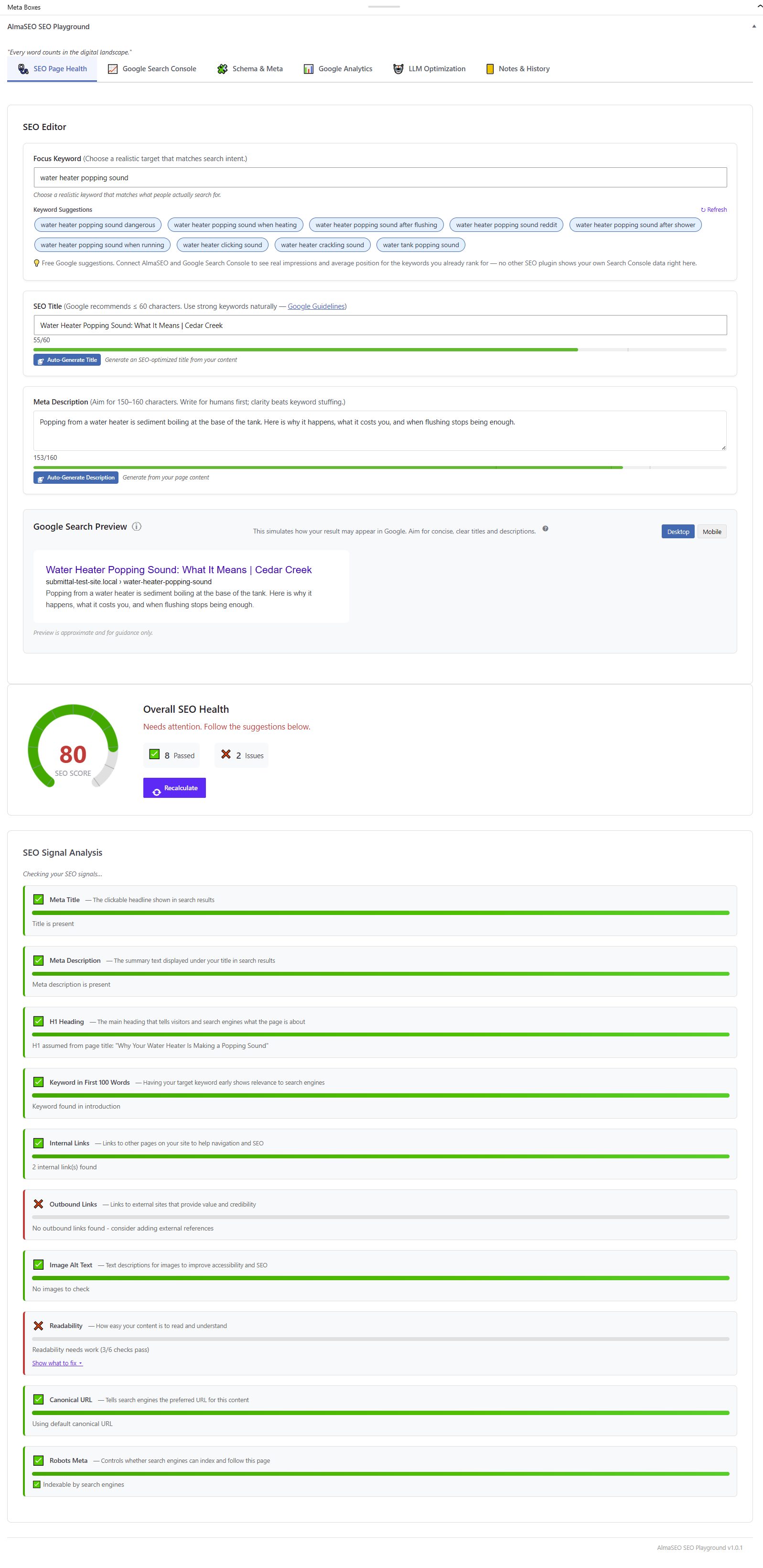
The panel you work in, on a post about water heaters. The focus keyword field offers real suggestions pulled from Google’s own service; the SEO title counts 55 of 60 characters and the description 153 of 160, both inside the bar Google actually renders. Below them the Google preview shows the result as a searcher would see it. The page scores 80, with 8 checks passed and 2 issues — and the issues are specific rather than scolding: no outbound links, and readability passing only 3 of 6 checks. Every signal names what it is and why it matters.
Structured data and schema
Telling search engines — and the answer engines — what the page is.
JSON-LD for the types you actually publish
Article, FAQ, How-To, Product, Event, Recipe, Person, Organization and more, authored per page. The site-wide advanced schema output ships switched off — you turn it on deliberately, rather than discovering the plugin has been emitting markup you never reviewed.
WooCommerce product schema
Price, availability and SKU on your products, products and product categories in the XML sitemap, and per-product control over indexing.
Blocks and breadcrumbs
FAQ, How-To and Table of Contents blocks, plus breadcrumbs as a shortcode and a block with BreadcrumbList schema — so it works whether you’re on the block editor, Classic, or a page builder.
For the business that needs to be found in one place.
LocalBusiness schema with 154 sub-types
Not a generic “LocalBusiness” tag — the actual sub-type, across 18 categories, so a dental practice publishes as a dental practice and a plumber as a plumber.
Name, address and phone, structured
The NAP fields that local rich results are built from, authored in the page panel and emitted as proper JSON-LD rather than buried in your theme’s footer markup.
Opening hours
Hours carried into the schema, including the split and irregular ones that break most implementations.
Also includesGeo coordinatesPrice rangeService areaMulti-location support
yoursite.com/wp-admin/post.php
Local Business detailsScreenshot coming
Technical SEO
The plumbing, and the parts that usually cost extra.
XML sitemaps — and the four other kinds
The standard XML sitemap plus News, Video, Image and HTML sitemaps, with IndexNow support so new URLs get announced the moment they publish.
Redirect manager, including trash-to-redirect
A full redirect table with no upgrade prompt in it, and a catch that most sites need and few have: when you bin a post, you get offered the redirect before the 404 exists.
404 tracking with spike alerts
Every 404 logged with its referrer, and a warning when the rate jumps — which is how you find out a migration went wrong this week instead of next quarter.
Canonical health check
A canonical URL tells Google which address is the real home of a page. Point one at a missing page, a redirect, or an image file, and the page quietly asks to be left out of the results — while looking perfectly fine to you. This follows every canonical you have set, reports what is actually at the other end, and fixes the broken ones. It also tells you when a caching plugin is running, because until that cache clears the public page still shows the old value and a working fix looks like a failed one.
Also includesrobots.txt editorCrawl optimizationImage SEO alt/title templatesWebmaster verification codesRSS controlsLLMs.txtGoogle Analytics (GA4) tracking code
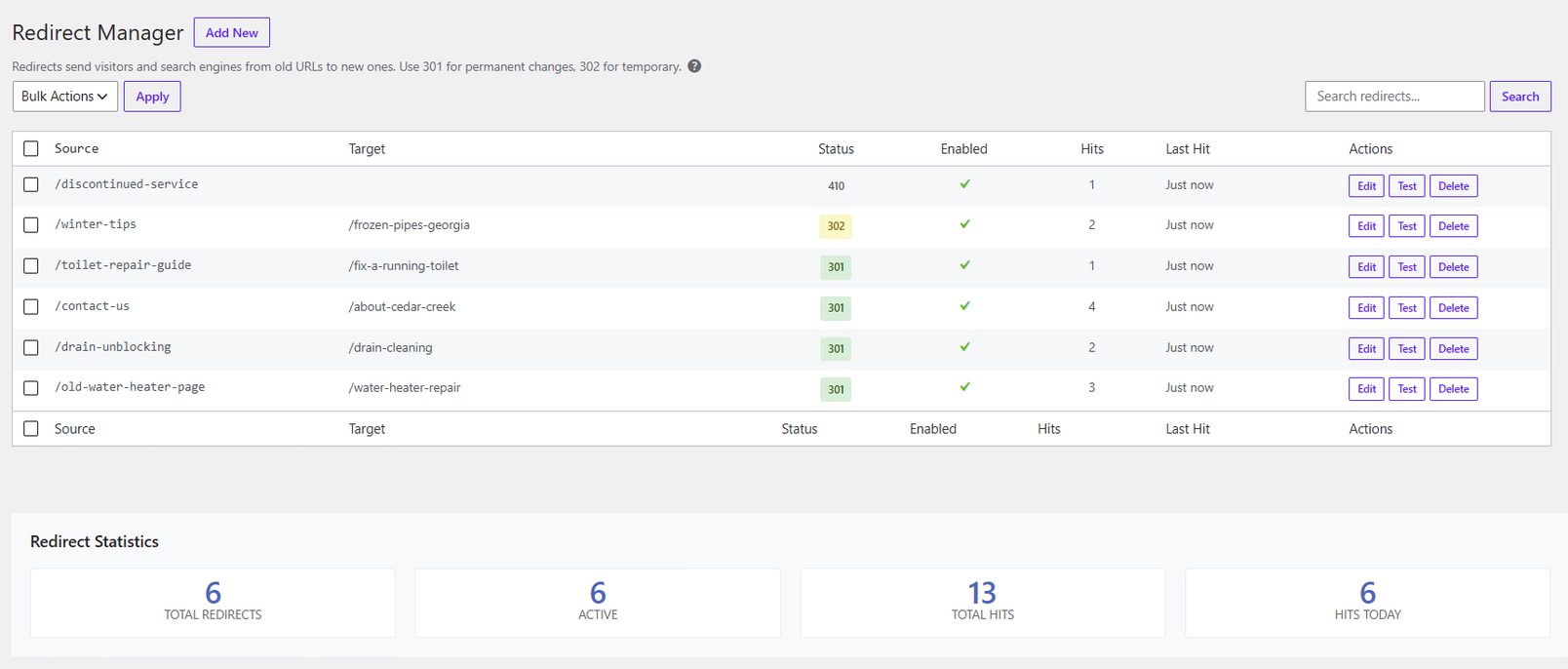
Six rules, and no upgrade prompt anywhere in the table. Source and target, the status code as a badge — 301 for the permanent moves, 302 for the seasonal one, and a 410 Gone for a service that is not coming back — then whether each rule is enabled, how many times it has fired, and when it last did. 13 hits across six rules at the foot. A redirect you cannot see the hit count for is a redirect you cannot tell is working.
Bulk editing and upkeep
The maintenance work that normally means four more plugins.
Bulk metadata editor, with undo
Edit SEO titles and descriptions across many posts in one table — find-and-replace, append, prepend, reset. Every run is backed up first and reversible in one click, and the backups download as files you can keep outside the database.
Internal link auto-linker, guardrailed
Turn chosen phrases into links to chosen URLs, with limits per post and per page, and rules that refuse to link inside a heading, inside an existing link, inside code, or from a page to itself.
Find what’s quietly rotting
Orphan page detection for published pages nothing links to, a date-hygiene scan for stale years and old price references, a refresh queue that ranks your content by how much a rewrite would be worth, and section-by-section refresh drafts you accept or reject one at a time.
Also includesE-E-A-T enforcementSearch appearance templatesRole-based access controlSetup wizard
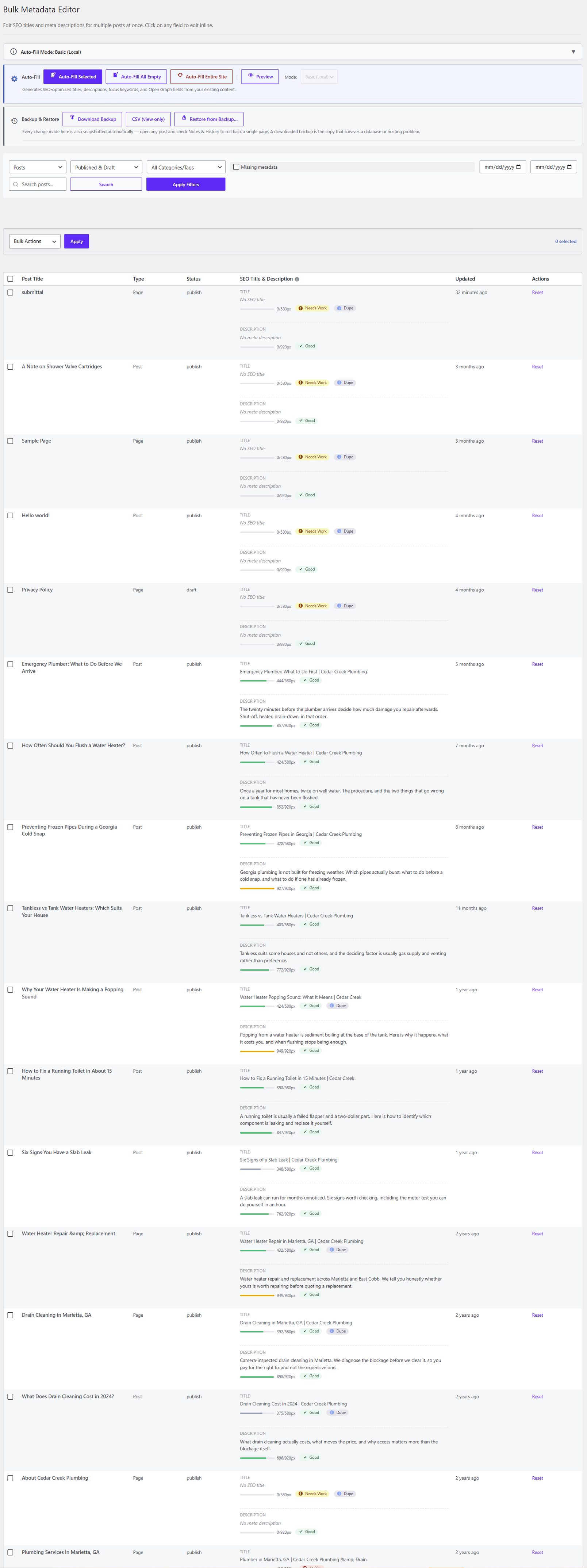
Every post and page in one table, each title and description editable in place. The bar under each field is its rendered pixel width, not a character count — which is what actually decides whether Google truncates you — flagged Good, Needs Work, or Dupe where two pages share a title. Auto-fill runs in Basic (Local) mode here, meaning on your own server with no account. Along the top: Download Backup, CSV export and Restore from Backup, because a bulk edit you cannot reverse is not a feature.
Moving off Yoast, Rank Math or AIOSEO
The reason switching isn’t a weekend.
A five-step import wizard
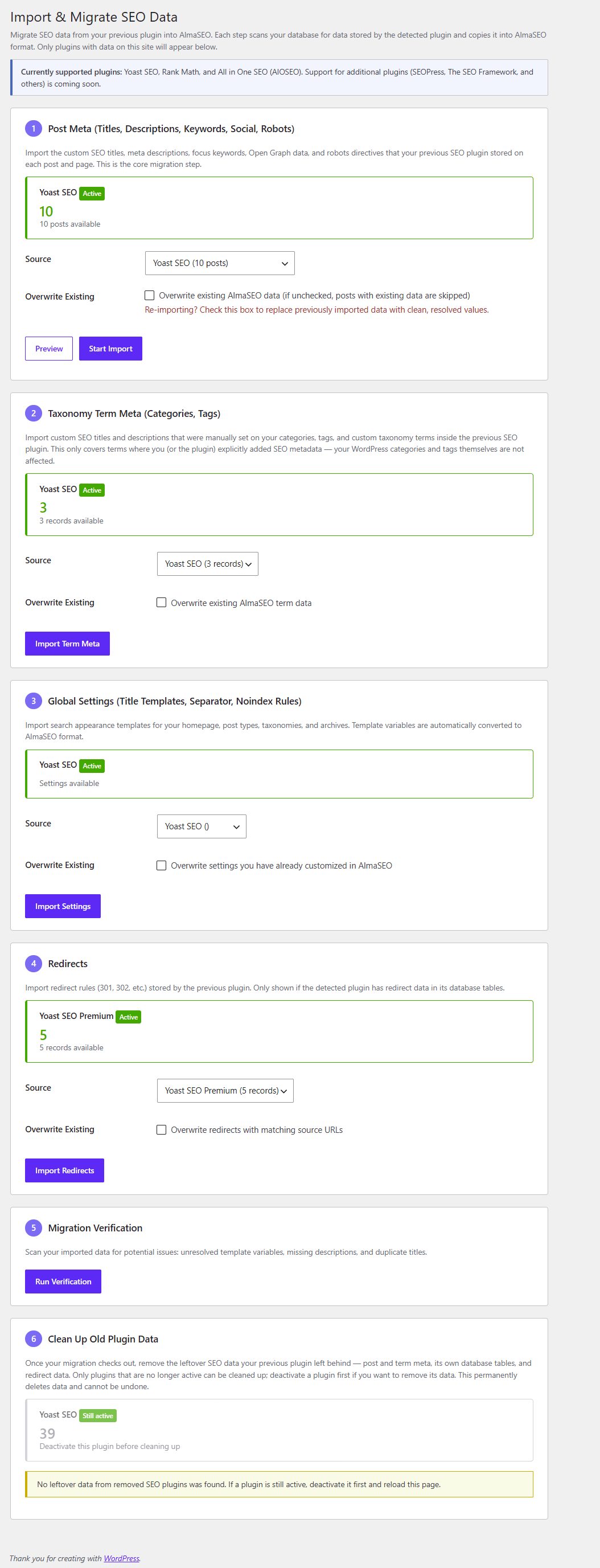
Post meta, taxonomy term meta, global search-appearance settings, and redirects — each detected independently, each run in batches, followed by a verification report that flags unconverted template variables, missing descriptions and duplicate titles.
Template variables translated, not copied
Yoast’s %%var%%, Rank Math’s %var% and AIOSEO’s #var are different languages. The importer converts them, then the verifier tells you which ones it couldn’t.
Clean-up afterwards, on your say-so
Old plugins leave years of rows behind. The cleanup step removes them from a curated list, one source at a time — and refuses to run at all while that plugin is still active.
Also includesYoast Premium redirectsRedirection plugin importConflict detectionPer-step re-run
A real Yoast install, found. Each step counts what it can see before you commit to anything: 10 posts of post meta, 3 taxonomy term records, the global settings, and 5 redirects from Yoast Premium. Every step has its own Overwrite existing checkbox, unticked, so a re-run skips what you have already brought across rather than trampling it. Step 5 verifies the result. Step 6 offers to delete the old plugin’s leftover data — and refuses while Yoast is still active, which is why it reads Still active — deactivate this plugin before cleaning up.
The short list of things that need an AlmaSEO account.
Not because we held them back. Because they cannot run inside WordPress — they need a language model, or they read data that lives in our service rather than on your server. Everything above works without any of this.
Content-freshness analysis — reading your evergreen pages against what has actually changed in the world since you published them.
Keyword performance from your connected Google Search Console, shown against the page you’re editing.
Per-page Google Analytics — views, sessions, engagement and traffic sources for the page in front of you, read from your connected GA4 property. Putting GA4 tracking on your site is free and local, and stays in the list above; it is the reporting inside the editor that needs the account.
Business details filled in for you — a location’s address, phone, service areas and opening hours pulled from its AlmaSEO profile, with hours coming from the connected Google Business Profile, instead of being retyped on every page. Typing them in yourself stays free.
Headline suggestions — AlmaSEO reads the page and writes alternative headlines that actually fit it, each scored by the same checks that run locally so you can see whether it is an improvement. Scoring the headline you wrote yourself stays free, local and account-free.
E-E-A-T judgement — the local scanner checks whether the signals are present: an author box, outbound citations, a date. Connected, AlmaSEO reads the prose instead and answers the questions presence cannot — whether the page shows real first-hand experience, which specific claims need a source and what kind of source would settle each, and whether the author’s bio actually qualifies them on this subject. The six local detectors keep running free either way.
Date-hygiene judgement — the local scan flags years, prices and dated phrases wherever it finds them, which catches things that are correctly dated as often as things that have rotted. Connected, AlmaSEO rules on each flag with a reason, and adds the staleness that carries no date at all — “our newest location”, “the latest model” — which a pattern match cannot see. Finding the dates stays free and local.
Image alt-text suggestions and cornerstone-content detection — both of which also have a local version that works on its own; connecting swaps in the fuller one.
The plugin sends nothing anywhere unless you connect an account and trigger one of the features above. During normal browsing, editing and use of the free features, nothing leaves your server.
How to get it.
Download the zip, go to Plugins → Add New → Upload Plugin in your WordPress admin, pick the file, activate, and follow the setup wizard. It runs on as many sites as you like. There is no licence key to enter and nothing to buy.
One thing to know before you install
This build will not tell you when there is a new version. Because it is installed from a file rather than from the WordPress.org plugin directory, WordPress has no way to check for updates on it — so you will not see an “update available” badge, and nothing will appear on your Plugins screen when 1.21.1 exists. It is not that updating is manual; it is that there is no notification at all. Check back here periodically, and install the newer zip over the top when there is one.
That is the honest cost of a direct download, and it is worth knowing up front rather than discovering it after a security release. Sites with an AlmaSEO account don’t have this problem — that build updates itself in the normal way.
Is it really free, or is there a premium version of the plugin?
There is no premium version of the plugin and no licence tier inside it. Every feature listed on this page runs locally, on any number of sites, without an account. The only exceptions are the handful of features that need our service to work at all, and they are listed in full above.
Do I need an AlmaSEO account, or an internet connection, to use it?
No. The plugin works fully offline. Connecting an account is optional, off by default, and only adds the cloud-powered analysis described above.
Will the downloaded version update itself?
No, and it will not notify you either. A plugin installed from a zip file rather than from the WordPress.org directory gives WordPress no way to check for new versions, so no update badge appears and nothing shows on your Plugins screen when a newer release exists. Check this page periodically and install the newer zip over the top. The build that comes with an AlmaSEO account updates itself normally.
Can I run it alongside Yoast, Rank Math or AIOSEO?
Not usefully, and you shouldn’t want to. Two SEO plugins writing meta tags and schema to the same page is how you end up with duplicate canonicals and conflicting robots directives. AlmaSEO detects the conflict and stands down rather than fighting for the output. The intended path is to import your data and deactivate the old plugin, which the five-step wizard exists to make quick.
What happens to my existing SEO data if I switch?
It comes with you. The import wizard reads per-post meta, taxonomy term meta, global search-appearance settings and redirects from Yoast, Rank Math and AIOSEO, converts each plugin’s template variables into AlmaSEO’s, and finishes with a verification report listing anything it could not convert cleanly.
Does it work with Elementor, Divi, or the Classic Editor?
Yes. The SEO fields live in a panel on the post editing screen and in post meta, not in blocks, so page-builder and Classic Editor sites get the full feature set. The Gutenberg blocks for FAQ, How-To and Table of Contents are a convenience for people using the block editor, never a requirement.
Does it support WooCommerce?
Yes — Product schema including price, availability and SKU, products and product categories in the XML sitemap, and per-product control over indexing.
Does it include redirects and 404 tracking, or are those separate?
Both are included. The redirect manager handles the table and offers a redirect when you send a post to the trash; the 404 log records every miss with its referrer and warns you when the rate spikes.
The whole plugin, on every site you run.
Schema, sitemaps, redirects, 404s, bulk editing and the migration off whatever you’re running now — with no per-site licence and no feature waiting behind an upgrade prompt.