How do I know which SEO work is actually worth doing?
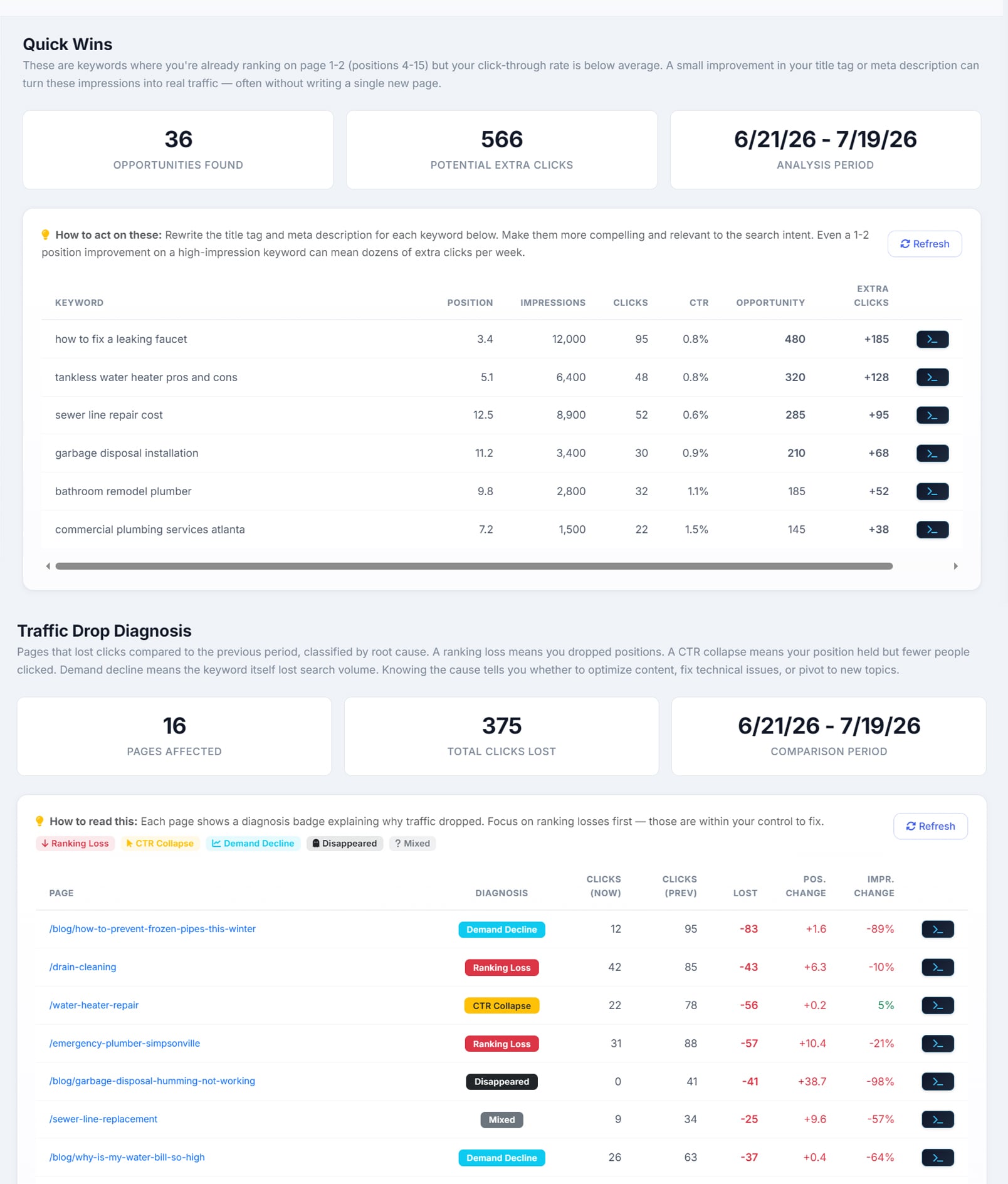
Start from the data you already own. AlmaSEO builds seven lists out of your own Search Console history — Quick Wins, CTR Gaps, Content Decay, Traffic Drops, Cannibalization, Keyword Research and Content Gaps — and none of them cost anything to run. Each one answers a different version of “what should I do next” rather than handing you one undifferentiated pile of issues.
What is a striking-distance keyword?
A query you already rank for between positions four and fifteen, with real impression volume behind it. Below fifteen you are rewriting the page; above three you have already won. The band in between is where a better title tag and an extra paragraph move the needle in a fortnight.
How does AlmaSEO decide which quick win is biggest?
It compares your actual click-through rate against what a normal result earns at position three, multiplies the shortfall by your impressions, and sorts by the difference. The number at the top of the list is an estimate of the extra clicks available, not a vanity score out of a hundred — which also means it tells you when the problem isn’t rank at all. Sitting at position six with a one per cent click rate is a headline problem, and the score separates that from a ranking problem.
Does AlmaSEO show search volume?
Not in the free lists, and this is worth being straight about. Search Console gives you impressions, not search volume, and the seven lists are built on impressions — which is genuinely the better signal for your own site, because it is demand Google has already shown you. Volume is a number about the whole market and it has to be bought. The Live SERP Check returns the Google Ads volume, CPC and competition figures for a keyword, and it is the only path to a real search-volume number in AlmaSEO.
Does AlmaSEO track keyword rankings?
Yes, on demand rather than on a schedule. You give the Keyword Tracker the phrases you care about — 25 of them on Solo, 150 on Pro, 500 on Agency — and press check when you want to know. Each check is a real Google search per keyword, run from the site’s own city if it has one, reading the top 100 results. Back come the ones you rank for with position, previous position and the URL Google chose, and the ones you don’t marked plainly as not in the top 100 — with the related Search Console keywords you do rank for listed beside them. A check costs 50 Data Credits per keyword, the total is shown before you confirm, and each result is saved so a trend chart builds up out of the checks you actually ran. What AlmaSEO deliberately does not do is scrape every keyword every morning whether you are looking or not — if a position logged daily is what you need, keep the tracker you have.
How is content decay different from a traffic drop?
Traffic Drops catches the fall you would notice: the last 28 days against the 28 before them, page-level, with a floor on prior clicks so a page that went from two clicks to one doesn’t crowd out one that went from nine hundred to four hundred. Every drop is given a cause — lost ranking, click-through collapse, falling demand, or disappeared entirely. Content Decay catches the decline you wouldn’t: three consecutive thirty-day windows, keeping only the pages that fell in both steps, so a page that dipped and recovered doesn’t qualify but one quietly bleeding for three months does.
Can it find keyword cannibalization?
Yes. AlmaSEO buckets 28 days of query-and-page data, keeps the queries where more than one of your URLs appears with real impressions behind it, and ranks them by how much traffic is caught in the split. Each competing page is listed with its clicks, impressions, click rate and position, so you can see which one Google actually prefers before deciding what to consolidate.
What does keyword research start from?
What you already rank for, rather than a blank search box. It pulls your Search Console queries, the content gaps found on your own site, any volume and difficulty figures previously looked up, cached SERP data, and free Google Suggest expansion. Scoring treats striking distance as worth more than raw volume — positions four to ten score highest, eleven to twenty next — and results are sorted by intent so a page of how-to queries isn’t scored against a page of buying queries. The list exports to CSV and feeds the AlmaSEO WordPress plugin directly.
How does the content gap analysis work?
In two passes, and the first one is free. The scan reads the top hundred queries in your Search Console, drops your brand terms, and sorts what is left into six verdicts — quick win, page two, content gap, keyword target, competitive, and already covered — each with the sentence explaining what to do about it. Before anything is called a gap it is checked against what you have published, using your AlmaSEO articles, your sitemap and your WordPress library, so a topic you already own never comes back as a suggestion to write it twice. The second pass is AI Gap Discovery: it reads your services, your industry and your whole published library and names fifteen topics a serious site in your field would cover and yours does not. The panel and the scan are free on every plan; AI Gap Discovery spends one AI action, and every plan carries a monthly allowance of those — 100 on Solo, 500 on Pro, 999 on Agency.
Won’t it tell me to write something I already published?
No, and that is the part most gap tools get wrong. AlmaSEO reads the site before it says anything is missing — every article it has published for you, the site’s own sitemap, and the WordPress library itself where there is one. If most of a query’s words already appear in something you published, the query is marked Covered rather than offered as a topic. Covered rows stay on screen so you can watch how the existing page performs, but they never turn up in the write pile.
Does it track which gaps I actually closed?
Yes. Publish an article for a gap and its row flips to Addressed with the date on it, and the scorecard at the top of the panel counts total opportunities, addressed, remaining and quick wins with a progress bar beside them. Re-running the scan refreshes the impressions and positions without losing that history, so the number that matters — gaps closed, not gaps found — keeps counting across months. Anything not worth doing can be dismissed, and a later scan can still surface it again.
Can I hand a quick win straight to someone to fix?
Every row carries a Fix in SSH button that lands the keyword in AI Agent Workspace with its position, its impressions and a written brief to rewrite the title tag. That handoff needs Pro, because that is where AI Agent Workspace lives — the list itself is on every plan. A content gap hands off the other way, into the article composer with the keyword already loaded.