Start your 14-day free trial Every Agency feature switched on. No card required.

Local SEO

Local SEO software that tells you what to do Monday morning.

A local SEO platform that runs the whole loop: Google Business Profile management across every location, city-level rankings, a 40-directory citation audit and a content plan built from your own ranking data — in one place, on every plan. No tier unlocks anything on this page.

Most local SEO software hands you a list. Then it leaves.

Run a citation scan anywhere else and you get a wall of red. Forty directories, thirty of them marked missing, and no way to tell which ones the scanner actually checked and which ones it simply couldn’t see. So you buy the fix, or you spend an afternoon manually confirming listings that were fine the whole time.

The rank tracker is its own island. The review dashboard is another. The content plan is a spreadsheet you keep by hand, because nothing that knows your rankings also knows what you’ve published.

AlmaSEO runs local as one loop. Connect the profile and the locations import themselves. Check rankings for a city and that data immediately drives three other things — what to fix first, what’s slipping, and what to write next. Scan citations and the unresolved rows hand off to an agent that can go fix them. Every tool here runs on every plan — two of them spend Data Credits, and both show you the price before you spend it.

Local SEO for the owner of one shop — and the agency running ninety.

For the local business owner

You just want to know if you’re showing up.

Someone told you your listings are inconsistent. You have no idea which ones, or whether it matters. You want a straight answer about whether people searching in your city can find you, and a short list of what to fix — not a subscription to a directory service.

  • One dashboard that says what to do next, in order
  • A citation audit that never guesses to fill a row
  • Your rankings for your city, not a national average

For the multi-location agency

One client, nine locations, nine of everything.

Every location is its own profile, its own NAP, its own set of city keywords, its own citation footprint. Doing that by hand is the job nobody wants, and it’s the one that quietly loses accounts when a phone number goes stale in three directories.

  • Bulk-import locations from a CSV, or sync them from the profile
  • Service-area businesses handled properly, not forced into an address
  • A rank swing of five positions pings you in Slack

Six local SEO tools, from citation audit to local rank tracking.

Each one feeds the next. Connect a profile at the top and by the bottom you have a list of articles to write, with the keyword already loaded.

Google Business Profile

Connect once. The locations come with it.

Real profile connection

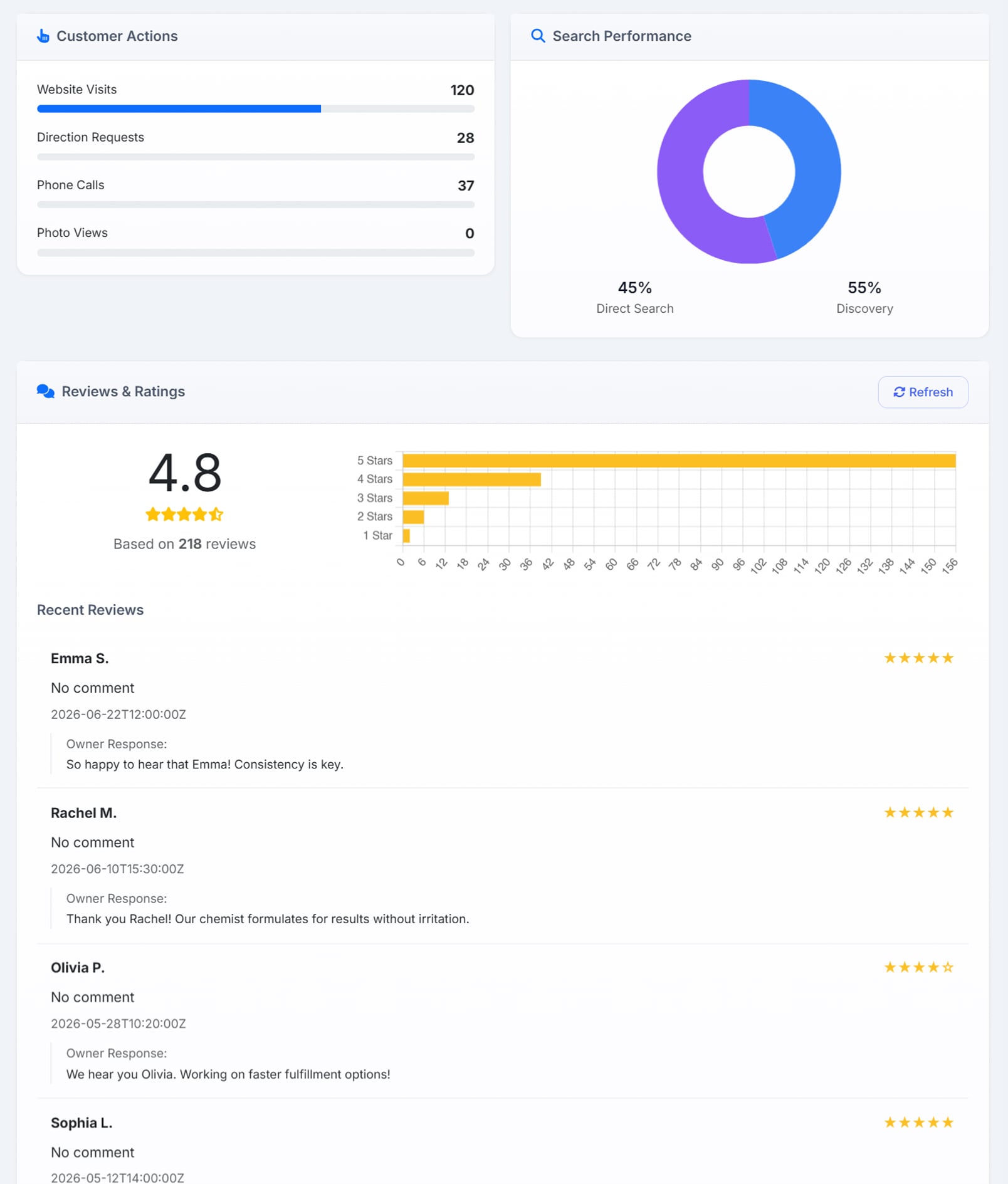
Sign in with Google and AlmaSEO reads the profile directly — rating, review distribution, recent reviews with any reply you already wrote, the searches people used to find you, and how your photos are performing.

Locations import themselves

Connecting the profile pulls your locations in. Re-syncing never duplicates them — each one stays bound to its own profile listing.

Honest when Google is quiet

If Google won’t return individual reviews, AlmaSEO says so and falls back to the rating and count. It doesn’t pad the panel with nothing.

Powered byProfile metricsPerformance trendsSearch queriesPhoto statsPlace ID

The Google Business Profile panel: a Customer Actions card counting website visits, direction requests, phone calls and photo views; a Search Performance donut splitting traffic 45% direct search and 55% discovery; and a Reviews & Ratings card showing 4.8 stars based on 218 reviews with a five-bar rating distribution, above recent reviews each displaying the owner’s own written response
The profile read straight from Google — rating spread, what customers did, and the replies you already wrote.

Locations

Where multi-location actually gets handled.

Service-area businesses, properly

A plumber with no storefront isn’t an address with the street removed. Mark a location as service-area and record the areas it actually covers.

Acceptable address variants

“Suite 200” and “Ste 200” are the same address. Record the variants you accept, so the citation audit stops flagging a match as a mismatch.

Bulk import

Drop in a CSV, skip duplicates, set the first row as primary. Ninety locations is a paste, not an afternoon.

Powered byPer-location hoursPrimary locationNAP countProfile binding

Local Dashboard

The one screen that tells you what to do next.

A prioritized next-action list

Not a score. Four things to do, ranked, each with a button that opens the exact tool that fixes it.

Quick wins, found for you

Keywords sitting on page two with real search volume behind them — the ones a single article can push onto page one. It names the best one and the volume it carries.

What’s slipping

Anything that dropped three or more positions since the last check, surfaced before it becomes a phone call.

Powered byCoverage by cityContent gapsConnection statusAuto profile sync

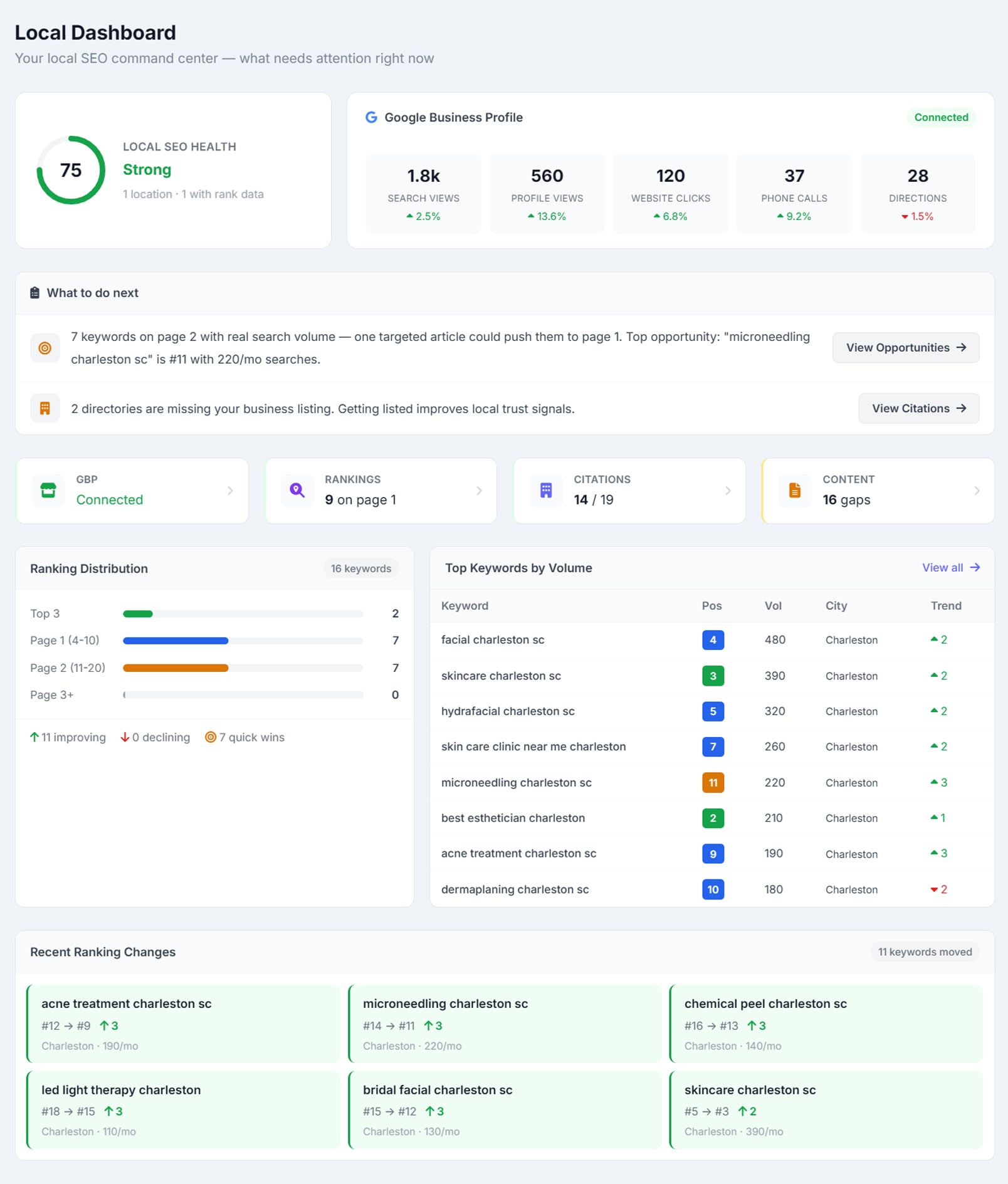
The Local Dashboard, showing a Local SEO Health score of 75 rated Strong above a ‘What to do next’ panel naming the top keyword opportunity
What needs attention right now — and the exact keyword to write about, with the volume behind it. A Local SEO Health score of 75, rated Strong, sits above a connected Google Business Profile strip with search views, profile views, website clicks, phone calls and directions each trending. The ‘What to do next’ panel opens on ‘7 keywords on page 2 with real search volume — one targeted article could push them to page 1. Top opportunity: microneedling charleston sc is #11 with 220/mo searches’, beside a View Opportunities button. Below that, status tiles for GBP, rankings, citations and content gaps, a ranking distribution chart, and a Recent Ranking Changes grid of keywords that moved.

Local Rankings

How you rank in the city, not in the country.

Rankings filtered to the city

The keywords your domain ranks for in that specific city, deduplicated to your best position for each, sorted by the traffic actually at stake.

A trend line, not a snapshot

Every check is saved. Watch top-three, page-one and estimated traffic move across thirty checks.

Slack alerts on big swings

A move of five positions or more pushes a Slack message on its own. You find out because AlmaSEO told you, not because the client did.

Data Credits 100 Data Credits per location check — the cost is shown on the button before you spend it, and results are cached for six hours so a second look is free.

Powered byEstimated trafficPosition historySix-hour cachePer-location checks

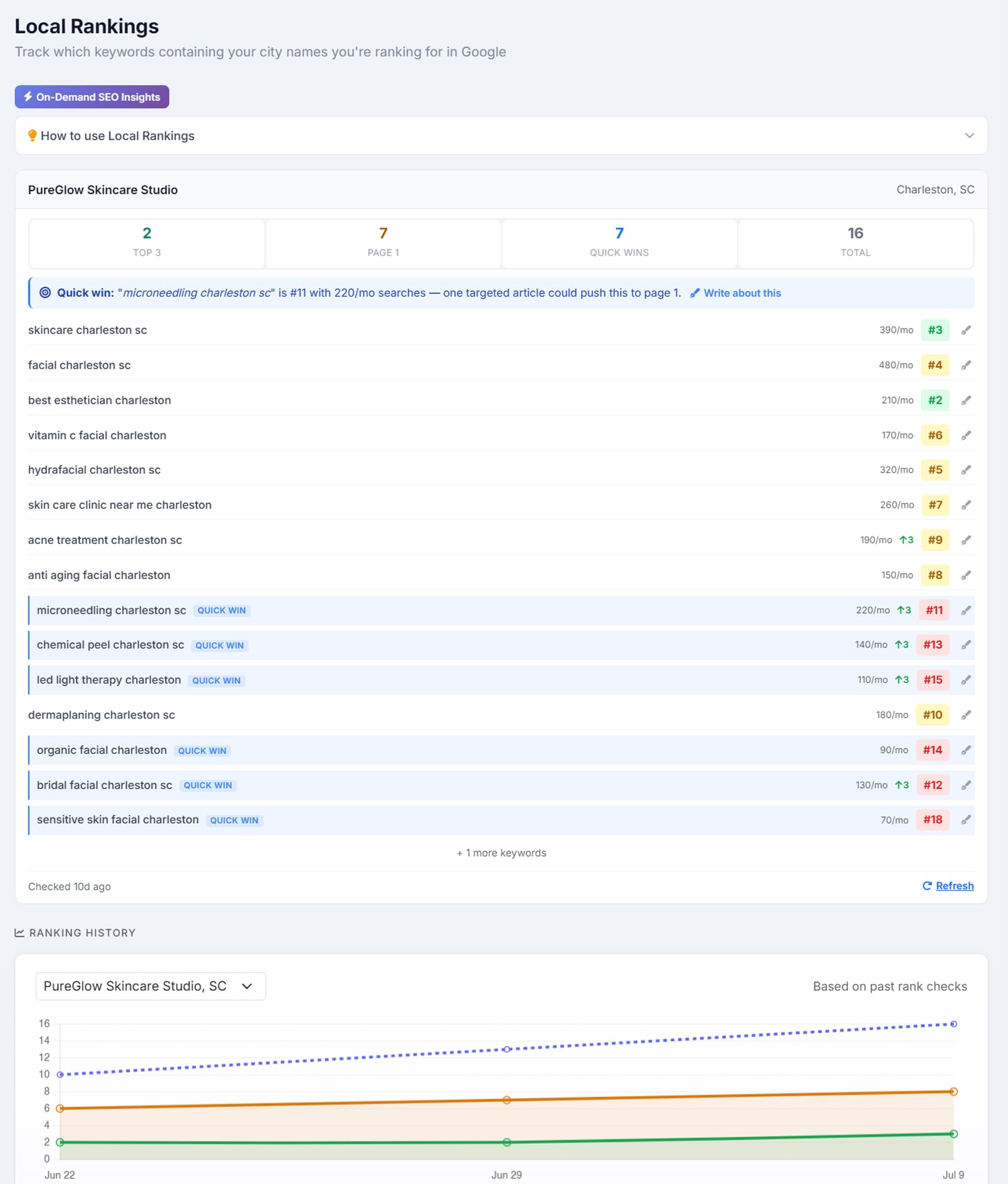
The Local Rankings panel for a Charleston, SC business, counting 2 keywords in the top three, 7 on page one, 7 quick wins and 16 in total
The keywords you rank for in that city, sorted by the traffic at stake — with the trend behind them. Counters read 2 in the top three, 7 on page one, 7 quick wins and 16 keywords total, above a highlighted quick-win callout: ‘microneedling charleston sc is #11 with 220/mo searches — one targeted article could push this to page 1’, with a Write about this link. Then a ranked keyword list showing monthly volume, position and movement, with page-two entries tagged QUICK WIN, and a ranking history chart tracking top-three, page-one and total keywords across past checks.

Citations & Listings

A 40-directory audit that would rather say nothing than guess.

The checklist is free

Forty directories across six categories — search and maps, major local directories, social profiles, review sites, industry and trade, data aggregators. Generate it, work it by hand, pay nothing.

Field-by-field NAP matching

The scan doesn’t eyeball it. Name, phone, city, state and street are each compared on their own — phone down to the last ten digits, name with a fuzzy fallback — and the verdict is the share of fields that actually matched.

Your notes survive the rescan

Whatever you marked or wrote by hand stays exactly as you left it. AlmaSEO updates what it found and never overwrites what you know.

Data Credits 25 Data Credits per scan — shown on the badge and confirmed before it runs, and the wallet is only charged if the scan actually came back with results.

Powered byHealth score reportDuplicate detectionCustom directoriesHand-off to the SSH agent

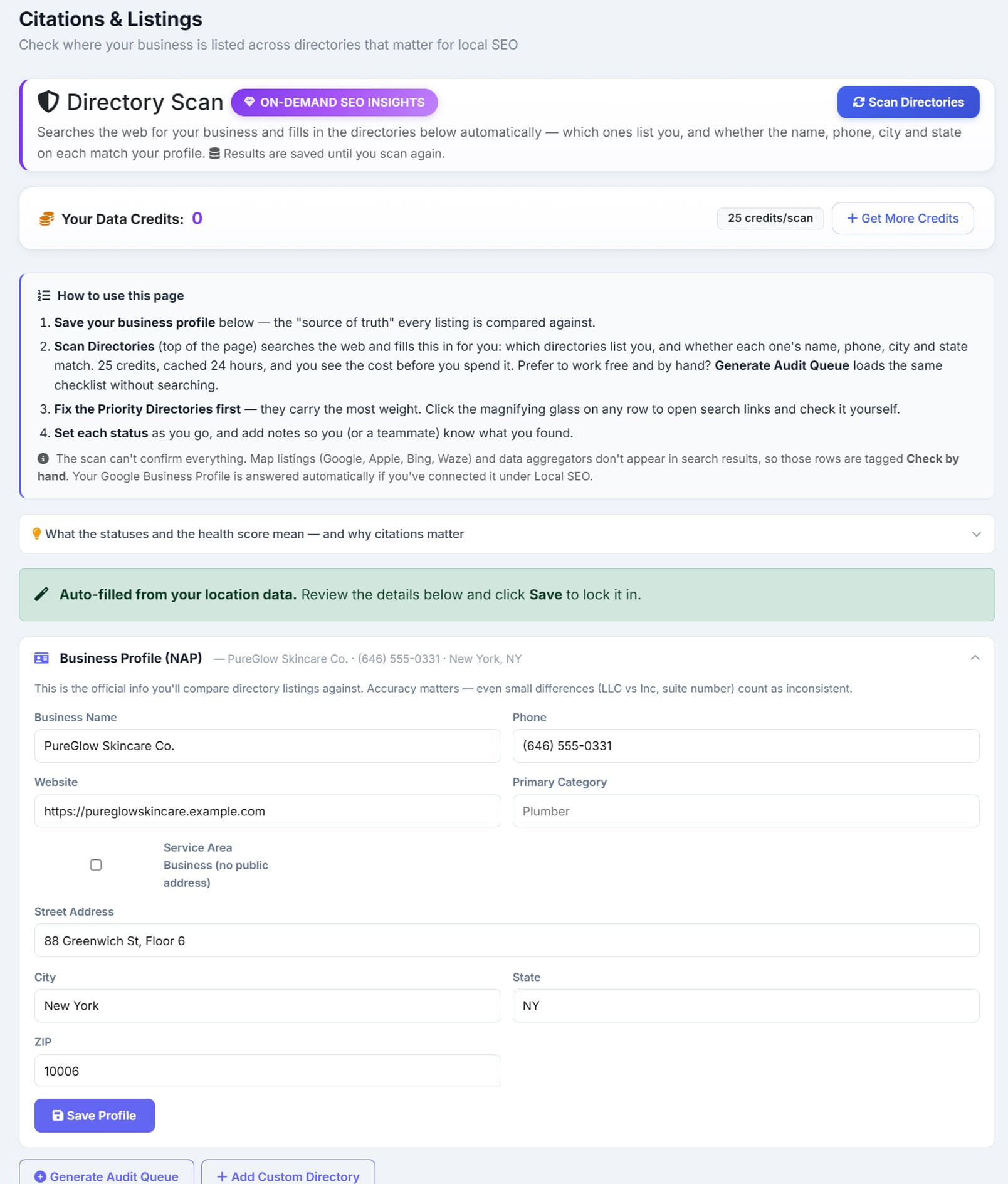
The Citations & Listings screen, with a Directory Scan card and a Data Credits bar showing the balance beside a ‘25 credits/scan’ badge
The price before the spend — and the app saying plainly which rows it cannot confirm. The Directory Scan card explains that it searches the web and fills in the directories below automatically, with a Scan Directories button, and the Data Credits bar shows the balance beside a ‘25 credits/scan’ badge. A how-to panel states that the scan can’t confirm everything — map listings and data aggregators don’t appear in search results, so those rows are tagged ‘Check by hand’, and the Google Business Profile row is answered automatically from the connection. Beneath it, a Business Profile NAP form auto-filled from the location data with name, phone, address, city, state and a service-area-business option.

Local Content

Your ranking data, turned into a list of articles to write.

Three buckets, no thinking required

Every keyword you rank for lands in Strengthen, Write New, or Covered — matched against what you’ve actually published.

Write New comes with a Write button

Click it and the article composer opens with that keyword already loaded. The gap becomes a draft in one click.

Coverage, city by city

The percentage of your ranking keywords that have an article behind them, per location. The number that tells you which city you’ve been neglecting.

Powered byPublished article matchingWordPress post matchingPer-city coverageKeyword-to-article scoring

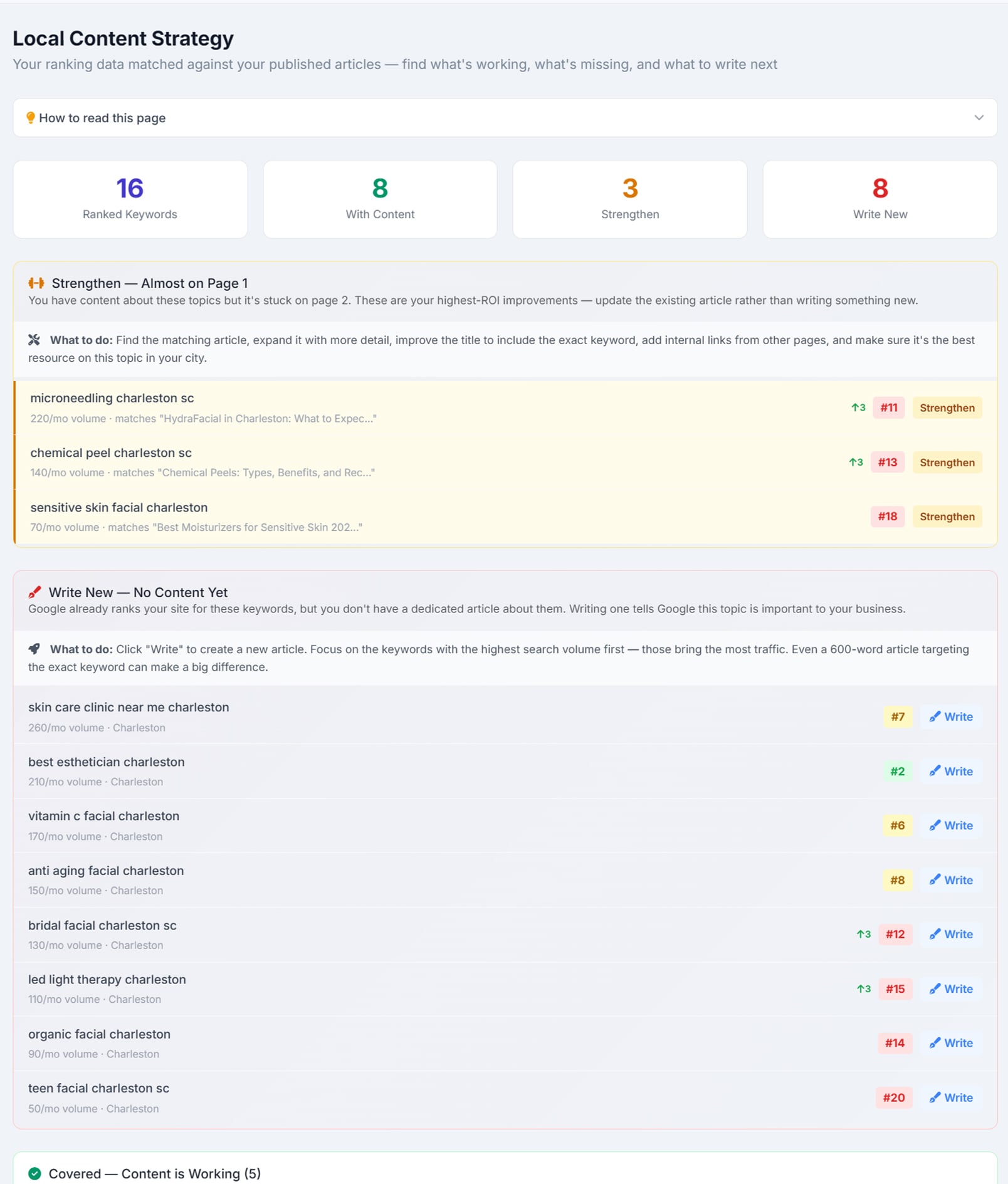
The Local Content Strategy screen, counting 16 ranked keywords, 8 with content, 3 to strengthen and 8 to write new
Every ranked keyword sorted into strengthen, write new, or covered — each gap one click from a draft. Counters read 16 ranked keywords, 8 with content, 3 to strengthen and 8 to write new. A ‘Strengthen — Almost on Page 1’ block lists page-two keywords beside the existing article each one already matches, and a ‘Write New — No Content Yet’ block lists keywords the site ranks for with no dedicated article — each row showing volume, city and current position next to a Write button.

The local citation audit refuses to guess. That’s the whole point.

Every citation tool can produce a wall of red X’s. Almost none of them can tell you which of those X’s it actually verified. Three rules are built into AlmaSEO’s scan:

Citations here are directory listings, not the AI citations an answer engine hands out — different job, different page.

A directory it didn’t see is never marked “missing.”

Absence of evidence isn’t evidence of absence. If the scan didn’t find your listing on a directory, that means the scan didn’t find it — not that it isn’t there. Marking that row “missing” would be AlmaSEO inventing a fact, and inventing facts is how you end up paying to fix listings that already existed.

Google gets answered from Google, not from a search result.

Your Google Business Profile doesn’t show up in organic results, so a scan structurally can’t confirm it. Leaving the single most important row at “Unknown” reads like I’m not on Google. So AlmaSEO answers that row from your actual profile connection instead.

Seventeen directories are tagged “Check by hand,” on purpose.

Map listings and data aggregators don’t appear in search results, so a scan structurally can’t confirm them — not AlmaSEO’s, and not anyone else’s. Rather than report them as unknown, AlmaSEO labels those rows Check by hand right in the interface, so you know exactly where the automation stops and you begin.

The audit ends in a report you can hand to a client — a health score that starts at a hundred and comes down for every listing that’s missing, duplicated, or out of date. And any row you can’t fix from a directory login hands off to the AI Agent Workspace with the fix already written out.

Local SEO that works whatever your site is built on.

Local businesses are on everything — a WordPress site from 2019, a Squarespace page a nephew built, a Wix template, a single hand-written HTML file that’s been up for a decade. None of that changes anything here. AlmaSEO reads your sitemap or scrapes your HTML, so it never needs a CMS to plug into.

The one thing that does change: if you are on WordPress, the Write button in Local Content publishes straight through, and you never open the admin. If you’re not, you get the same finished article to paste wherever it goes. The plan is identical either way.

Local SEO questions people actually ask.

What does the citation audit actually check?

Forty directories across six categories — search and maps, major local directories, social profiles, review sites, industry and trade, and data aggregators. The checklist itself is free to generate and work through by hand. The scan doesn’t eyeball a match: name, phone, city, state and street are each compared on their own, with the phone matched down to the last ten digits and the name given a fuzzy fallback, so a real mismatch is separated from a formatting difference.

Are these the same citations AI answers give?

No, and the word does double duty. A local citation is your business listed in a directory — the same name, address and phone repeated consistently across dozens of them. An AI citation is an answer engine naming your page as its source. Both are worth having, but they are different jobs; AI search optimization covers the second kind.

Can it handle a business with no storefront?

Yes. A plumber with no shopfront isn’t an address with the street removed, so you mark the location as service-area and record the areas it actually covers. You can also record acceptable address variants — “Suite 200” and “Ste 200” are the same address — so the citation audit stops reporting a match as a mismatch.

Does it work for a business with many locations?

Yes. Connecting your Google Business Profile pulls your locations in, and re-syncing never duplicates them because each one stays bound to its own profile listing. For a larger book you can bulk import from a CSV, skipping duplicates and setting the first row as primary — ninety locations is a paste rather than an afternoon.

What does it read from my Google Business Profile?

Sign in with Google and AlmaSEO reads the profile directly — the rating, the review distribution, recent reviews including any reply you already wrote, and the searches people used to find you. When Google won’t return individual reviews, AlmaSEO says so and falls back to the rating and count rather than padding the panel out with nothing.

How does city-level rank tracking work?

It reports the keywords your domain ranks for in that specific city, deduplicated to your best position for each and sorted by the traffic actually at stake. Every check is saved, so you get a trend line across thirty checks for top-three placements, page-one placements and estimated traffic — not a single snapshot. Anything that has dropped three or more positions since the last check is surfaced on its own.

Will I be told when a ranking drops?

A move of five positions or more pushes a Slack message by itself, so you find out because AlmaSEO told you rather than because the client did.

What do I hand the client at the end?

The audit ends in a report with a health score that starts at a hundred and comes down for every listing that is missing, duplicated or out of date. Your own notes survive a rescan — AlmaSEO updates what it found and never overwrites what you wrote by hand. Any row you can’t fix from a directory login hands off to AI Agent Workspace with the fix already written out.

See the local SEO software running.

The citation report prints on your brand, ready to hand to the client. Open the Local Dashboard in the demo and follow it end to end — the next-action list, the city rankings behind it, the citation audit, and the article plan that falls out the other side.