See AlmaSEO on a live client workspace The running app, fully populated. No signup, no login.

YouTube SEO

The YouTube SEO tool for the channel your client forgot they had.

Most local businesses have a channel. Forty videos, real views, and not one description written for search. AlmaSEO scores those videos against the things YouTube actually reads, writes the schema markup that gets them into search results with a thumbnail, and turns any one of them into a published article with the video embedded in it — without asking anyone to film anything new.

YouTube SEO is the work nobody did — not even the person who filmed the videos.

The channel got set up in a burst of enthusiasm three years ago. Somebody filmed a walkthrough, a testimonial, a couple of before-and-afters. The videos went up with whatever title was in the file name and a description that reads “Call us today!” Then everyone went back to work.

Meanwhile that channel accumulated views. Not many, but real ones, from people searching for exactly what the business does. Every one of those videos is a page that could rank — on YouTube, and in Google’s results with a thumbnail beside it — and none of them are set up to. The titles are too short, the descriptions are two lines, the tags are empty, and there’s no captions file, which means there’s no transcript for anything to read.

This is the rarest thing in SEO: work that doesn’t need a budget approval. The asset already exists and it’s already paid for. AlmaSEO tells you which videos are worst, exactly what’s wrong with each one, and hands you the structured data that gets them showing up. It runs on every plan and spends no Data Credits — it reads the client’s own channel through their own connection.

Video SEO for the client with a dormant channel — and the agency already shooting.

For the SEO who inherited a channel

There are forty videos and you’ve never opened one.

The client mentioned the channel in the kickoff call and nobody followed up. You suspect there’s something there but auditing forty videos by hand means forty tabs, and you can’t justify the afternoon on a maybe. You want to know in one screen whether this is an opportunity or a graveyard.

  • A health score for the recent videos, worst first
  • The specific fault on each one, not a vague grade
  • The five problems that repeat across the channel

For the agency already making video

You film. It just never feeds the site.

You’re producing video because the client asked for it, and it lives on YouTube and nowhere else. The website never benefits, the videos never appear in a search result with a thumbnail, and every month you write blog posts from scratch while sitting on footage that already says the thing.

  • VideoObject markup written for you, per video or in bulk
  • An article built from a video you already published
  • A competitor’s channel measured against yours

Five video SEO tools, from the health check to the published article.

Connect the client’s channel once. Everything below reads from that one connection — no uploads, no exports, no second subscription.

Video SEO Health

A score out of a hundred, and the reason it isn’t higher.

Scored against what YouTube reads

Four checks, run on each of the ten most recent videos it finds: whether the title lands in the range that survives truncation, whether the description is long enough to say anything, whether there are enough tags, and whether captions exist at all. Each video comes back with its own score and its own list of faults.

The faults that repeat

Individual scores tell you which video to fix. The aggregate tells you what kind of agency you’ve inherited — the five most common issues across the set, counted. “No captions” appearing ten times out of ten is a process problem, not ten separate mistakes.

Captions counted as SEO, because they are

A video with no captions has no transcript, and no transcript means nothing to read but the title. It’s the single most common miss on an inherited channel and the cheapest one to fix.

Plan Every plan. No Data Credits.

IncludesPer-video scoreTitle lengthDescription depthTag countCaptions present

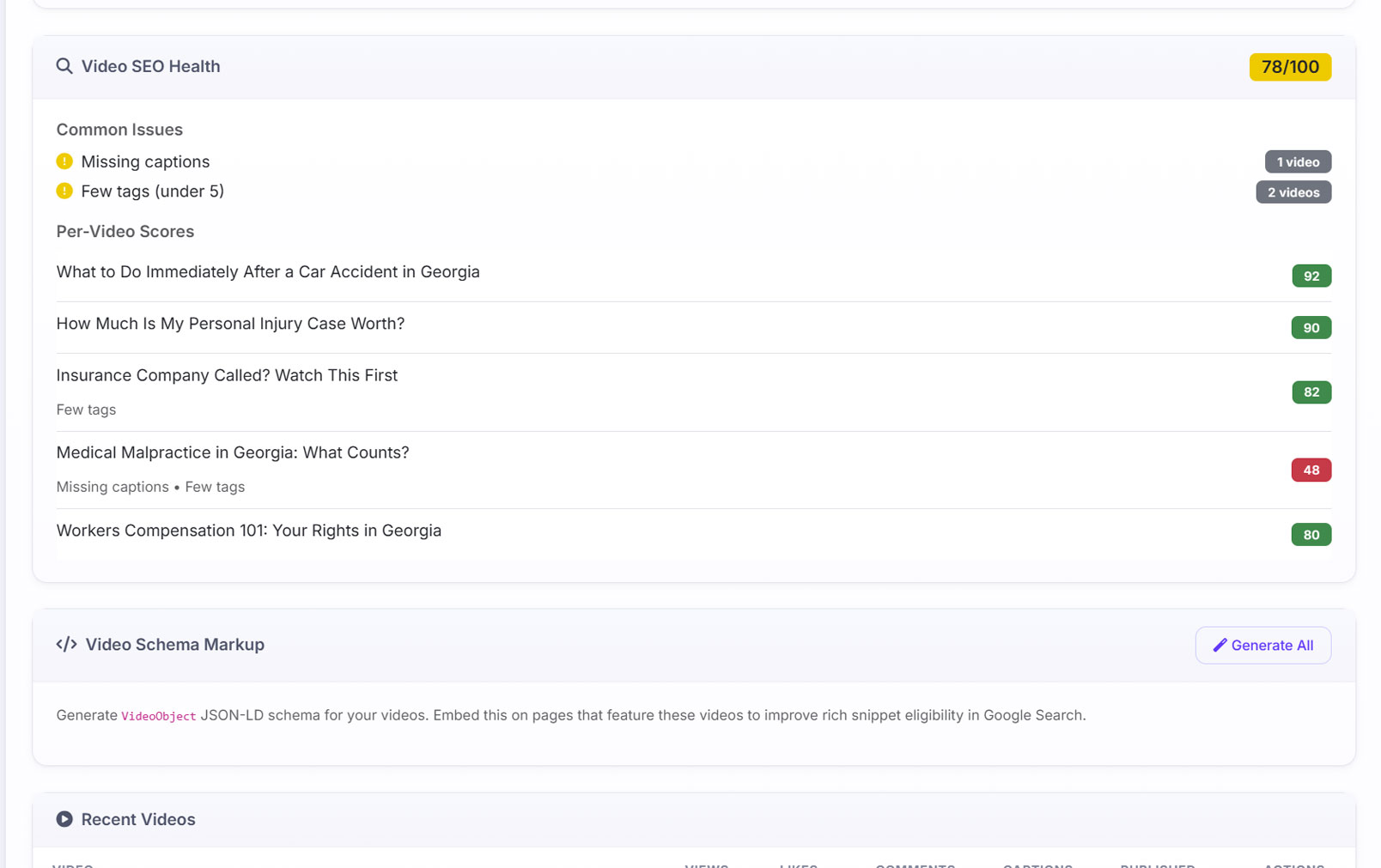
The Video SEO Health panel scoring a law firm’s channel 78 out of 100, with a Common Issues list and a per-video score table
The health check across a client channel, scored 78/100. Common Issues counts the faults that repeat — missing captions on one video, fewer than five tags on two. Per-Video Scores then names each one: “What to Do Immediately After a Car Accident in Georgia” at 92, “How Much Is My Personal Injury Case Worth?” at 90, and “Medical Malpractice in Georgia: What Counts?” at 48 with both faults listed under it. The 48 is the afternoon’s work, and you found it without opening YouTube.

Video schema markup

The structured data that puts a thumbnail next to your result.

Written for you, per video or all at once

AlmaSEO generates complete VideoObject JSON-LD — title, description, thumbnail, upload date, duration, the watch and embed URLs, and the channel as publisher. Do one video, or generate the set for every video it has cached.

On articles AlmaSEO writes, it’s already there

Publish an article through AlmaSEO with a YouTube video embedded in it and the VideoObject markup is appended to the article automatically — it goes out with the post, to WordPress or into the static export. You only place the block by hand when you’re retrofitting a page AlmaSEO didn’t write.

Engagement carried into the markup

View, like and comment counts go in as interaction statistics, and tags come through as keywords. It’s the difference between markup that identifies a video and markup that describes a popular one.

Captions declared where they exist

A video with captions is marked as having them, which is an accessibility signal and a search signal in the same field.

Plan Every plan. No Data Credits.

IncludesVideoObject JSON-LDThumbnail & durationWatch & embed URLsInteraction countsBulk generation

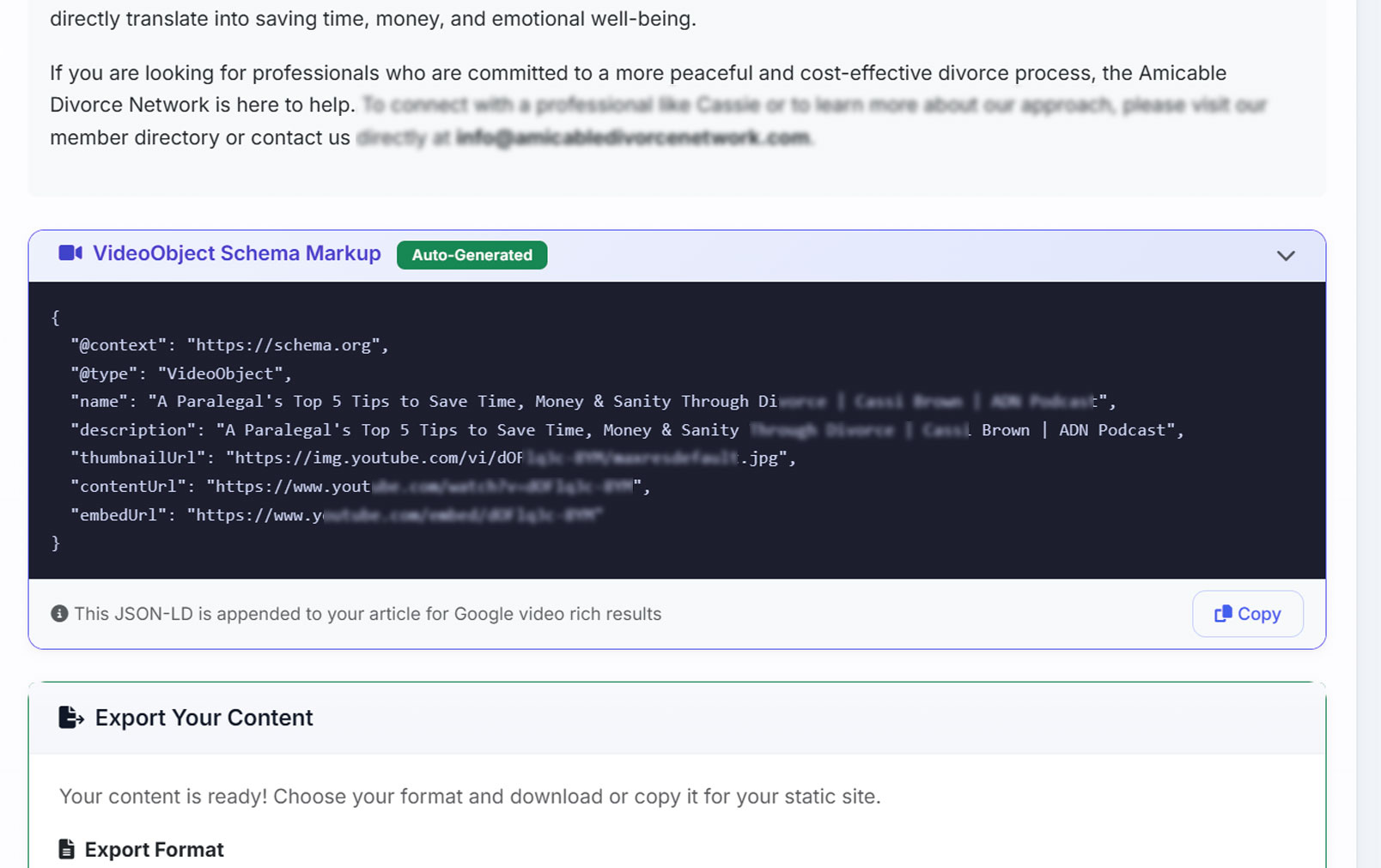
A published article with an auto-generated VideoObject Schema Markup panel showing the JSON-LD block beneath the copy
A published article that embeds a YouTube video, with its VideoObject Schema Markup panel marked Auto-Generated — the JSON-LD block carrying the video’s name, description, thumbnail, watch URL and embed URL, appended to the post rather than left for someone to paste. The note under it says exactly what it does: appended to your article for Google video rich results.

Channel & upload cadence

The YouTube analytics half: how big, and how often.

The channel at a glance

Subscribers, total views, video count and the channel handle, read straight from the client’s own connection rather than typed into a spreadsheet once and left to rot.

How often they actually publish

Upload frequency calculated from the real publish dates, which is usually the conversation nobody wants to have. A channel that posted nine times in one month two years ago and twice since is a different problem from a quiet one.

Plan Every plan. No Data Credits.

IncludesSubscribersTotal viewsVideo countUpload frequencyRecent videos

Competitor channels

Paste their channel URL. See the gap.

Measured on the numbers that matter

Their total views, their video count, and their average views on recent uploads — which is the honest one, because a channel with a viral video from 2019 and nothing since looks enormous on totals and empty on recent averages.

Kept, so you can compare

Channels you’ve looked at stay on the list, so the comparison is a running one rather than something you re-paste every quarter.

Plan Every plan. No Data Credits.

IncludesPublic channel statsAverage recent viewsSaved comparisons

From a video to a published article

The footage already argues the point. Now the site says it too.

The article, with the video in it

Pick a video and AlmaSEO writes the article around it — the piece opens by framing what the video covers, embeds it where a reader has just been told why to watch, and carries on in text underneath for everyone who won’t. The page and the channel stop competing for the same attention and start feeding each other.

Three ways in, depending on what the video is

Quick writes from the title, description and tags, which is enough when the video is a straightforward how-to. Deep has AlmaSEO watch the video and write from what was actually said. Transcript watches it and gives you the structured text, for when you want the words rather than an article.

Or just the brief, if you have a writer

The lighter version returns an outline instead of a draft: a suggested title different from the video’s, a target keyword, a meta description, four to six sections, the key points made, internal link ideas and a length. Hand that to whoever writes for you.

It publishes with its schema attached

An article written here goes out with the VideoObject markup appended, so the embedded video is described to Google as part of publishing rather than as a second job you have to remember.

Plan The brief is on every plan. The finished article is Pro and up, and spends one of your monthly articles.

IncludesQuick / deep / transcriptVideo embedded in the articleVideoObject attachedBrief-only optionTarget keyword

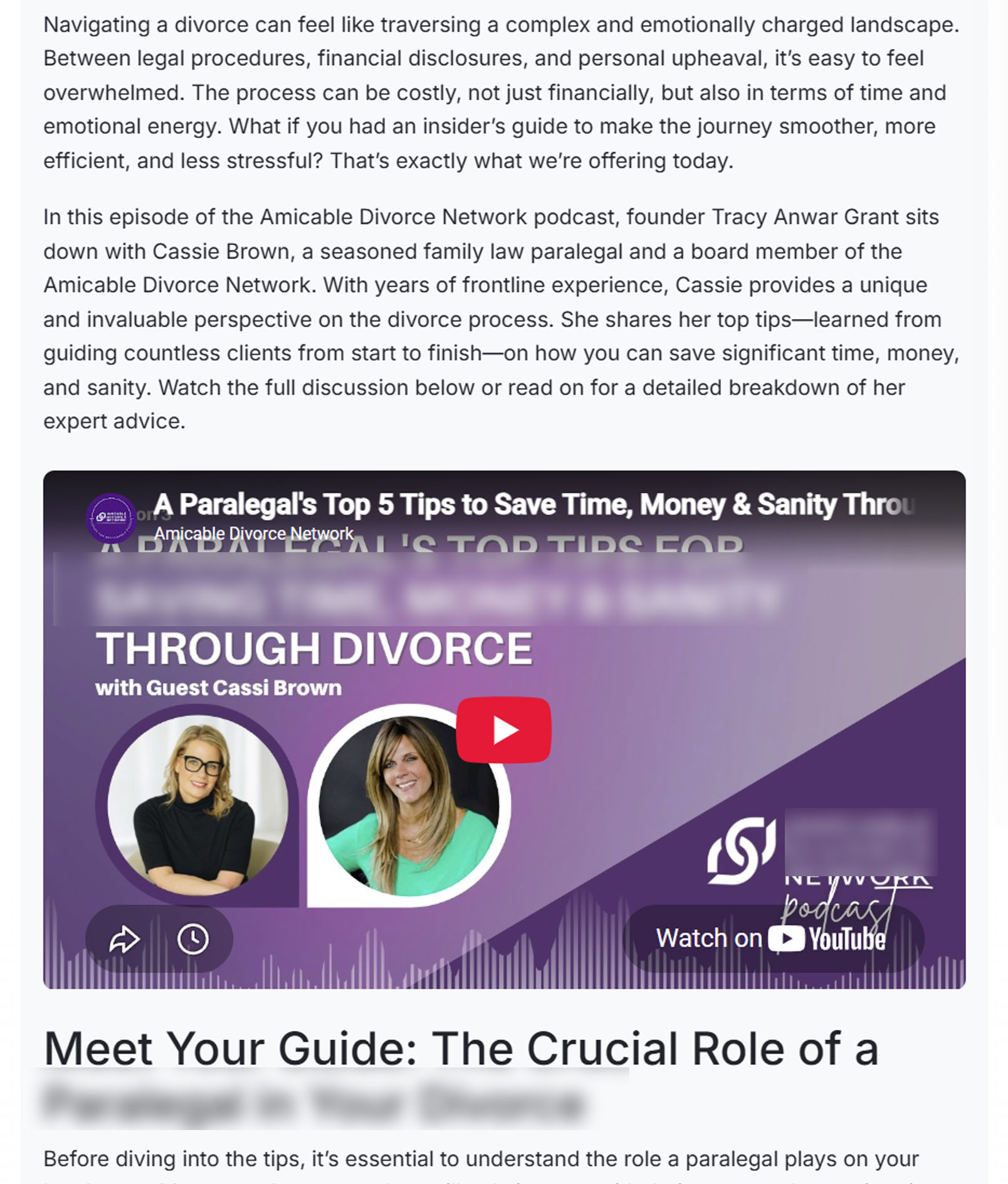
A published article written from a YouTube video, with the video embedded partway down the page
The article AlmaSEO wrote from a podcast episode. It opens on the problem the video addresses, introduces the guest and what she covers, then tells the reader to watch the full discussion below or read on for a detailed breakdown — and the video sits exactly there. Underneath, the written version carries on for the people who were never going to press play.

What the YouTube SEO audit checks — and what it leaves alone.

Four checks, stated plainly, because a video SEO tool that implies it grades everything is one a client can catch out.

It scores the recent videos, not the whole back catalogue.

The health check runs across the ten most recent uploads — fewer, if the channel has fewer. On a channel with forty videos that’s the working set — the ones still earning views and the ones your process produced most recently. It is not an archive audit, and this page will not pretend it is.

It checks four things: title, description, tags, captions.

Those are the fields you control on the video itself, and the four that most commonly go unfilled. It does not grade your thumbnail, your retention curve or your click-through rate. Those matter, and they live in YouTube Studio, which is free and already open.

It places the schema on its own work. You place it on everything else.

An article AlmaSEO writes with a video embedded in it carries the VideoObject markup out the door automatically. For a page AlmaSEO didn’t write — an old service page with a video on it, something your developer built — it generates the block and you paste it, because it has no way into a site it doesn’t publish to. The structured data tools are where schema gets checked once it’s live either way.

Competitor lookup sees public numbers only.

Views, video count and recent averages for any channel you paste in. There is no per-video tag or keyword intelligence on somebody else’s channel, because that data isn’t public and a tool claiming it is guessing.

What YouTube SEO software costs here, and the one thing that isn’t free.

Almost all of this area sits below the tier wall. One thing doesn’t, and it’s named rather than buried.

Free, on every plan

The health check, the schema generation, channel stats, upload frequency, competitor lookup and the article brief. There is no YouTube feature switch on any plan, so the cheapest plan we sell runs the same audit the largest one does.

No Data Credits, ever

Some things in AlmaSEO cost credits because the data is bought per call from a provider. This isn’t one of them. It reads the client’s own channel over their own connection, so running the audit again next month costs exactly what running it today costs.

Where the tier line actually falls

One thing on this page is not free, and it’s the biggest one: turning a video into a finished article is Pro and up, and spends one of your monthly articles like anything else the content engine writes. The brief version is on every plan. Reading the channel, scoring the videos and generating their schema cost nothing at all.

YouTube SEO questions people actually ask.

What does the YouTube SEO audit actually check?

Four things, on up to the ten most recent videos: title length, description length, tag count and whether captions exist. Each video gets a score out of a hundred and its own list of faults, and the channel gets an average plus the five issues that came up most often. It does not grade thumbnails, retention or click-through — those live in YouTube Studio, which is free and already open.

Does it audit every video on the channel?

No. It runs across up to the ten most recent uploads, which is the working set on most client channels — the videos still earning views and the ones your current process produced. Treat it as a health check on how you are publishing now rather than an archive audit.

Will this put my videos in Google search results?

It writes the markup that makes that possible, and on its own articles it places it too. AlmaSEO generates complete VideoObject structured data for a video — title, description, thumbnail, upload date, duration, watch and embed URLs, view and like and comment counts, and the channel as publisher — which is what lets a result show with a video thumbnail beside it. If AlmaSEO wrote and published the article the video sits in, that markup is appended to the post automatically and ships with it. If you're retrofitting a page AlmaSEO didn't write, it hands you the block and you paste it — it has no way into a site it doesn't publish to.

Do I need a separate YouTube tool as well?

For SEO, no. For production analytics, yes — and you already have it. YouTube Studio gives you retention, traffic sources and audience data for free, and nothing here is trying to replace it. This covers the search-facing half: whether each video is set up to be found, and whether the site benefits from the videos existing at all.

Can I see what a competitor's channel is doing?

You can paste any channel URL and get its public numbers — total views, video count, and average views on recent uploads. That last one is the useful one, because a channel carrying one viral video from years ago looks enormous on totals and empty on recent averages. There is no per-video keyword or tag intelligence on someone else's channel; that data isn't public, and a tool that claims it is guessing.

Can it turn a video into an actual article, or just an outline?

Either, and they sit on different plans. The finished article is Pro and up and spends one of your monthly articles: AlmaSEO writes the piece with the video embedded in it, in one of three ways — quick, working from the title, description and tags; deep, where it watches the video and writes from what was said; or transcript, where it watches and hands back the structured text. The outline version is on every plan and returns a suggested title, target keyword, meta description, four to six sections, the key points, internal link ideas and a length, for you to hand to a writer.

Which plan do I need for this?

Any of them. There is no YouTube feature switch on any plan, so Solo runs the same audit Agency does. It also spends no Data Credits, because it reads the client's own channel over their own connection rather than buying data from a provider. The one exception to the plan answer is turning a video into a finished article, which is Pro and up and spends one of your monthly articles.

What do I need from the client to start?

Their YouTube connection, once. Everything on this page reads from that — no uploads, no CSV exports, and no second subscription to a video tool.

See the YouTube SEO audit run on a real channel.

The demo client is a plumbing company with forty-two videos and a hundred and eighty thousand views sitting on them. Run the health check, read what’s wrong with each one, and turn the best of them into an article the site actually gets to keep.