An SEO content writer that quotes real customers, not made-up ones.
Every other AI writer starts from a blank page and fills it with things that could be true of anyone. AlmaSEO starts from your client’s real reviews, real credentials, and real videos — writes the article, then works as content optimization software too, having Google’s own language model grade the draft before it publishes to WordPress with the SEO fields already set, or into a static site’s own repository — then sends the finished page to Bing and IndexNow and resubmits your sitemap to Google, from the same screen.
An SEO content writer that only writes what’s actually true about your client.
It starts from nothing. A generic AI writer is handed a topic and told to invent the supporting detail — so it does. The happy customer it quotes doesn’t exist. The certification it name-drops was never earned. The result ranks like filler because it is filler, and readers feel it before Google does.
AlmaSEO writes from a file, not from thin air. Before it writes a word it has your client’s verified Google reviews, their licenses and certifications, their service area, and their YouTube channel. The article can only say true things, because the true things are the input.
And it doesn’t stop at the draft. Google’s own Natural Language API reads what AlmaSEO wrote and grades it, then AlmaSEO publishes into WordPress with the meta title, the description, and an AI-named featured image already in place — in the SEO plugin your client already runs.
SEO content writing for agencies at volume — and owners tired of generic AI.
Built for the agency producing content across a dozen clients — and just as useful to the owner who has tried the AI writers and winced.
For the business owner
You’ve tried the AI writers.
It wrote something. It read like everyone else’s something — generic, hedged, and quietly wrong about your business. You don’t want more words. You want an article that sounds like a person who actually runs this company wrote it.
The reviews your real customers left, quoted exactly
Your licenses and certifications, said out loud
Your own videos, embedded where they fit
For the SEO freelancer or agency
Twelve clients, twelve voices, one afternoon.
Every client needs content that sounds like itself, at a cadence you can defend on the retainer — and none of them can read like the same robot wrote all of it. You need volume without sameness, and proof it’s any good before it ships.
Every client’s reviews, credentials and videos on file, per site
A quality grade from Google before you publish
Published to their WordPress with the SEO fields already set
The difference is where the writing starts. Everyone else starts at a blank page. AlmaSEO starts at your client.
Never open the composer wondering what to write about.
Find Untapped Topics sits inside the composer itself and reads what you’ve already published, what you sell, and what people actually type into Google to reach you — then tells you what you haven’t covered yet, without leaving the page you’re writing on.
It cross-references your live Search Console queries — the searches already earning impressions, including the ones where you show up and nobody clicks — against the content already on your site. So it never hands you a topic you already own, and never repeats one you’ve published. It spots the pages that are indexed and the ones that slipped through, watches which of your keywords are rising and which are sliding, and labels every idea evergreen or trending so you know what will still matter next year.
It runs on your own Google Search Console data, so the topics are yours — not a generic keyword list every site in your niche is being handed the same afternoon. Want the full picture rather than a shortlist beside the brief? Content Gap Analysis is its own panel — six verdicts across every query, checked against everything you’ve published, and a scorecard that counts the gaps you close.
How the SEO content writer works: find the topic, write it, grade it, publish it, submit it.
Most AI writers give you a text box. AlmaSEO gives you the whole loop — and the loop does not end at “published”, because a published page nobody has told Google about is a page nobody reads.
1
Choose
Pick from eleven content types — a blog post, a service page, a city landing page, a full pillar.
2
Find
Or let Find Untapped Topics surface the gap from your own Search Console data.
3
Write
From your client’s real reviews, credentials, location and videos — in any of 28 languages, in the tone you set.
4
Grade
Google’s own language model reads the draft and scores it before it goes anywhere.
5
Publish
Straight into WordPress, draft or live, with the SEO meta and featured image already set. On a static site, the AI Agent Workspace writes it into the site’s repository once you approve.
6
Submit
Bing and IndexNow take the URL; Google gets your sitemap resubmitted and a one-click link into Search Console — all from the article’s own page.
7
Keep fresh
A content freshness scan reads every post on the site — not just the publish date, but the actual words — and scores each one 0–100 on how urgently it needs a rewrite. Stale statistics, outdated year references, deprecated advice: flagged before a visitor notices, with section-by-section refresh drafts you accept or reject one at a time.
Eleven content types Blog · Service page · City landing page · FAQ · How-to guide · Glossary · Listicle · Comparison · Pillar · About · Freestyle
The whole loop runs on every plan. On Pro and Agency it runs without you — automation finds the topic, writes the article, and schedules it on its own.
It writes from real reviews, credentials, location, and videos.
This is what makes the writing impossible to mistake for anyone else’s.
Their real Google reviews
Quoted, not invented.
Pulled from the client’s own verified Google Business Profile
Quoted word for word — never paraphrased, embellished, or made up
Left in the language the customer wrote them in, even when the article isn’t
Set as a real review block, cited to the reviewer’s first name
Told, in the prompt, never to invent a single local statistic
Their YouTube channel
Video you forgot was content.
The right video from the client’s own channel, embedded where it fits
Only real uploads from their channel — never a stock clip
Or turn a video into the article: AlmaSEO’s model watches it and writes
A responsive embed — your client’s own face on the page, for dwell time competitors can’t copy
And the channel itself gets audited: the YouTube SEO tool scores each video and writes its schema
Then Google’s own Natural Language API reads the finished draft — scoring its entities, sentiment, structure and topic into a single quality grade, with the specific fixes that would raise it. The grade doesn’t come from us. It comes from Google.
Inside the SEO content writer: the four screens you’ll actually use.
Four surfaces, one job each. Open any for the detail.
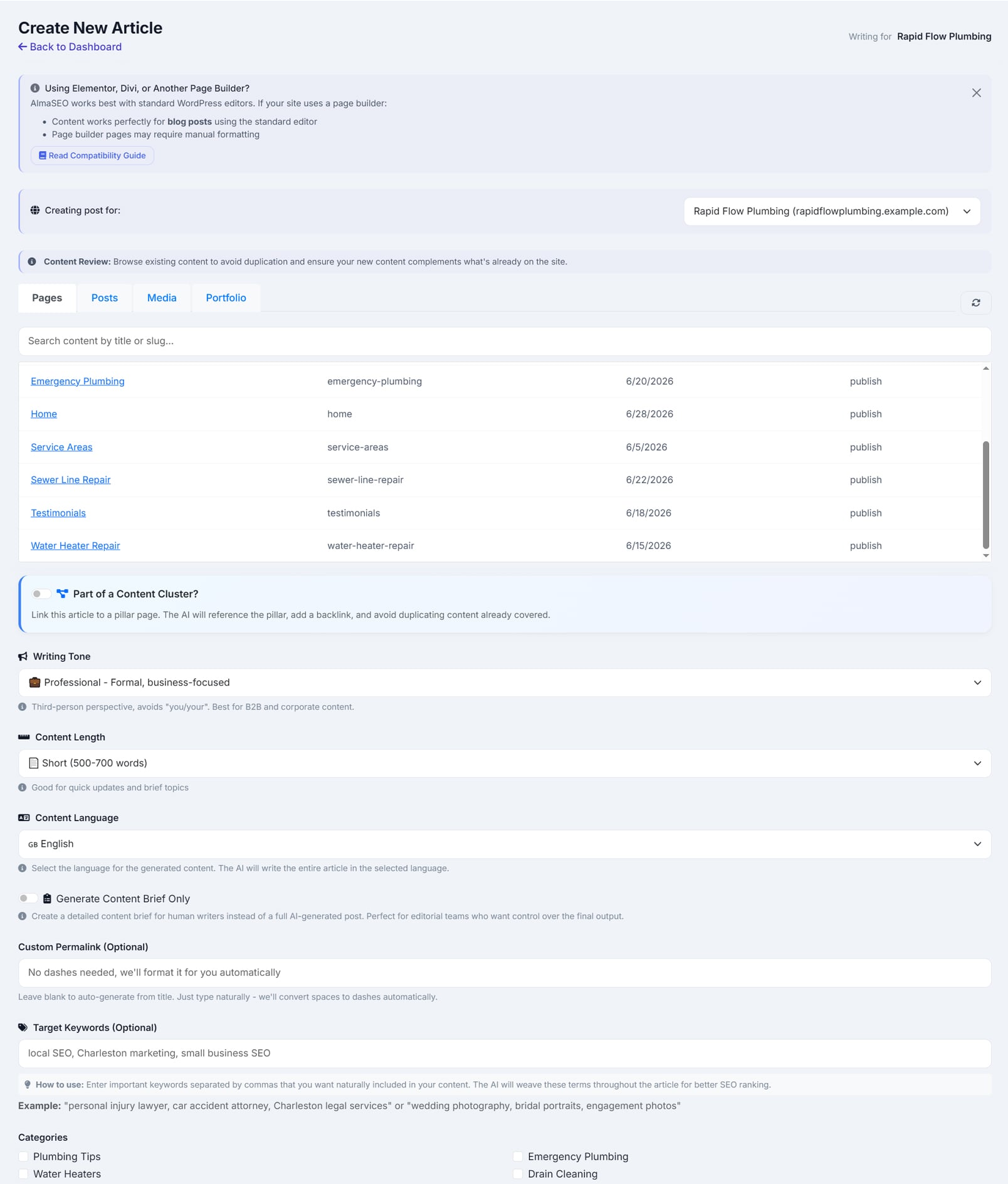
The composer
One screen for the whole brief: what you’re writing, the permalink, the target keywords, the tone, the length, the language — above a live view of everything already published, so you never write a topic you’ve covered.
See what’s inside the composer
Eleven content types, from a blog post to a full pillar
Target keywords woven in naturally, not stuffed
Four tones: professional, friendly, authoritative, conversational
Short, medium or long — medium and long are outlined first, then written
Content Review shows your existing posts, pages and categories so you don’t duplicate yourself
Flip on Site Knowledge and the writer also reads the site’s own brief from its last content extraction — the services, the pages already there to link to, the house voice — so the article links inward and sounds like the rest of the site. Needs an extraction on file, which is Pro and up
The brief, above a live view of what’s already published.
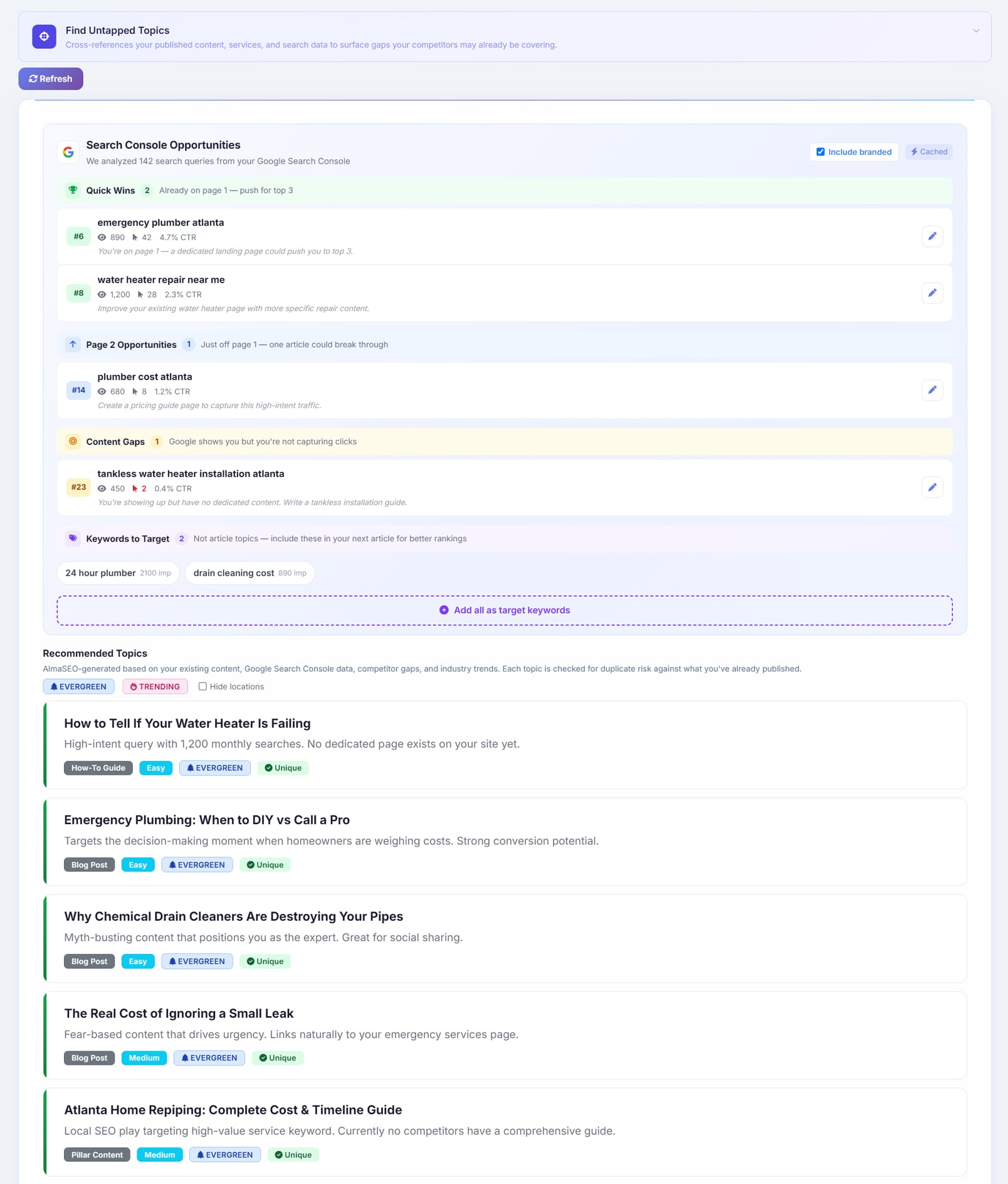
Find Untapped Topics
The gap-finder. It reads your published content, your services, and your real Search Console queries, then surfaces the topics you haven’t covered — each labelled evergreen or trending.
See what’s inside find untapped topics
Cross-references your live Google Search Console queries against your existing content
Surfaces high-impression, low-click searches as opportunities
Flags indexing gaps — pages Google should know about and doesn’t
Reads your rising and declining keywords, so the timing is right
Labels every idea evergreen or trending
app.almaseo.com/create-post
Topic gaps from your own search data, labelled evergreen or trending.
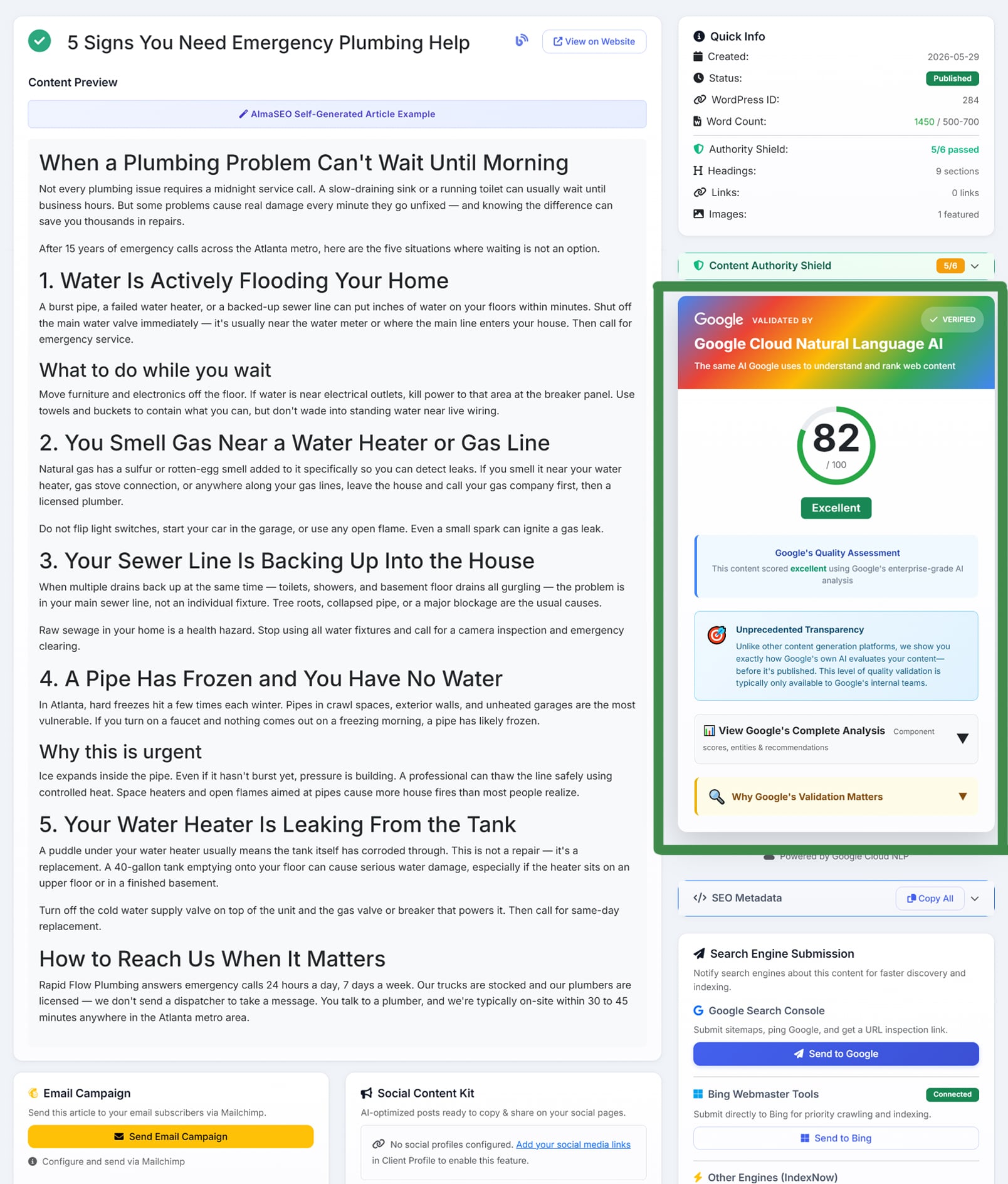
The quality grade
Before you publish, Google’s Natural Language API reads the draft and scores it — a number you didn’t generate, from the company you’re trying to rank in.
See what’s inside the quality grade
Entities and their salience — is the article actually about what you think
Sentiment and tone consistency
Sentence structure and readability, from Google’s syntax analysis
Topic classification into Google’s own content categories
One weighted score, a rating, and the fixes that would raise it
Generation Notes on every article — how AlmaSEO read the topic, used the business details and your special instructions, and chose its links — with a Flag for Review button that sends the article to the AlmaSEO team if something looks off
app.almaseo.com/post/2438
Entities, sentiment, structure and topic, scored into one grade — by Google.
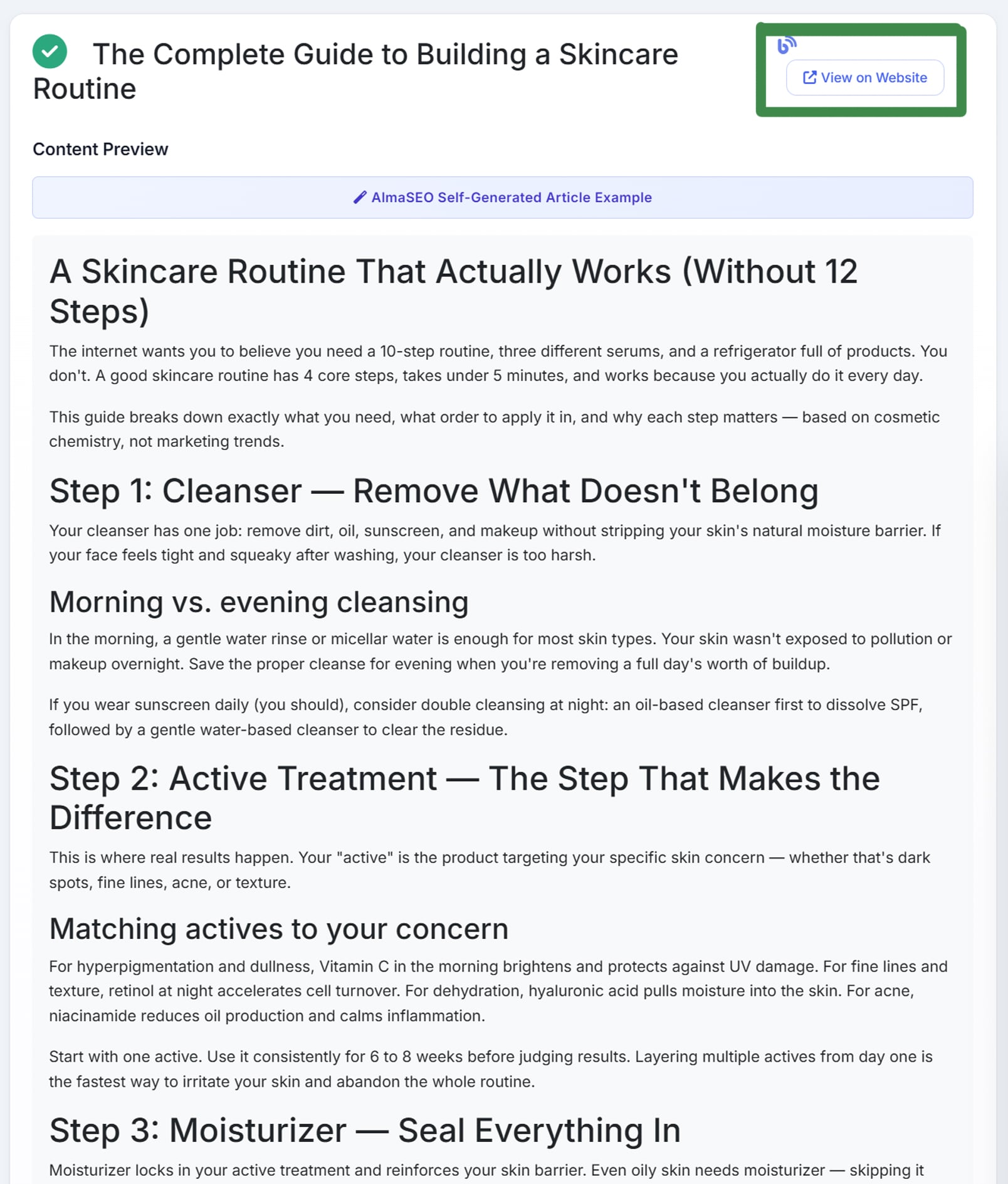
Publishing
One button to your client’s WordPress — draft or live — with the SEO fields written into whichever plugin they run. Not on WordPress? Send the finished article to the AI Agent Workspace and the agent writes it into the site’s own repository.
See what’s inside publishing
WordPress over its REST API, as a draft or published live
SEO meta title and description written into Yoast, Rank Math, AIOSEO or SEOPress
An AI-generated featured image, SEO-named, with its alt text set — and compressed before it goes up. The image model hands back a heavy PNG; AlmaSEO turns it into a JPEG a fraction of the size, no wider than the page needs, so the article loads fast and the upload never trips a host’s size limit
Not on WordPress? Send it to the AI Agent Workspace — the agent finds the content directory, matches the frontmatter your existing posts already use, writes the file with its featured image, commits it on your approval and confirms the build deployed. The article then shows as Published here, goes to IndexNow and Bing, and anything left unpublished gets a daily reminder
Or export it yourself, as Markdown, HTML, JSON, MDX or YAML
Then, on the article’s own page, one button each for Google Search Console, Bing and IndexNow — each stamped with the date you submitted it, so you can see at a glance what has been told and what hasn’t. Bing and IndexNow take the URL itself; for Google, AlmaSEO resubmits the sitemap, shows whether the page is indexed, and opens it in Search Console one click from Request indexing. IndexNow fires on its own the moment you mark the article live
And the Social Content Kit: posts for Facebook, X, LinkedIn and Instagram, written from the article, three versions for each, ready to copy
app.almaseo.com/post
The finished article, published and live on the client’s site.
And then the part every other AI writer leaves to you: telling search engines the page is there. On the article’s own page in AlmaSEO — the same screen you just published from — there is a button for Google Search Console, one for Bing, and one for IndexNow, each showing the date it was last submitted. Bing and IndexNow take the URL directly, and IndexNow goes automatically the moment you mark the article live. For Google, AlmaSEO resubmits your sitemap, tells you whether the page is indexed yet, and opens it in Search Console one click from Request indexing. Google keeps that button for itself, and no tool can press it for you, so AlmaSEO takes you to it rather than pretend. No Bing Webmaster Tools login, no pasting the URL into a third tool and hoping you remembered. It is on every plan, and it costs no Data Credits.
Then the posts that share it. Under the published article, the Social Content Kit writes posts for Facebook, X, LinkedIn and Instagram, three for each, from three different angles: one that opens on a hook, one that asks the question the article answers, and one built around a stat or a tip from it. Each is sized to its platform with a live character count, editable in place, and one click to copy, with the article’s featured image beside them to download and attach. AlmaSEO doesn’t post on your behalf. You paste each one where and when you choose, so nothing goes out on a client’s page that you didn’t put there. It is on every plan and counts as one AI action a run.
SEO content writing questions people actually ask.
How is this different from other AI writing tools?
Where the writing starts. Everyone else starts at a blank page; AlmaSEO starts at your client. It writes from their real Google reviews, their real credentials, their location and their YouTube videos, so the article says things that are actually true about that business rather than things that are true about the category.
How does it pick what to write about?
From your own Google Search Console data. Find Untapped Topics surfaces the queries Google is already showing you for where nothing on the site is a dedicated answer — so the topics are yours, not a generic keyword list every site in your niche is handed the same afternoon.
What kinds of pages can it write?
Eleven content types: blog post, service page, city landing page, FAQ, how-to guide, glossary, listicle, comparison, pillar, about, and freestyle. You set the tone and the length, and it writes in any of 28 languages.
Who checks the article before it goes out?
Google does, before you do. Google’s own Natural Language API reads the finished draft and scores its entities, sentiment, structure and topic into a single quality grade, with the specific fixes that would raise it. The grade doesn’t come from us — it comes from Google. Then you decide whether to publish.
Does it publish to WordPress?
Yes — straight into WordPress as a draft or live, with the SEO meta and the featured image already set, and that image already compressed for page speed rather than uploaded at the size the model produced it. After it is out, AlmaSEO watches that article’s Search Console performance and flags it when it starts to age.
Does it work with static sites, not just WordPress?
Yes. Send the finished article to the AI Agent Workspace (Pro and up) and the agent finds the site’s content directory, matches the frontmatter your existing posts already use, writes the file with its featured image, and commits it once you approve. It then confirms the build deployed, the article shows as published in AlmaSEO, and it goes to IndexNow and Bing like any other. Anything left unpublished gets a daily reminder. Or export the article yourself as Markdown, HTML, JSON, MDX or YAML.
Can I submit the article to Google and Bing from inside AlmaSEO?
Yes, from the article’s own page. Bing and IndexNow take the URL directly, and IndexNow fires automatically the moment you mark the article live. For Google, AlmaSEO resubmits your sitemap, shows whether the page is indexed, and opens it in Search Console one click from Request indexing — Google keeps that button for itself, and no tool can press it for you. Each button shows the date it was last used. It is on every plan and costs no Data Credits.
Does it write the social media posts too?
Yes. Once an article is published, the Social Content Kit on its page writes posts for Facebook, X, LinkedIn and Instagram — three versions for each: a hook, a question the article answers, and a stat or tip pulled from it. Each fits its platform’s character limit, and you can edit it, copy it and download the featured image to go with it. AlmaSEO doesn’t post for you; you paste them where you want them. It is on every plan.
Do I have to run it myself every time?
Not on the higher plans. The whole loop is on every plan, but on Pro and Agency it runs without you — the automation finds the topic, writes the article and schedules it on its own.
Will it write the same article for two clients?
It can’t, because it isn’t working from a shared brief. Each article is built from that client’s own reviews, credentials, location and videos, and from their own Search Console data — so twelve clients in one afternoon come out in twelve voices rather than one.
Can I see what has already been published before I write?
Yes. The composer holds the whole brief on one screen — what you are writing, the permalink, the target keywords, the tone, the length and the language — above a live view of everything already published, so you don’t write a topic you already covered. There is a wider view of what to work on next in finding the work worth doing.
See the SEO content writer work from a real client.
Open the demo on a populated workspace and watch AlmaSEO pull the reviews, the credentials and the video into a draft — then grade it before you publish.