Can I put my own branding on the client dashboard?
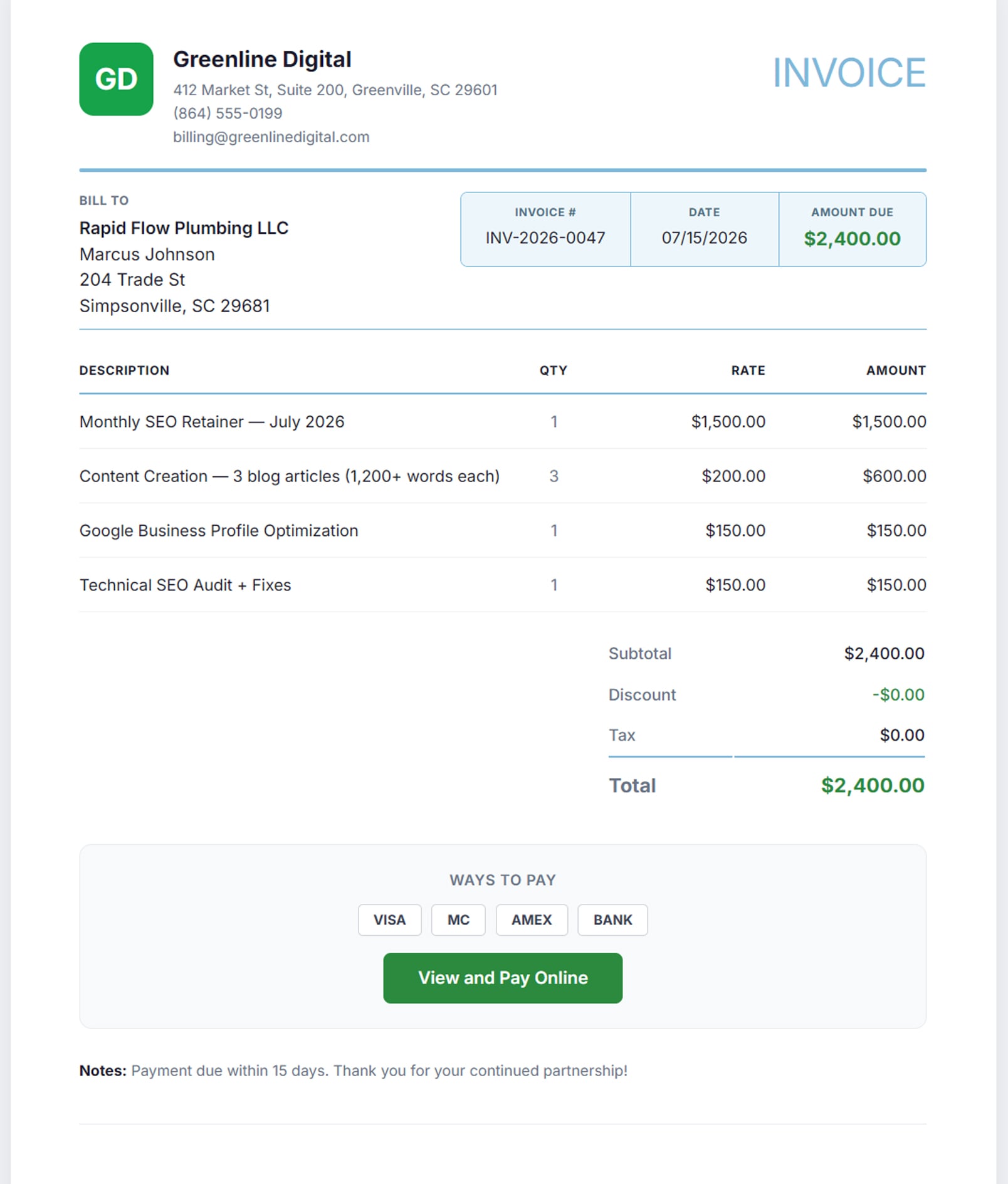
Yes — the portal carries your logo, your primary and secondary colours and your business name. The client sees your agency, and there is no AlmaSEO badge to pay to remove. The same is true of the invoice: your logo on the PDF, your business name, your reply-to address and your own invoice numbering, so the client never learns what software you use. On Agency you can go one further and authenticate your own domain, so billing email leaves from your address rather than almaseo.com.
Does the client need a login?
Not unless they want one. The portal is one private link by default — no account to create and no password-reset email six months later — and generating a new link retires the old one instantly. You can prove it to yourself in about four seconds: open the demo portal and you are looking at a real client-facing page, branded for the agency, without signing in to anything. Where a client does want a login — usually because their own IT policy treats a shareable URL as a risk — you set that client an email and password in the portal panel, and they sign in to the same branded page. It is decided per client, and the link keeps working either way.
Can I send a client a proposal or an estimate?
Yes, on Agency. Build it from line items — description, quantity and rate, totalling as you go — add a scope note, and send it. The client gets a branded email and opens a page carrying your business name and your colour, where they accept or decline with a button. It moves from draft to sent to viewed to accepted or declined on its own, so you can tell the proposal that hasn't been opened from the one that's being thought about, which is the difference between chasing usefully and nagging. And when they accept, one click turns the proposal into an invoice: the same line items, the same rates, the same client, with your due-day and tax defaults already on it. It arrives as a draft rather than going out — converting is not sending, so you still look at it first — and a proposal remembers the invoice it produced, so nobody can bill the same yes twice. You can also ask for a deposit: set a percentage, and the client sees the amount before they commit, accepts, and lands on a card payment page for it. The one limit worth stating is that the proposal itself isn't a PDF — it's a web page on your brand, which is what makes the accept button and the status tracking possible in the first place.
Can the client check in between monthly reports?
Yes, and that is the second tab of the portal. Alongside the report archive there is a standing performance dashboard on the same private link: clicks, impressions, sessions and average position for the last 30 days against the 30 before them, a 90-day chart of clicks and sessions, site health with its weakest areas named first, page speed, the Business Profile numbers — views, calls, direction requests and star rating — and what you have published lately. It keeps itself current from the figures AlmaSEO already collects each day, so there is nothing for you to refresh and no per-view cost. Each section appears once the matching Google connection exists; until then the tab says the data is still being collected.
Can the client see my hours and margins?
Not on the portal. Hours are force-hidden on every report published there — that is a rule the portal enforces rather than a checkbox you might forget, so your margins can’t escape by accident. On reports you send yourself you decide per report: hide hours, hide dates, or both. Some clients should see effort; most should see outcomes.
Where does the report come from?
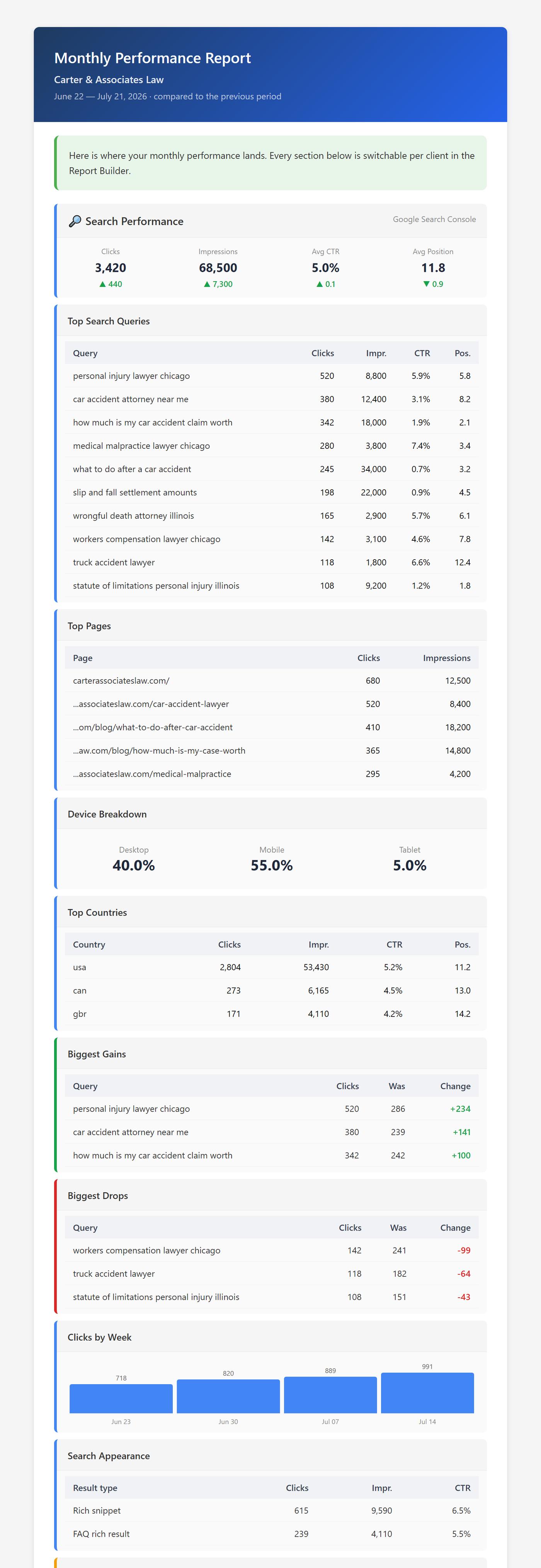
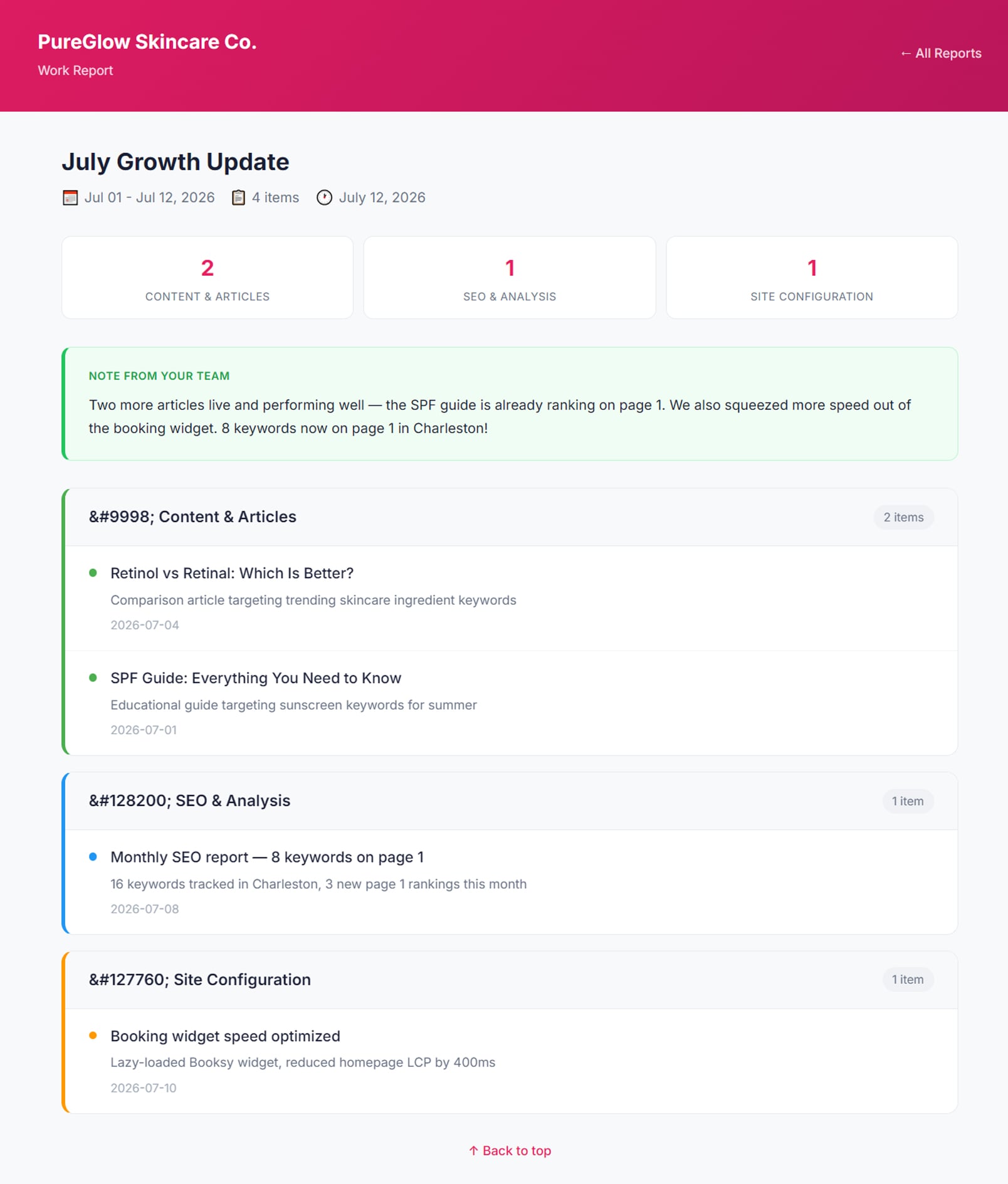
From two places at once, in one email. The performance half is assembled from the client's own Search Console, Analytics, Business Profile and Google Ads connections — rankings and clicks, traffic and channels, calls and directions from the map listing, and paid spend beside all of it — plus the tracked keywords from your last Keyword Tracker check, each with its position, its move since the check before, and the page that ranks. The work half comes from what you logged: you pick the entries, group them by category and add a personal note at the top. Anything logged as an error is filtered out automatically — a retry you already fixed is not news your client needs.
Can I leave sections out for a particular client?
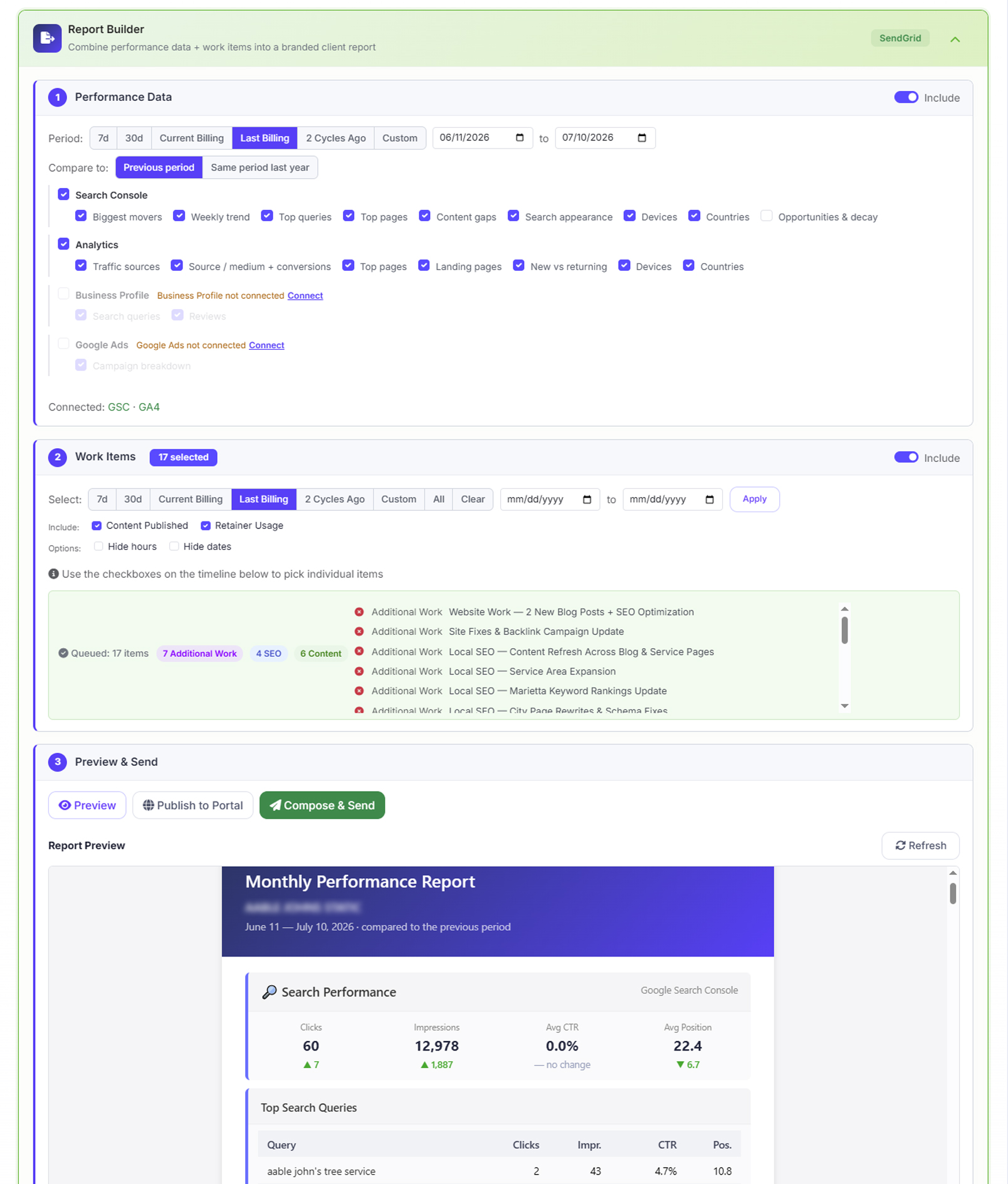
Yes, down to the individual table. Search Console, Analytics, Business Profile, Google Ads, Keyword Rankings and Growth Metrics are each a switch, and every table underneath the four connections is its own checkbox — top queries, devices, countries, landing pages and the rest. Untick what a client doesn't care about and it isn't just hidden, it's never fetched, so a shorter report is also a faster one. The selection saves against that client and becomes their default, so you set it once rather than re-trimming the same report every month.
Is this SEO reporting software, or a report builder?
Both, and the distinction matters less than what comes out of it. Most SEO reporting software assembles a dashboard of metrics and stops there. AlmaSEO builds the monthly SEO report your client actually receives — the performance numbers, the work you did underneath them, your branding on it — and then turns the same record into the invoice. The reporting is one step in the loop rather than the product.
Does the report say which keywords went up or down?
Yes, by name. Alongside the headline movement in clicks and impressions, the report lists the biggest gains and the biggest drops as individual searches, with what each one did last period and how far it moved. That's the part clients actually read — "clicks are up 14%" tells them something changed, and the query list tells them what. You can compare against the previous period or against the same period a year earlier, which matters for anyone whose business has a season — or against nothing, for a first report with no period before it. And when a month deserves to be read as a win, Highlight Reel keeps only the metrics that improved or held and drops the rest, so the down-arrows never make it in; the builder greys out the tables it has overruled so you know exactly what was left out.
Can I hide branded searches from the report?
Yes, with one checkbox. Hide branded searches removes every query that matches the client's name or domain from the top queries, the biggest gains and drops, and the Business Profile search terms. AlmaSEO works the brand terms out from the site itself, so there is no list to maintain. What remains is the traffic from people who found the client without already knowing the name — the part of the month SEO can honestly take credit for.
Will it show conversions and ad spend?
Conversions appear when the client's Analytics has key events configured — where they are, conversions lead the traffic card and carry through to each individual channel, so the report opens with leads rather than sessions. Google Ads is available as its own section covering spend, clicks, conversions, cost per click and cost per conversion with a campaign breakdown; it's switched off by default, because a spend section reading zero is worse than no spend section at all.
Will AlmaSEO send reports to clients on its own?
It will if you ask it to. Set a client to weekly, every two weeks, or monthly, give it the address to send to, and the work summary for that period assembles itself and goes — Monday mornings on the weekly setting, the first of the month on monthly. Time you marked non-billable stays out of it. The safeguard is that a scheduled report only ever says what you recorded: it reports the work you logged rather than inventing a narrative around it, so nothing goes out in your name that you didn't put there. Leave the setting off and nothing sends itself, which is still the right answer for clients who need a covering note more than a rhythm. Reports go out as email and are published to the portal as a web page; the PDF in this area is the invoice.
Can the portal be on my own domain?
Yes, on Agency. Put in the hostname you want — clients.youragency.com, reports.youragency.com — and AlmaSEO shows you the DNS records to add at your registrar. One of them proves the domain is yours; a Verify button checks it, and once it passes we issue the certificate and serve from your address. After that every client-facing link resolves on your domain rather than ours — the portal, the proposals you send, and the pay link on your invoices — and anything else on that hostname redirects away. It is not instant: the certificate step happens on our side once your DNS is in place. But it happens once, and after that the client never sees our name in the URL bar, including at the checkout.
How do logged hours turn into an invoice?
One dialog turns the work you logged into billable line items, priced at the rate implied by the retainer, grouped or itemised as you prefer. Recurring invoices run weekly through annual — regenerating on schedule, copying their line items, and sending themselves if you want them to.
How do clients pay, and where does the money go?
Into your own account. You connect your own Stripe account and client payments settle directly into it — AlmaSEO never sits between you and your revenue. The client clicks the link in the invoice email and pays by card with no login and no portal, and can save a card once so recurring invoices collect themselves.
Will it chase a late invoice for me?
Yes. Reminders go out before and after the due date on a schedule you set, and late fees apply automatically — flat or percentage — with a one-click waive when you’d rather not. Alongside that, retainer pacing tracks hours agreed against hours burned on your billing cycle, and profit per client measures retainer revenue against the hours you actually logged. There is more on the hours themselves in retainer tracking.
How does AlmaSEO compare to AgencyAnalytics?
AgencyAnalytics is a reporting tool — it displays data from other software you pay for separately. AlmaSEO does the SEO work, reports on it, and bills the client for it, at a flat price rather than per client. The full side-by-side, including where AgencyAnalytics comes out ahead, is on our AgencyAnalytics alternative page.