
Why this matters
"Why did my website traffic drop?" is the question every agency gets, usually in an anxious email. The honest answer is almost never one thing. A few pages slip, one loses its clicks to a new box at the top of Google, a seasonal post fades as it does every year.
Answering it page by page turns a scary total into a list of separate, fixable jobs, and some that need no fixing at all.
The business concept: explain it before the client asks
A client who sees traffic fall and hears nothing from you assumes the worst. A client who gets "three pages dropped; one is seasonal, one lost a ranking and we're on it, one moved and the redirect is fixed" trusts you more than before the drop.
- Separate what you can fix from what you can't. A ranking loss is yours to work on. Fewer people searching in summer isn't.
- Put a number on it. "Down 57 clicks a month" lands better than "down a bit."
- Show you're tracking it. A reminder to check recovery in four weeks makes the follow-up automatic.
The SEO concept: clicks fall for four different reasons
Clicks are impressions times click-through rate, and impressions depend on position and on how many people search. So when clicks fall, one of these changed:
- Position: the page ranks lower, so fewer people see it. Ranking Loss.
- Click-through rate: the page ranks the same, but fewer people choose it. CTR Collapse.
- Demand: fewer people searched at all. Demand Decline.
- Presence: the page stopped appearing entirely, often because it was removed, blocked or moved. Disappeared, or Moved? when a new address took its place.
When none of those clearly explains it, AlmaSEO says Mixed. Each cause has a different fix, which is why the label matters more than the size of the drop.
Walkthrough
Where: open a client site from Sites, then SEO Intelligence › Traffic Drops. Plans: every plan. Needs: Search Console connected.
- Start with Last 28 days, vs previous period. That shows what changed recently.
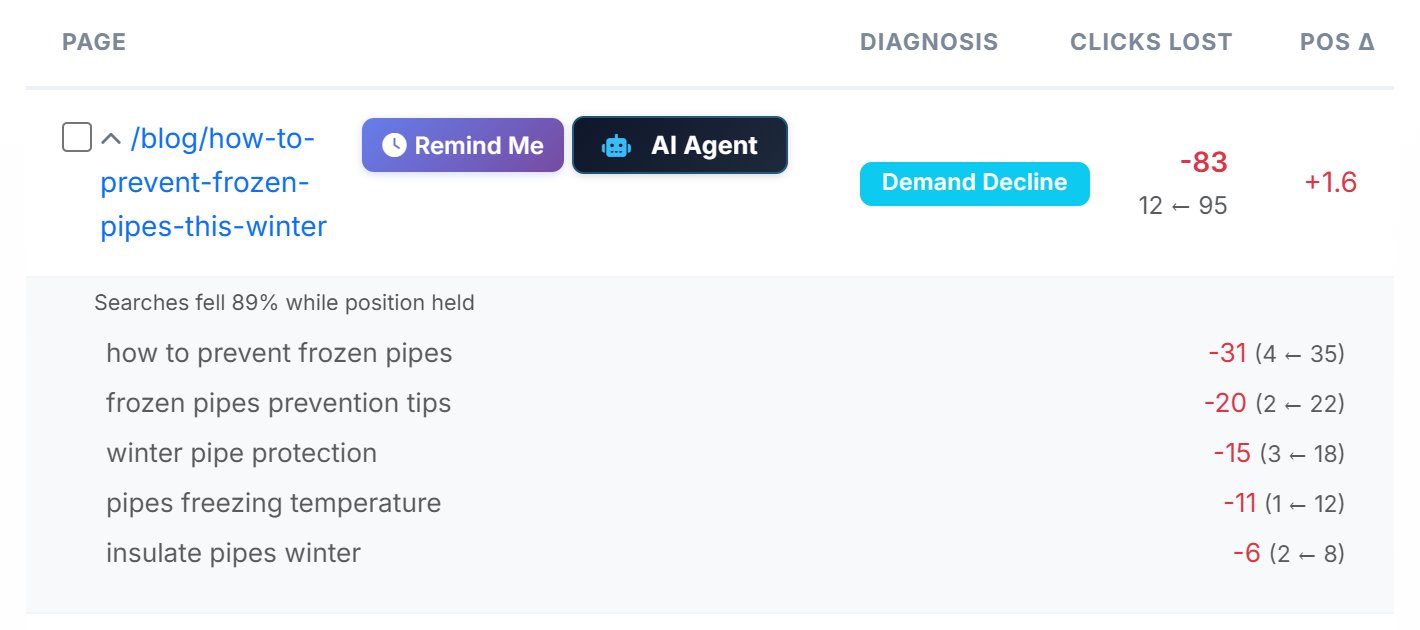
- Read the causes, biggest loss first. Each row has the clicks lost, now against before, and the position change.
- Open a page. The five searches that lost the most clicks show whether one search fell or everything did.
- Check anything seasonal against last year. Switch to vs same period last year before treating a Demand Decline as a problem.
- Fix by cause. Refresh content for a ranking loss, rewrite the title for a CTR collapse, check indexing and redirects for a page that disappeared.
- Set Remind Me. It saves today's numbers for a check in four weeks. On Pro and Agency, AI Agent hands the job to AI Agent Workspace with a brief that matches the cause.
Real-world example: the plumber's November
- The email: the client says traffic is down. Traffic Drops shows 8 pages down 364 clicks in the last 28 days.
- The seasonal one: the frozen-pipes post lost 83 clicks, labelled Demand Decline. Opened, every search that fell is about winter pipes. Against last year, it's on track. No fix needed.
- The ranking one: /emergency-plumber-atlanta fell 10.4 places and lost 57 clicks. You check who outranks it now and add the prices and response times they show.
- The click-through one: /water-heater-repair held position 4 but lost 56 clicks. Its title hadn't changed in two years; you rewrite it.
- The missing one: a garbage disposal post Disappeared. It turns out to have been unpublished by mistake. You restore it.
- The reply: you send the client the four findings and set Remind Me on the three you changed.
Key takeaways
- A traffic drop is usually several page-level problems, each with its own cause.
- Ranking Loss, CTR Collapse, Demand Decline and Disappeared each need a different fix.
- Check seasonal drops against the same period last year before acting.
- The searches behind a drop show whether one search fell or the whole page did.
- Tell the client what dropped and why before they ask.
Next: Keyword Research, where you find the searches worth winning.