
Why this matters
Every agency knows what each client pays. Far fewer know what each client costs. A $2,000/month retainer sounds great until you realize it takes 40 hours a month, while your $800 client takes 5.
The Profitability page answers the question most agencies never answer: which clients make money, and which ones quietly cost you? It updates every day as your team logs time, not once a quarter when someone builds a spreadsheet.
The business concept: your cost rate
Your cost rate is what one hour of work actually costs you. Most agency owners have never calculated it, and most guess too low.
If you have staff:
Cost rate ≈ (salary + payroll taxes and benefits + share of overhead) ÷ billable hours per year
Payroll taxes and benefits typically add a good chunk on top of salary, and overhead (software, rent, insurance) has to be spread across the hours you can actually bill.
If you're solo:
Cost rate = (the income you need + business expenses) ÷ realistic billable hours per year
The trap is the hours. A full-time year is about 2,080 hours, but nobody bills all of them. Sales calls, admin, invoicing, learning and time off eat a big share. Many solo operators realistically bill somewhere around 1,000 to 1,400 hours a year.
Example: you want $90,000, expenses are $10,000, and you bill 1,000 hours. Your cost rate is $100/hr. Divide by 2,080 instead and you'd think it's $48, and you'd underprice everything.
If you have a team, use a blended rate: the average cost across the people who do the work.
The business concept: effective hourly rate and margin
Two numbers tell you whether a retainer is healthy:
- Effective hourly rate = fee ÷ hours actually worked. What the client really pays you per hour.
- Margin = fee − (hours × cost rate). What's left after paying for the work. As a percentage: margin ÷ fee.
Example: a $1,500/month retainer, 20 hours worked, $60/hr cost rate.
- Effective rate: $1,500 ÷ 20 = $75/hr
- Margin: $1,500 − (20 × $60) = $300 (20%)
Same client, 30 hours worked: effective rate $50/hr, margin −$300. You paid to work for them this month.
The business concept: scope creep
Retainers rarely lose money all at once. They lose it a few "quick favors" at a time: a landing page here, an extra report there, a call that runs long. Each one feels small. Together, they turn a profitable client into an expensive one.
The fix isn't refusing to help. It's seeing it early so you can have the conversation with data: "This month we're at 24 hours on a 15-hour retainer. Want to adjust the scope, or the retainer?" That early warning is what retainer tracking is for.
Walkthrough
Where: Profitability, in the sidebar. Plans: Agency. The account owner and managers can open it; analysts and viewers can't, because it shows what every client pays — Team is the lesson on who sees what.
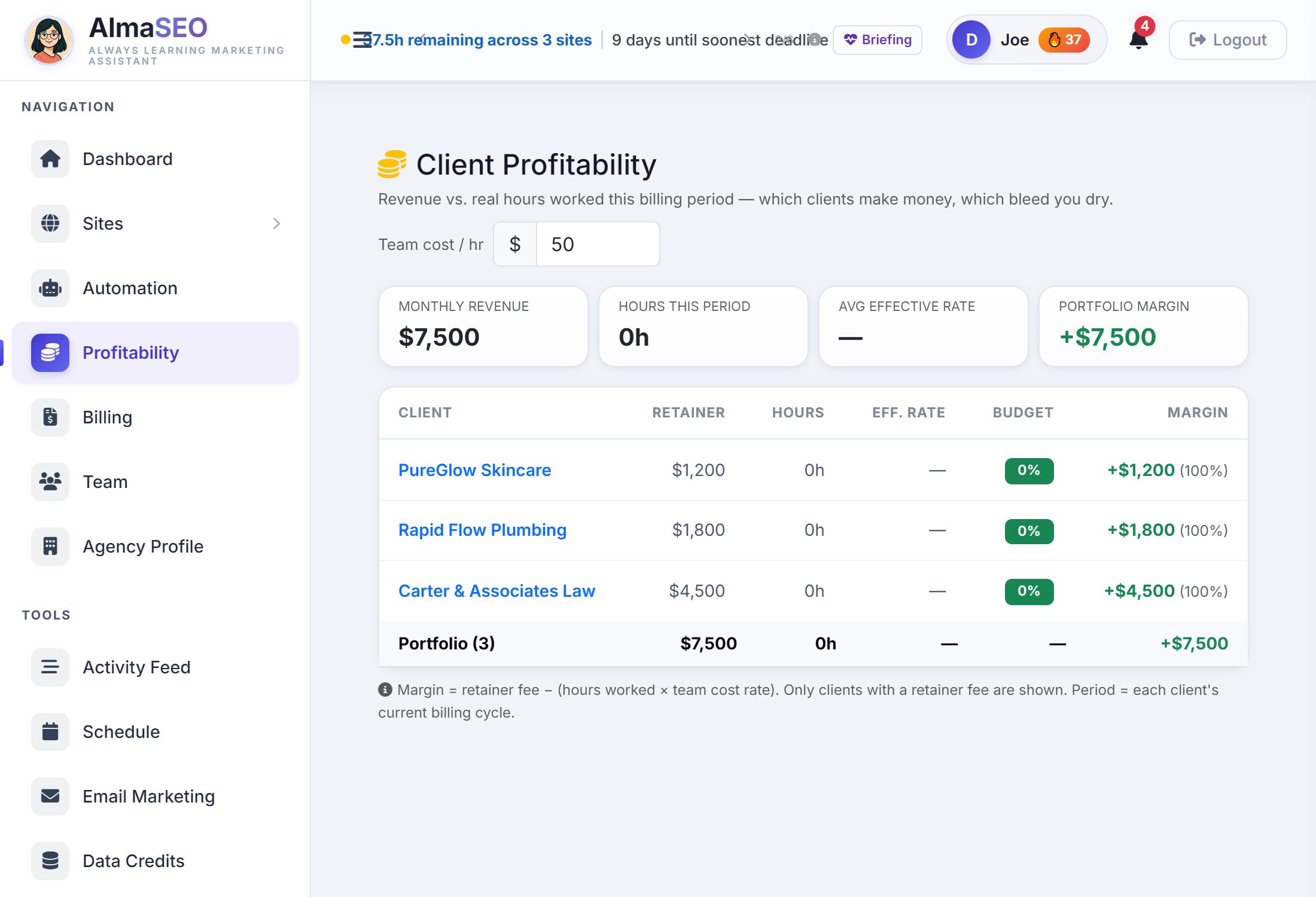
The Profitability page of the product guide documents every column; this lesson is about what to do about them.
Step 1: Set your team cost per hour

Team cost / hr sits at the top right. It starts at $50. Change it to your real cost rate and every margin on the page recalculates instantly.
It's saved to your account, so the owner and managers see the same margins. Only the account owner can change it.
Step 2: Set up each client's retainer
Open the client's site → Activity/Logs/Reports tab → Retainer Tracker:
- Monthly Fee: what they pay. Required: without it, the client doesn't appear.
- Monthly Hours: the hours the retainer covers. Optional, but without it there's no budget percentage.
- Billing Day: the day each billing cycle starts. Without it, AlmaSEO uses the calendar month.
Step 3: Log your time
Hours come from work your team logs against the site, with a duration, anywhere in AlmaSEO. The page is only as honest as your time log. Unlogged hours make every client look more profitable than it is.
Step 4: Read the page
The four numbers at the top:
| Number | What it means |
|---|---|
| Monthly revenue | All retainer fees added together |
| Hours this period | Hours logged across all clients in their current billing cycles |
| Avg effective rate | Revenue ÷ those hours. A dash until the first hour is logged. |
| Portfolio margin | Revenue minus hours × cost rate. Green if positive, red if the portfolio is losing money. |
The client table, one row per retainer client:
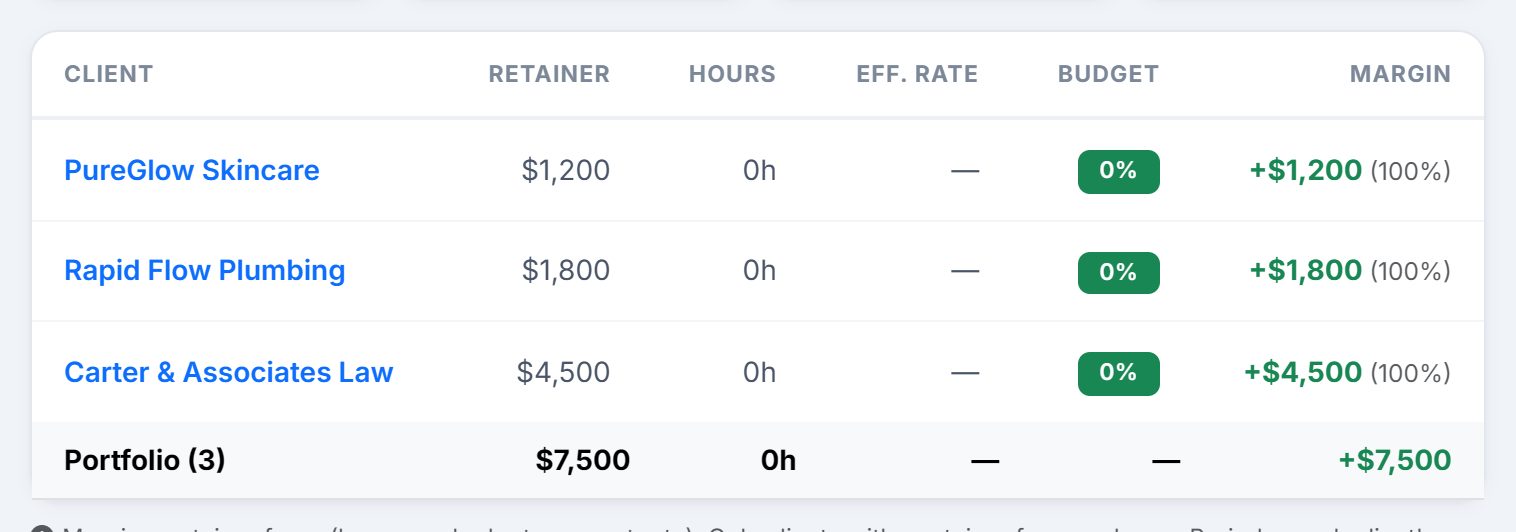
| Column | What it shows |
|---|---|
| Client | Links straight into the site |
| Retainer | Monthly fee |
| Hours | Hours logged in this client's current billing cycle |
| Eff. rate | Fee ÷ hours |
| Budget | Hours used as a % of Monthly Hours: green under 85%, yellow at 85% or more, red when over budget. A dash if no hours budget is set. |
| Margin | Fee − hours × cost rate, plus margin %. Losing clients are tinted red. |
The table opens sorted by margin, worst first, so problems are at the top. Click any heading to re-sort. The bottom row totals the portfolio.
These are the same numbers the Dashboard's Business Overview shows, so the two screens always agree.
Step 5: Act on what you see
Check it once a week:
- Red row or red budget badge: the client is costing more than it pays this cycle. Read the work log before the next renewal conversation.
- Yellow badge before mid-cycle: on pace to go over. Slow the non-essential work now.
- High effective rate on a green row: a healthy retainer. Use it as the model for your next proposal.
- Zero hours on an active client: either nobody's logging time, or nothing's being done. Both are worth knowing before the client asks.
Real-world example: the quiet money-loser
You set your cost rate to $65 and look at the table for the first time. It's sorted worst first.
At the top: Bob's Gardening, $1,200/month for 12 hours. This cycle: 21 hours logged, effective rate $57/hr, margin −$165, row tinted red.
You open the work log. Three "quick" landing pages Bob asked for in texts, plus a monthly call that keeps running 90 minutes. None of it was in the original scope.
At the bottom: Lakeside Mold Pros, $1,500/month for 15 hours. Only 9 hours this cycle, effective rate $167/hr. Their automation runs in Draft mode, you review on Mondays, and everything is logged.
Two actions: you email Bob a friendly note with the hours, offering either a 20-hour retainer at $1,800 or a list of what's in and out of scope. And you use Lakeside's setup as the template for your next client.
Key takeaways
- Set Team cost / hr to your real cost, not the default. Divide by billable hours, not total hours.
- Every retainer client needs a Monthly Fee, ideally Monthly Hours and a Billing Day too.
- Log every hour. Unlogged time hides unprofitable clients.
- Effective rate below cost rate means you lose money on every hour.
- Yellow early in the cycle is your warning. Act before it turns red.
- Use your best clients' numbers to price new retainers.
Every hour on this page came from a person on your team. Team is the lesson on adding those people without handing over more than the job needs.