
Why this matters
"Where do we rank?" is the first question most clients ask, and the one they keep asking. A tracked set of keywords answers it the same way every week, so the answer is a trend you can show, not a screenshot someone took on a good day.
Tracking also tells you whether the work worked. You rewrote the emergency plumbing page; did "emergency plumber atlanta" move? Without a record from before, you can't say.
The business concept: report what the client cares about
Clients don't buy positions. They buy calls, bookings and sales. But position is the part they can see, and a steady climb on the searches that bring them work is the clearest proof that the retainer pays.
- Track a short list on purpose. The client's main services with the city, the "near me" versions, and one or two you're actively working on.
- Report the trend, not one week. Rankings wobble. Four weeks of a line going up is a story; one week's number is noise.
- Put clicks next to positions. A ranking that earns no clicks isn't worth celebrating, and a client will notice.
The SEO concept: position, location and real demand
- Position is where the site appears in Google's results for a search. The top three take most of the clicks; page 2 takes almost none.
- Location changes the answer. Someone in Atlanta searching "emergency plumber" sees different results from someone in Denver. For a local business, only the local ranking matters.
- Impressions show demand. Search Console counts how often the site actually appeared for a search. A #4 with no impressions is a search almost nobody makes. A #11 with thousands is the page worth improving.
Walkthrough
Where: open a client site from Sites, then SEO Intelligence › Keyword Tracker. Plans: every plan. Needs: Search Console connected for impressions and clicks.
- Set the client's location first. Under Local SEO › Locations, add the business address. Every check then runs Google from that city.
- Add the keywords. Paste them one per line and press Add Keywords, or press Track on a keyword in Keyword Research. The first check runs straight away, free.
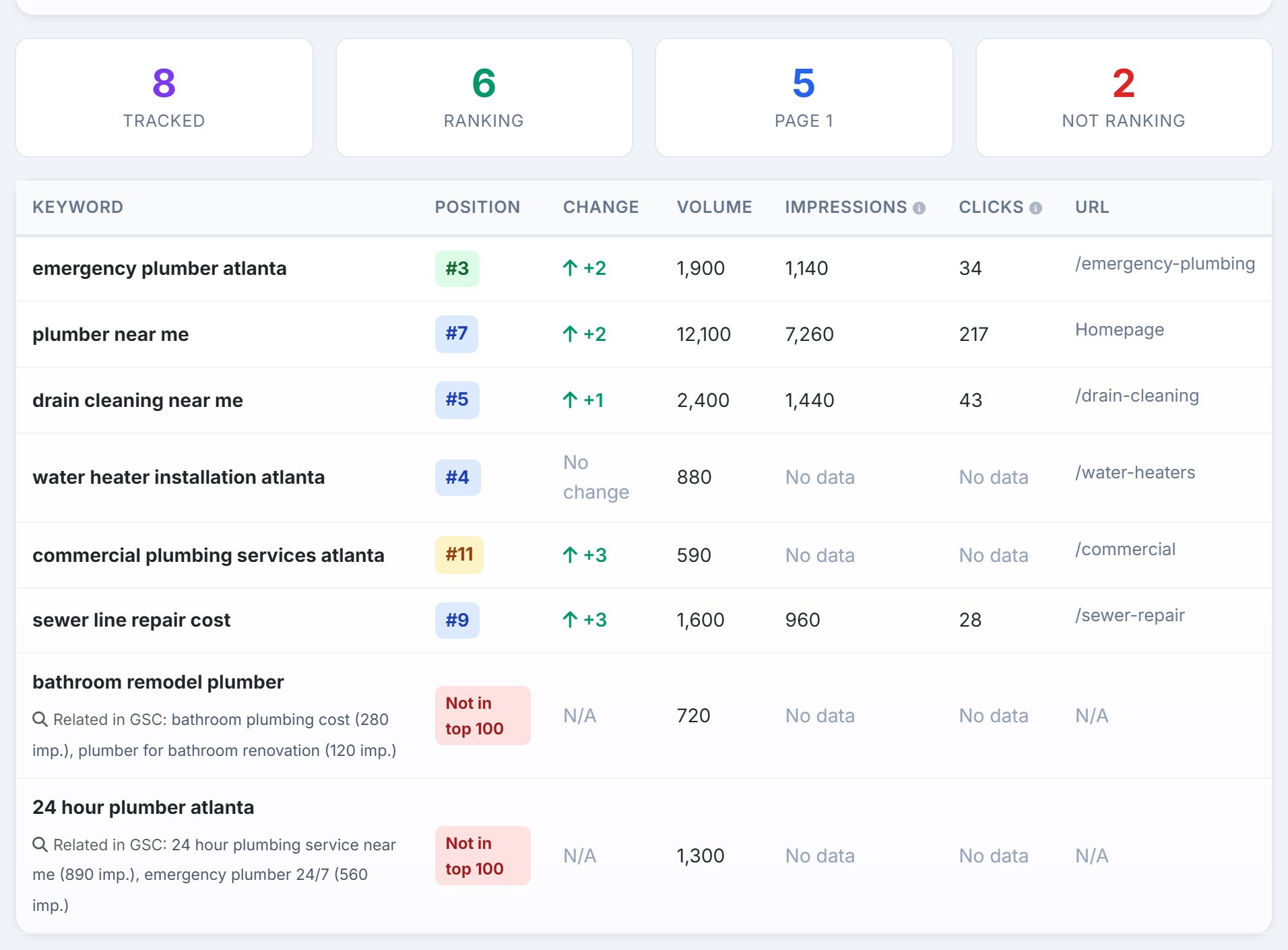
- Read the table. Position and Change show where each keyword stands and how it moved. Impressions and Clicks show whether anyone sees it. A GSC badge means the position is Search Console's average for that day.
- Look under the ones that don't rank. Related in GSC names similar searches the site already appears for. They're often the better keyword to track.
- Let Sunday do the work. Every tracked keyword is checked every week at no cost. After the second check, Position History charts the trend.
- Check on demand only when it matters. After a page goes live, Check Rankings checks the keywords you tick now. It shows the Data Credits cost and your balance first, and charges only for keywords Google answered for.
Real-world example: four weeks after the page rewrite
- Before: in mid-October you track eight keywords for Rapid Flow Plumbing. "emergency plumber atlanta" sits at #8.
- The work: you rewrite the emergency plumbing page with prices, response times and the service area.
- Week by week: the Sunday checks move it to #6, #5, then #3. Position History shows one line climbing.
- The proof: the table shows 1,140 impressions and 34 clicks in the last 28 days for that search, and the ranking page is /emergency-plumbing.
- The next target: "bathroom remodel plumber" isn't in the top 100, but Related in GSC shows the site already appears for "bathroom plumbing cost". You add that keyword and plan a page for it.
- The report: one chart, one row of numbers, and a sentence: the page you paid for now ranks third and brings in calls.
Key takeaways
- Track a short list of keywords that bring the client work, not everything.
- Set the client's location so you see the ranking a local customer sees.
- Read position next to impressions and clicks: demand matters as much as rank.
- Let the free weekly check build the trend; check on demand only when timing matters.
- Report the line, not one week's number.
Next up is Live SERP Check: what Google's results page shows for a client's keywords today, and what to do about it.