
WordPress plugin · FAQ schema
FAQ schema for WordPress, from a block you write in.
Add AlmaSEO’s FAQ block to any page, type your questions and answers, and publish. Visitors get a tidy FAQ section; search engines get valid FAQPage structured data built from exactly the same words. No generator, no copying JSON into a custom-HTML block, and nothing to keep in sync by hand.
Version 1.31.0 on WordPress.org · WordPress 5.6 or newer, PHP 7.4 or newer. Part of the AlmaSEO WordPress SEO plugin, with no account needed.
What FAQ schema is, and what it still does in 2026
FAQ schema is a small block of structured data, written in a format called JSON-LD, that labels the questions and answers on a page as exactly that. Search engines don’t have to guess which line is the question and which paragraph answers it. The format is FAQPage from schema.org, and it is one of the simplest schema types there is.
One thing most FAQ schema guides still leave out: since August 2023, Google only shows the expandable FAQ result under a listing for well-known, authoritative government and health websites. If you run a plumbing company, an online store or an agency, adding FAQ schema will not bring that dropdown back to your listing, and any tool that promises it is out of date.
So why add it? Because the markup still does its basic job. It is valid, Google still reads it and its Rich Results Test still checks it, other search engines can use it, and it hands any system reading your page a clean, unambiguous list of the questions you answer. Most of the value, though, is in the FAQ section itself: questions your customers actually ask, answered on the page where they are already looking. The schema should come along with that for free, not be the reason for it.
How to add FAQ schema in WordPress
With the AlmaSEO plugin installed, in the block editor:
- Add the FAQ block. Click the + where you want the section and search for FAQ.
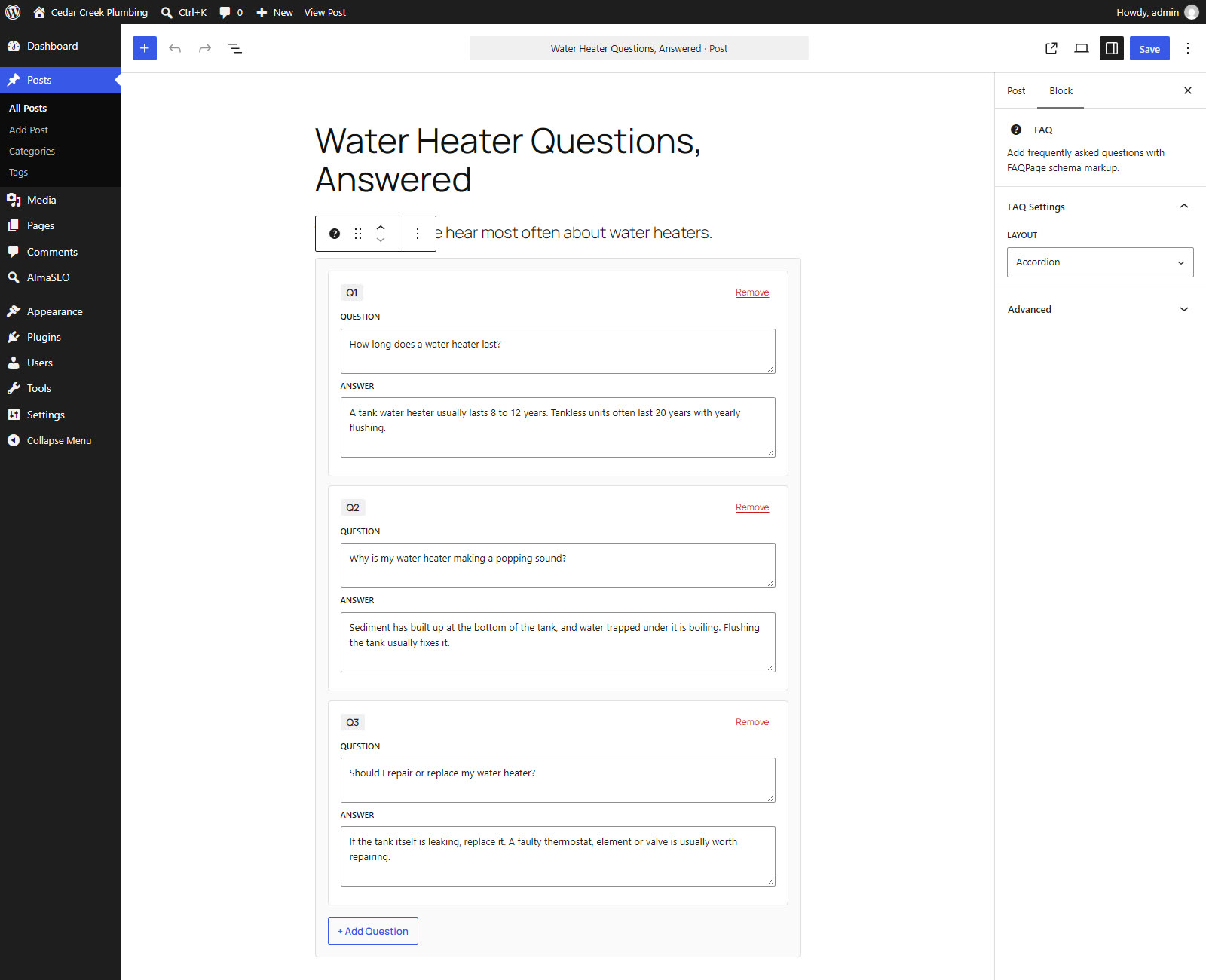
- Add your questions. Click Add Question, type the question, then the answer. Answers can carry links and bold text. Repeat for each one.
- Choose a layout. In the block settings, pick Accordion (each answer opens when the question is clicked) or List (every answer showing, each question as a heading).
- Publish. The FAQPage structured data is written into the page from the same questions and answers. To check it, paste the page’s address into Google’s Rich Results Test or the schema.org validator.
There is no setting to switch on first. The block produces its markup on its own, whatever the rest of your schema settings say.
Why a block beats an FAQ schema generator
An online FAQ schema generator gives you a snippet of code to paste into your page. It works on the day you do it, and that is about all you can say for it.
- The markup always matches the page
Google’s rule for FAQ markup is simple: it has to describe questions and answers a visitor can see. A pasted snippet is a copy, and copies drift: someone edits an answer on the page and the JSON still says the old thing. The block writes the visible section and the structured data from one set of fields, so they can’t disagree.
- Nothing to paste, nothing to break
No custom-HTML block holding a wall of JSON that the next editor deletes by accident or breaks with one missing comma. You edit questions like any other content.
- Clean output, either layout
The accordion uses the browser’s own open-and-close element, so it works without any script and with a keyboard. The list layout gives every question a real heading. Questions or answers left blank are skipped, in the page and in the markup.
- Formatting where it belongs
Links and bold text stay in the visible answer. The structured data gets the same answer as plain text, which is what the schema.org format expects.
On the Classic editor, Elementor or Divi
No block editor? AlmaSEO’s SEO panel, which sits under the content on every post and page, has its own FAQ fields. Tick Enable Advanced Schema Features under AlmaSEO → Settings (it starts switched off, so the plugin never publishes markup you haven’t reviewed). Then, on the page, set the schema type to FAQPage, or tick it under Also describe this page as, and enter your questions and answers.
If you leave those fields empty, AlmaSEO reads the page itself instead: any heading that ends in a question mark and is followed by a paragraph counts as a question and its answer, up to ten.
One rule to follow on this route: the questions must also appear on the page, because FAQ markup has to describe content visitors can see. The panel writes the structured data; to show the same questions to visitors, put the [almaseo_faq] shortcode where the FAQ section should go. In Elementor that is a Shortcode widget, in Divi a Code or Text module, and in the Classic editor anywhere in the content. It shows the panel’s questions as an accordion, or as headings with [almaseo_faq layout="list"], and since both come from the same fields, the visible section and the markup always match.
If a page ends up with both, the block wins. AlmaSEO notices the FAQ block, leaves the panel’s questions out, and tells you so in the panel, so the page never carries two competing sets of FAQ markup.
Writing an FAQ section worth having
- Use the questions you’re actually asked. Your inbox, your sales calls and the “People also ask” box for your main search terms are better sources than a brainstorm.
- Answer in the first sentence. Then add the detail. Someone scanning an accordion reads one line before deciding whether to stay.
- One FAQ per page, about that page. The same ten questions pasted onto every service page help nobody, and the markup is meant to describe the page it sits on.
- No selling inside answers. FAQ markup is for genuine questions and answers. An “FAQ” that is really an advert is exactly what search engines stopped rewarding.
Questions about FAQ schema
- Will FAQ schema get me the FAQ dropdown in Google?
Almost certainly not. Since August 2023 Google shows FAQ rich results only for well-known, authoritative government and health websites. The markup is still valid and still read, but for most sites its job is to label your questions and answers clearly, not to win extra space in the results.
- Is the FAQ block free?
Yes. The FAQ block and its FAQPage structured data are part of the free AlmaSEO plugin, on any number of sites, with no account.
- Do I need an FAQ schema generator as well?
No. The block writes the structured data from the questions you type into it, so there is no code to generate or paste. Generators produce a one-off copy that has to be updated by hand every time an answer changes.
- Can I use FAQ schema on every page?
You can use it on any page that has its own genuine questions and answers visible to visitors. Repeating one generic FAQ across many pages adds nothing, and the markup should always describe the page it is on.
- Does it work without the block editor?
Yes. On the Classic editor and page builders, AlmaSEO’s SEO panel has FAQ fields that produce the same FAQPage markup once Advanced Schema Features are switched on in AlmaSEO’s settings. Add the [almaseo_faq] shortcode to the page to show those questions to visitors, because FAQ markup must match what they can see.
- What if I already have FAQ schema from another plugin?
Two plugins writing schema to the same page is how you get duplicate, conflicting markup. AlmaSEO stands down when it detects another major SEO plugin; the intended path is to import your data with its migration wizard and deactivate the old plugin.
Write the FAQ once. The markup takes care of itself.
The FAQ block comes with the free AlmaSEO plugin, along with schema for the rest of your pages, sitemaps, redirects and 404 tracking, and the import from whatever you’re running now.