
WordPress plugin · Import and migrate
Switch WordPress SEO plugins without losing a single title.
AlmaSEO’s Import & Migrate wizard moves a site from Yoast SEO, Rank Math, All in One SEO, SEOPress, The SEO Framework, Squirrly SEO, SmartCrawl or Slim SEO. Titles, descriptions, social and search engine settings, category and tag SEO, site-wide templates and redirects come across, and your titles read the same afterwards. Anything that can’t come across is listed with the reason. It’s in the free plugin, with no account.
Version 1.31.0 on WordPress.org · WordPress 5.6 or newer, PHP 7.4 or newer. Part of the AlmaSEO WordPress SEO plugin, not a separate install. AlmaSEO is not affiliated with or endorsed by any of the plugins named on this page; their names are used only to say which ones the import reads.
Changing SEO plugins usually means your titles quietly change too.
Every SEO plugin stores its work in its own way. A title written in one plugin is often not finished text: it holds placeholders such as the site name, the category or the current year, written in that plugin’s own shorthand, and the plugin fills them in when the page loads. Copy the raw value into a different plugin and the placeholders either show up as code in Google’s results or disappear, along with the site name the old plugin added on the end.
Redirects are worse. They live in the old plugin’s own table, and when it’s switched off, every rule in it stops at once. Nobody notices until the 404s pile up.
AlmaSEO reads each plugin’s data the way that plugin read it, so the result is the page Google already knew.
How to switch SEO plugins in WordPress, in six steps
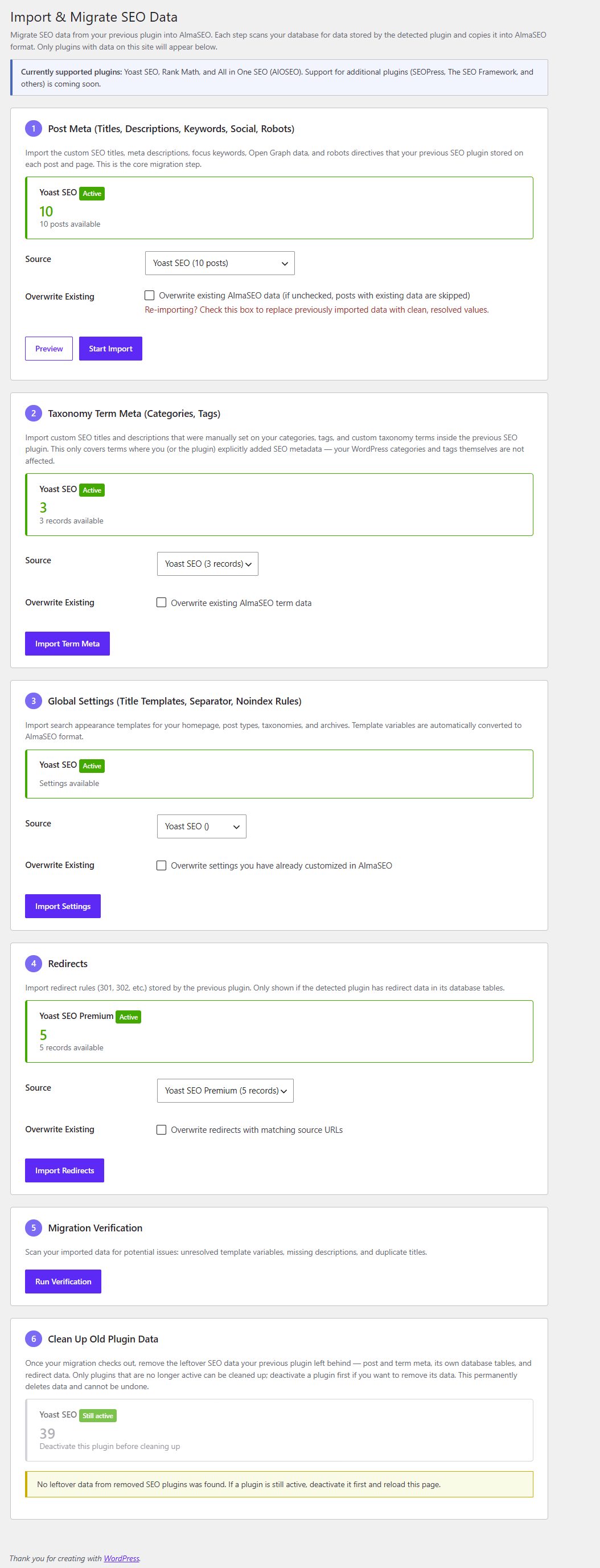
Install AlmaSEO, then go to AlmaSEO → Import / Export. The wizard looks in your database for each plugin’s data, so it finds your old plugin whether it’s still switched on or already deactivated, and only shows the plugins that left something behind. Each step counts what it found before you run it.
- Posts and pages. Each one’s SEO title and description, focus keyword, canonical address, social title, description and image, and its search engine settings, such as “noindex”.
- Categories, tags and custom taxonomies. The SEO title and description, canonical address, social settings and “noindex” choice for each term.
- Site-wide settings. The title and description templates for each kind of page, the title separator, and which kinds of page are kept out of search.
- Redirects. The old plugin’s redirect list, plus the redirects set on single pages and the old addresses it remembered for renamed pages, where it had them.
- Verification. A report on what was imported: any placeholder that didn’t convert, pages with no description, and titles two pages now share.
- Clean-up. Once the old plugin is deactivated, remove the data it left in your database. Optional, and only on your say-so.
Each import step has its own Overwrite existing checkbox, unticked to start with, so running a step again skips what you’ve already brought across instead of replacing it. Steps run in batches, so a site with thousands of posts doesn’t time out halfway through.
What stays exactly as it was
- Titles read the same after the move
Each plugin’s own placeholders are filled in the way that plugin filled them: Yoast’s
%%sitename%%, Rank Math’s%sitename%, AIOSEO’s#site_title, Squirrly’s{{sitename}}, and the rest. Where the old plugin added your site name to the end of custom titles, the site name is kept. The current year stays the current year, rather than freezing at the year you switched.- Your primary category is kept
If a post’s title uses its primary category, AlmaSEO uses the same primary category you chose in the old plugin. The clean-up step copies it into AlmaSEO before it deletes anything, so a title never switches to the post’s first category behind your back.
- Pages stay in or out of search the way they were
Each plugin had its own rules for which choice won, a page’s own “index” setting or the setting for its whole post type. AlmaSEO follows the old plugin’s rule, so a page that was in search stays in search, and one that was hidden stays hidden.
- Redirects keep their status codes
A 301 stays a 301, a 302 stays a 302, and a 410 for a page that’s gone stays a 410. Rules you had switched off in the old plugin are left behind, since they never ran.
- Nothing is dropped silently
When something can’t come across, the import lists it with the reason, so you can decide what to do with it instead of finding out from a 404 or an odd-looking search result.
What comes across from each plugin
All eight go through all six steps. The details differ because the plugins do. “Listed after the import” means the wizard shows you the item and why, and leaves it for you to recreate if you still want it.
- Switching from Yoast SEO
-
Comes across: Post and page titles, descriptions, focus keywords, social and search engine settings; category and tag SEO; Search Appearance templates and choices; and, if you ran Yoast SEO Premium, its redirect list.
Listed after the import, or not carried: Pattern (regular expression) redirects, and templates using a placeholder AlmaSEO has no equivalent for.
- Switching from Rank Math SEO
-
Comes across: Post and page titles, descriptions, focus keywords, social and search engine settings; category and tag SEO; Titles & Meta templates and choices; and its redirections.
Listed after the import, or not carried: Redirects matching every address that contains, starts with or ends with some text, pattern (regular expression) redirects, and templates using a placeholder AlmaSEO has no equivalent for.
- Switching from All in One SEO
-
Comes across: Post and page titles, descriptions, keywords, social and search engine settings; category and tag SEO; Search Appearance templates and choices; and its redirects.
Listed after the import, or not carried: Pattern (regular expression) redirects, and templates using a placeholder AlmaSEO has no equivalent for.
- Switching from SEOPress
-
Comes across: For each post and page: the SEO title and description, target keyword, canonical address, Facebook and X title, description and image, and the “noindex”, “nofollow”, “nosnippet” and “noimageindex” choices. For each category, tag and custom taxonomy term: title, description, canonical, Facebook title and description, and “noindex”. Site-wide: the separator, the templates for the homepage, each post type and taxonomy, author and date archives, search results and the 404 page, every “noindex” choice, and the attachment redirect. SEOPress hides author archives from search out of the box, and that carries over. Redirects: a page’s or category’s own redirect, and every rule in the SEOPress Pro redirect manager (301, 302, 307, 410, 451).
Listed after the import, or not carried: Pattern redirects, redirects that applied only to logged-in visitors, and templates using a tag AlmaSEO can’t fill. Not carried: SEOPress’s “noindex the whole site” switch (use WordPress’s own Discourage search engines setting instead), switched-off rules, and its 404 log.
- Switching from The SEO Framework
-
Comes across: For each post and page: the SEO title and description, canonical address, Facebook and X title and description, social image, X card type, and the “noindex”, “nofollow” and “noarchive” choices, with the site name and separator The SEO Framework added to custom titles. For each term: title, description, canonical, Facebook title and description, and “noindex”. Site-wide: The SEO Framework has no title templates of its own, so AlmaSEO writes its choices out as templates that look the same, including the separator, which side the site name goes on, and the “Category:”, “Tag:” and “Author:” prefixes. Its hidden post types, taxonomies and archives stay hidden. Redirects: the “301 redirect” address set on a page, a category or tag, an author, a post type archive or the homepage. On a Genesis site, Genesis’s “Custom Redirect URI” comes across too.
Listed after the import, or not carried: Not carried: the “hide the whole site” and “hide the homepage” switches, and the “Year:” and “Month:” prefixes on date archive titles.
- Switching from Squirrly SEO
-
Comes across: For each post and page: the SEO title and description, keyword, canonical address, Facebook and X title, description, image and card type, the “noindex” and “nofollow” choices, and the primary category. For each term: title, description, canonical, Facebook title and description, and “noindex”. Site-wide: the Automation patterns for posts, pages, other post types, categories, tags, custom taxonomies, authors, search results, the 404 page and the homepage, with each one’s “noindex” choice. Squirrly lets each page type have its own separator; the one for posts becomes AlmaSEO’s, and any page type that used a different one keeps it. Redirects: a page’s or category’s own redirect (301, 302, 307), and the old addresses Squirrly remembered when a post’s address changed.
Listed after the import, or not carried: Patterns using a tag AlmaSEO has no equivalent for, such as the product price. Not carried: Squirrly’s “send every missing page to one address” setting, which isn’t a rule for one page. Pages where SEO was switched off in Squirrly are left out, since Squirrly showed nothing for them.
- Switching from SmartCrawl
-
Comes across: For each post and page: the SEO title and description, focus keyword, canonical address, Facebook and X title and description, social image, the “noindex”, “nofollow”, “noarchive”, “nosnippet” and “noimageindex” choices, and the primary category. For each term: title, description, canonical, Facebook title and description, and the search engine choice. Site-wide: the Titles & Meta templates for every post type, taxonomy, author and date archives, search results, the 404 page and the homepage, the separator, and each “noindex” choice. Redirects: every rule in its redirect manager (301, 302, 307, 308, 410, 451), including rules that pointed at a page, and a page’s own “301 redirect” address.
Listed after the import, or not carried: Pattern redirects, redirects that applied only to visitors from some countries, and templates using a macro AlmaSEO has no equivalent for, such as a custom field.
- Switching from Slim SEO
-
Comes across: For each post and page: the SEO title and description, canonical address, social image and “hide from search engines” choice. For each term: title, description, canonical and “hide from search engines”. Site-wide: the Meta Tags templates for every post type, taxonomy, author archives and the homepage, with each one’s search choice. Redirects: every rule in its Redirection list (301, 302, 307, 410), and the old addresses of renamed pages Slim SEO sent on to the new one.
Listed after the import, or not carried: Redirects matching every address that contains, starts with or ends with some text, pattern redirects, and templates using a variable AlmaSEO has no equivalent for, such as one from ACF. Not carried: a term’s social image, and Slim SEO’s separate X image, which has no AlmaSEO field (X uses the social image instead).
Moving redirects from the Redirection plugin as well? Step 4 reads those too. The redirects themselves are covered on the redirect manager page.
Clearing out the old plugin, safely
Deactivating a plugin doesn’t remove its data. Years of SEO fields, redirect tables and remembered addresses stay in your database after it’s gone. Step 6 removes them, for all eight plugins, with three safeguards:
- It won’t run while the old plugin is active. Deactivate it first, check your pages look right, then clean up.
- It removes only the old plugin’s own fields, named one by one. Another plugin’s fields that happen to have a similar name are never touched. On a Genesis site, Genesis’s own SEO and layout fields stay.
- It never touches the old plugin’s settings. If you reinstall it later, its configuration is still there.
Each post’s primary category is copied into AlmaSEO before anything is deleted. The clean-up is permanent and can’t be undone, so take a backup first, as you would before any database change.
Questions about switching SEO plugins
- Which SEO plugins can AlmaSEO import from?
Eight: Yoast SEO, Rank Math SEO, All in One SEO, SEOPress, The SEO Framework, Squirrly SEO, SmartCrawl and Slim SEO. Redirects can also come from the Redirection plugin. AlmaSEO is not affiliated with any of them.
- Is the import free?
Yes. All six steps are part of the free AlmaSEO plugin on WordPress.org, on any number of sites, with no AlmaSEO account.
- Do I need to keep my old SEO plugin active while I import?
No. The wizard reads the old plugin’s data from your database, so it works whether that plugin is still on or already deactivated. Deactivate it once you’re done, because two SEO plugins writing tags to the same page cause conflicts.
- Will my titles change in Google after I switch?
They shouldn’t. Each plugin’s placeholders are filled in the way that plugin filled them, the site name is kept where the old plugin added it, and the primary category stays the same. Step 5 then lists any placeholder that didn’t convert, so you can fix it before anyone sees it.
- What happens to redirects the import can’t copy?
They’re listed after the import, each with the reason. AlmaSEO matches one exact address per rule, so pattern rules, rules matching any address that contains, starts with or ends with some text, and rules limited to logged-in visitors or some countries can’t be copied as they were. Recreate the ones you still need by hand, or at your server or CDN.
- Can I run the import more than once?
Yes. Each import step has an Overwrite existing checkbox that starts unticked, so a second run skips what’s already been brought across. Tick it to replace earlier imports.
- Does the clean-up delete my old plugin’s settings?
No. It removes only the SEO fields, tables and redirect data the old plugin left on your posts and terms, and only after you’ve deactivated it. Its settings stay. The clean-up can’t be undone, so take a backup first.
Bring your SEO with you.
The import comes in the free AlmaSEO plugin, along with schema, sitemaps, redirects, 404 tracking and bulk meta editing.