
WordPress plugin · Redirects and 404s
WordPress redirects and 404 tracking, in the free plugin.
AlmaSEO’s redirect manager handles 301, 302, 307, 308 and 410 rules, counts every hit, and catches chains before they cost you. The 404 log beside it shows which broken addresses people are actually landing on, flags a sudden spike, and suggests where each one should go. Both run on your own server, with no account.
Version 1.31.0 on WordPress.org · WordPress 5.6 or newer, PHP 7.4 or newer. Part of the AlmaSEO WordPress SEO plugin, not a separate install.
Every URL you change breaks something you can’t see.
A page gets a better slug. A service you stopped offering gets deleted. A category is merged into another one during a tidy-up. Each of those is a sensible change, and each one leaves an address behind that used to work: in Google’s index, in a link from someone else’s site, in a customer’s bookmarks, in last year’s newsletter. Visitors who follow any of them get your 404 page, and search engines slowly forget a URL they had already ranked.
WordPress quietly forwards some renamed posts by itself, but not all of them, and it gives you no list of what it is forwarding. Most sites only find out how many broken addresses they have when traffic dips and someone goes looking. By then the links have been dead for months.
AlmaSEO keeps both halves in one place: the redirects you have decided on, and the 404s that tell you which redirects you still need.
How to redirect a page in WordPress
With the AlmaSEO plugin installed, a redirect takes a minute and needs no access to your server, your .htaccess file or your host’s control panel.
- Open the redirect manager. In your WordPress admin, go to AlmaSEO → Redirects and choose to add a redirect.
- Enter the old address as a path. Just the part after your domain, such as
/old-services-page. Leave off anything after a?— the rule matches the page itself, so it already catches every version of that address. - Enter where it should go. Another path on your site, or a full URL on a different domain.
- Pick the status code. 301 for a permanent move, which is almost always the right answer. The codes are explained below.
- Save, then test it. The Test Redirect button checks a path against your rules without leaving the screen. If you try it in your own browser, use a private window: browsers remember 301s and will keep sending you to the old answer.
AlmaSEO refuses a redirect that would point back to itself, and won’t follow one that would loop, so a typo can’t take a page offline.
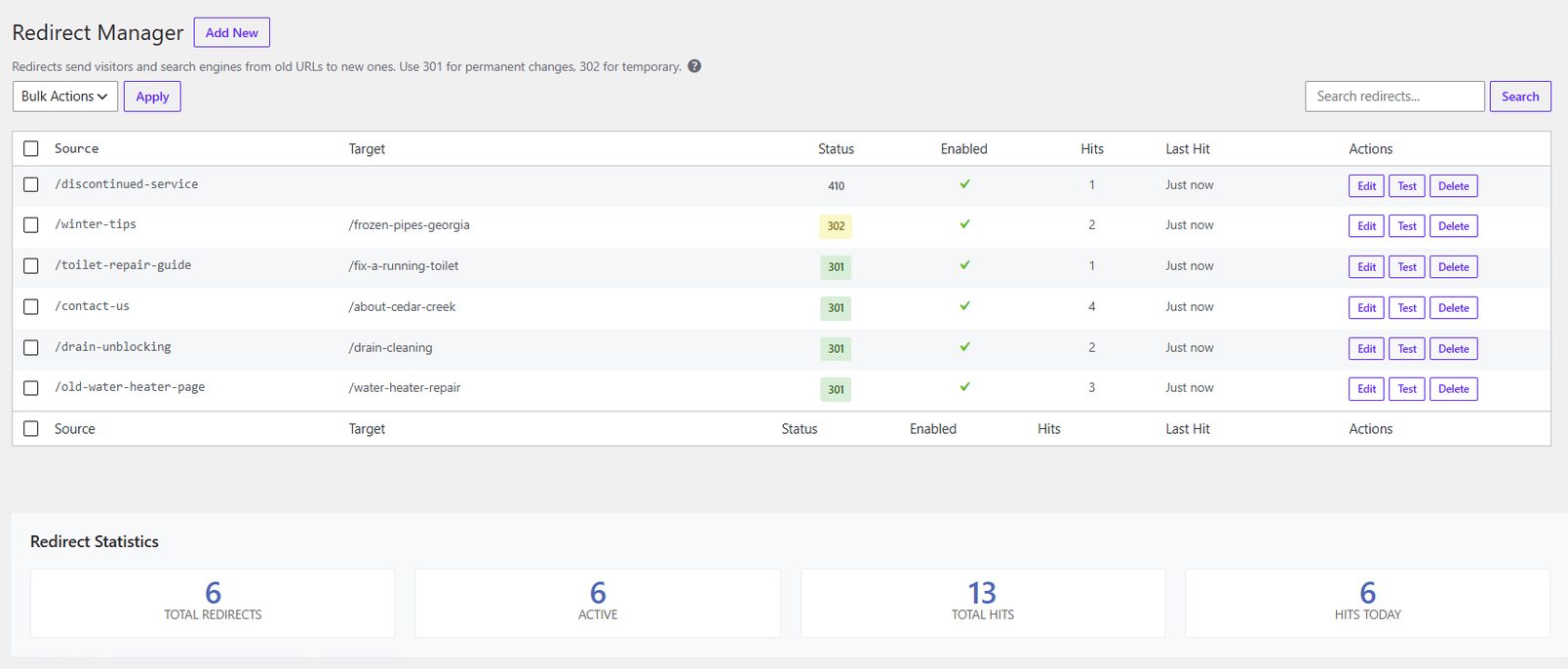
301, 302 or 410? The codes, in plain English.
The status code tells search engines what kind of change this is. AlmaSEO supports six, and you will use the first one most of the time.
- 301 — Moved permanently
The page has a new home for good. Search engines move the old URL’s standing to the new one over time. This is the 301 redirect WordPress sites need after a slug change, a merge or a restructure, and AlmaSEO’s default.
- 302 — Found (temporary)
The page is somewhere else for now and coming back: a seasonal offer, a page under rebuild. Search engines keep the original URL indexed.
- 307 and 308 — the strict versions
The same meanings as 302 and 301, with one guarantee added: a form submission keeps its method across the redirect. Developers ask for these by name; most sites never need them.
- 410 — Gone
The page was removed on purpose and has no replacement. Clearer to search engines than a 404, so they drop the URL sooner. AlmaSEO serves a plain page marked
noindex, with no redirect.- 451 — Unavailable for legal reasons
Removed because of a legal demand. Rare, but when you need it, it’s the honest answer.
A redirect manager you can actually audit.
Adding a rule is the easy part. Knowing which ones still matter, a year and two hundred rules later, is where most WordPress redirect plugins leave you on your own.
- Hit counts and last-hit times
Every rule records how often it fires and when it last did. A rule that hasn’t been hit since 2023 is safe to retire, and one firing every hour shows you an old URL that’s still out there working.
- Chain detection
When one redirect points at the source of another, A → B → C, visitors make two hops and search engines pass less value along. AlmaSEO lists every chain it finds, with a one-click Point straight at fix that sends A to C directly.
- Import and export as a spreadsheet
Export CSV downloads every rule; Import CSV brings a list back in. Handy for a site move, or for a batch of redirects worked out in a spreadsheet.
- Switch rules off without deleting them
Disable a rule, keep its history, switch it back on later. Search the table, and enable, disable or delete in bulk.
- Imports from the plugin you used before
Redirects come across from Rank Math, Yoast SEO Premium, AIOSEO, the Redirection plugin, SEOPress, The SEO Framework, Squirrly, SmartCrawl and Slim SEO, as part of the import wizard, with their status codes. Rules AlmaSEO can’t copy, such as pattern rules, are listed with the reason. You don’t rebuild years of rules by hand.
- WP-CLI commands
wp almaseo redirect add /old /new, plus list, delete, enable, disable and flush-cache, with list output as CSV. Useful for agencies scripting a migration across many sites.
The redirect offered before the 404 exists.
Most broken URLs on a WordPress site are made in one place: the Trash link. When you move a published page or post to the trash, AlmaSEO notes its address first, and the next screen offers to redirect it, with the old path already filled in. Pick a destination, or dismiss the offer if the page really is gone.
It works from the edit screen and from the hover link in your posts list, for pages, posts and any public custom post type. Trash several at once and each gets its own row in the offer, up to ten. Trash more than that and AlmaSEO lists the addresses instead, with a spreadsheet of them to download: fill in where each should go and bring it back through Import CSV.
The same offer appears when a published page changes address without being deleted — a new slug, or a move under a different parent page. Save the change and AlmaSEO shows both addresses with a one-click redirect from the old to the new. WordPress forwards some simple slug changes on its own, but it leaves no record you can see, and it does not cover a change of parent; a redirect made here sits in your Redirects screen with every other rule. Rename the same page twice before answering and the offer keeps the first address, which is the one the rest of the web still links to.
Find the 404 errors people are actually hitting.
A crawler shows you every broken link it can find. AlmaSEO’s 404 log shows you the ones real visitors and real search engines followed, ranked by how often they did.
- Every miss, with where it came from
Each 404 is logged with its path, the hit count, when it was last seen, every page that linked to it and the browser or bot that asked. Across the top: total 404s over seven days, unique paths, and your top referrer.
- Spike alerts
When a single address suddenly takes three times its usual daily misses, AlmaSEO flags it at the top of the 404 screen. Tick one box and it emails you as well when a missing page gets 10 or more visits in a day, at most once a day. That is how a broken menu link or a botched migration shows up this week, not next quarter.
- Suggestions, then one-click redirects
For any logged 404, AlmaSEO suggests the live pages it most likely meant, matched on the slug, its keywords and your page titles, each with a percentage match. Use as redirect opens the redirect manager with both ends filled in.
- Noise filtered out
Requests for missing images, scripts and stylesheets, and the paths vulnerability scanners probe on every WordPress site, are skipped. Mark anything else that isn’t worth fixing as ignored: it is badged, hidden by the Active Only filter, and left out of the spike check.
- No visitor IPs by default
Addresses are not stored unless a developer switches it on with a filter, so the log isn’t quietly collecting personal data you have to account for.
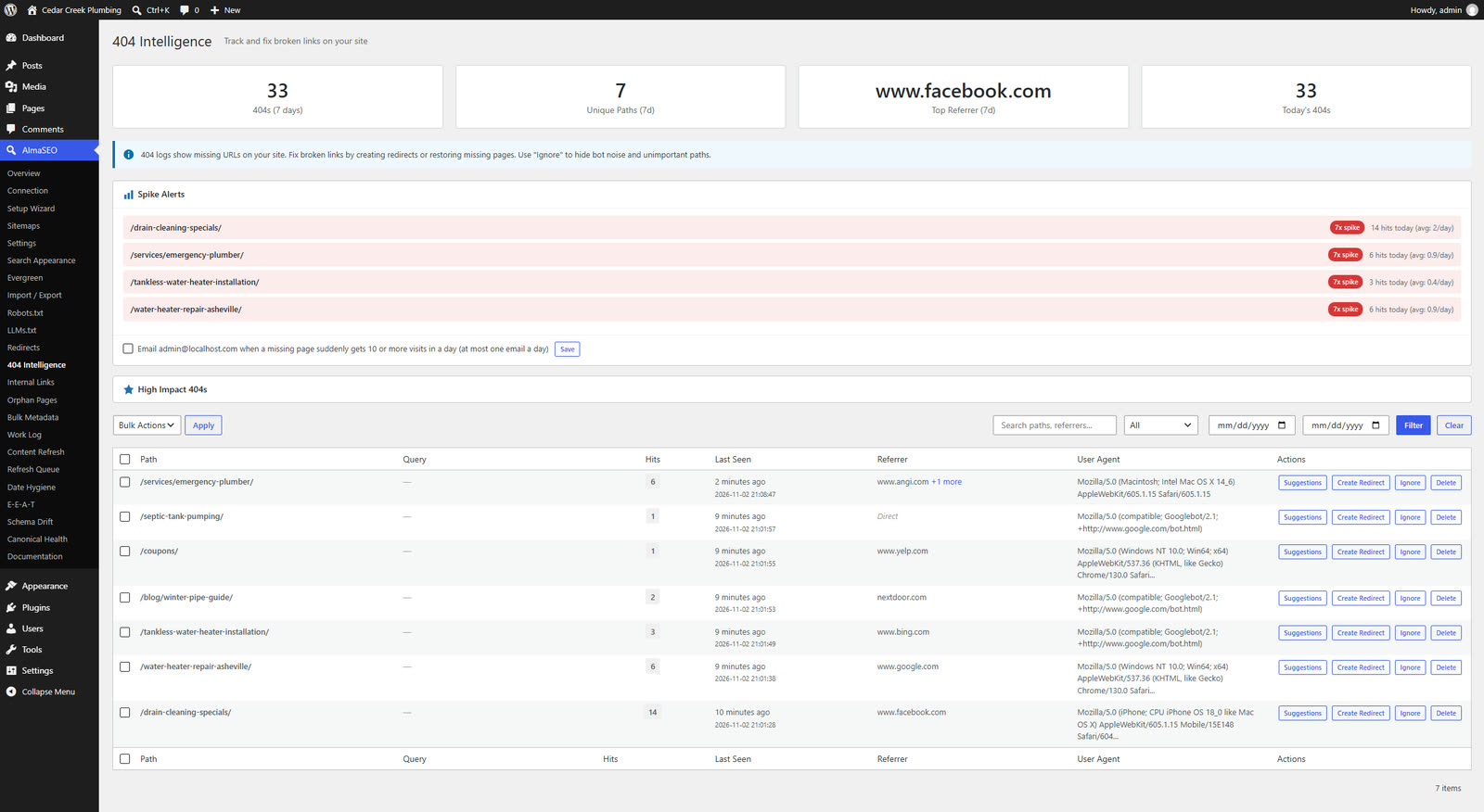
With an AlmaSEO account: the 404s Google is still sending people to
One panel on the 404 screen needs a connected AlmaSEO account with Google Search Console: High Impact 404s. It checks your logged paths against Search Console and ranks the ones Google is still showing in results and people are still clicking. A path hammered by a scraper and never seen in search sorts last. Everything else on this page works without an account.
Questions about redirects and 404s
- Is the redirect manager free?
Yes. The redirect manager, the 404 log, spike alerts, redirect suggestions and the redirect offered when you rename or trash a page are all part of the free AlmaSEO plugin, on any number of sites, with no account. The one exception is High Impact 404s, which needs an AlmaSEO account connected to Google Search Console.
- Do I need to edit .htaccess or have server access?
No. Redirects run inside WordPress, so they work on any host, including managed hosting where you can’t touch the server configuration. You add and change them from the WordPress admin.
- Should I use a 301 or a 302 redirect?
Use a 301 when the move is permanent, which covers slug changes, merged pages and restructures. Use a 302 only when the original page is coming back, such as a seasonal promotion. If a page is gone with no replacement, a 410 tells search engines that more clearly than a redirect to the homepage.
- Does it support regex or wildcard redirects?
No. Each rule matches one exact path, which keeps rules predictable and fast. Query strings are ignored when matching, so a rule for /old-page also catches /old-page?ref=newsletter. Pattern-based rules for whole sections are best done at the server or CDN.
- Can I bring my redirects over from the plugin I use now?
Yes. The import wizard brings redirects across in batches, with their status codes, from Rank Math, Yoast SEO Premium, AIOSEO, the Redirection plugin, SEOPress, The SEO Framework, Squirrly SEO, SmartCrawl and Slim SEO, alongside your SEO titles, descriptions and settings. Pattern rules, rules matching any address that contains, starts with or ends with some text, and rules limited to logged-in visitors or some countries are listed after the import with the reason, since AlmaSEO matches one exact address. AlmaSEO is not affiliated with any of these plugins.
- What happens when I delete a page?
When you move a published page or post to the trash, AlmaSEO offers to create a redirect from its old address on the next screen. Trash up to ten at once and each gets its own offer; trash more and you get a list of the addresses and a spreadsheet to fill in and import.
- Will the 404 log slow my site down?
It only runs when a page is already a 404, skips static files and known scanner paths, and stores one row per broken address with a running hit count rather than a row for every visit.
Stop losing visitors to addresses that used to work.
Redirects, 404 tracking and spike alerts come in the free AlmaSEO plugin, along with schema, sitemaps, bulk meta editing and the import from whatever you’re running now.