
WordPress plugin · Local business schema
Local business schema for WordPress, as the business you actually are.
AlmaSEO lets each page describe your business to search engines in their own format: the exact type of business, from 154 options; your address, phone and opening hours; your map coordinates; and a link to your Google Business Profile. You fill in a form in the page editor, and AlmaSEO writes the structured data. Free, with no account.
Version 1.31.0 on WordPress.org · WordPress 5.6 or newer, PHP 7.4 or newer. Part of the AlmaSEO WordPress SEO plugin.
What local business schema does
Local business schema is structured data, in a format called JSON-LD, that states the facts about a business in a way search engines don’t have to interpret: this is a plumber, here is the street address, this is the phone number, these are the hours, and this is its Google Business Profile. The format is LocalBusiness from schema.org, along with its more specific types such as Plumber, Dentist or Restaurant.
Your site already shows those details to people, usually in a footer or on a contact page. The schema shows them to machines, so the name, address and phone number on your website line up with what Google holds in your Business Profile and what directories list. Consistent details across all of them are one of the oldest signals in local search. The schema won’t get you into the map pack on its own, but it removes guesswork from how search engines read your site.
154 business types, so a dentist publishes as a dentist
Plenty of WordPress setups publish a generic LocalBusiness tag, or just Organization, whatever the business. Schema.org has specific types for a reason, and Google’s own guidance is to use the most specific one that fits.
AlmaSEO’s Business Type list holds 154 of them across 18 groups, including:
- Home and garden
Plumber, Electrician, HVACBusiness, RoofingContractor, GeneralContractor, HousePainter, Locksmith, MovingCompany
- Health and medical
Dentist, Physician, MedicalClinic, Optician, Pharmacy, Physiotherapy, VeterinaryCare, Pediatric
- Legal and financial
Attorney, LegalService, Notary, AccountingService, BankOrCreditUnion, InsuranceAgency
- Food and drink
Restaurant, CafeOrCoffeeShop, Bakery, BarOrPub, Brewery, Winery, FastFoodRestaurant
- Automotive
AutoRepair, AutoDealer, AutoBodyShop, TireShop, AutoWash, GasStation
- Personal care and fitness
HairSalon, BeautySalon, NailSalon, DaySpa, ExerciseGym, YogaStudio
- Retail, lodging and more
Florist, HardwareStore, JewelryStore, Hotel, BedAndBreakfast, RealEstateAgent, SelfStorage, ChildCare
If nothing fits exactly, plain LocalBusiness is always there as the fallback.
How to add local business schema in WordPress
With the AlmaSEO plugin installed. It works the same on the block editor, the Classic editor and page builders, because the fields live in AlmaSEO’s panel under the content, not in a block.
- Switch on advanced schema, once. Under AlmaSEO → Settings, tick Enable Advanced Schema Features. It starts switched off, so AlmaSEO never publishes structured data you haven’t reviewed.
- Open the page that represents the business. Usually your homepage or contact page, or each location’s own page.
- Set the schema type to LocalBusiness. The business fields appear below it.
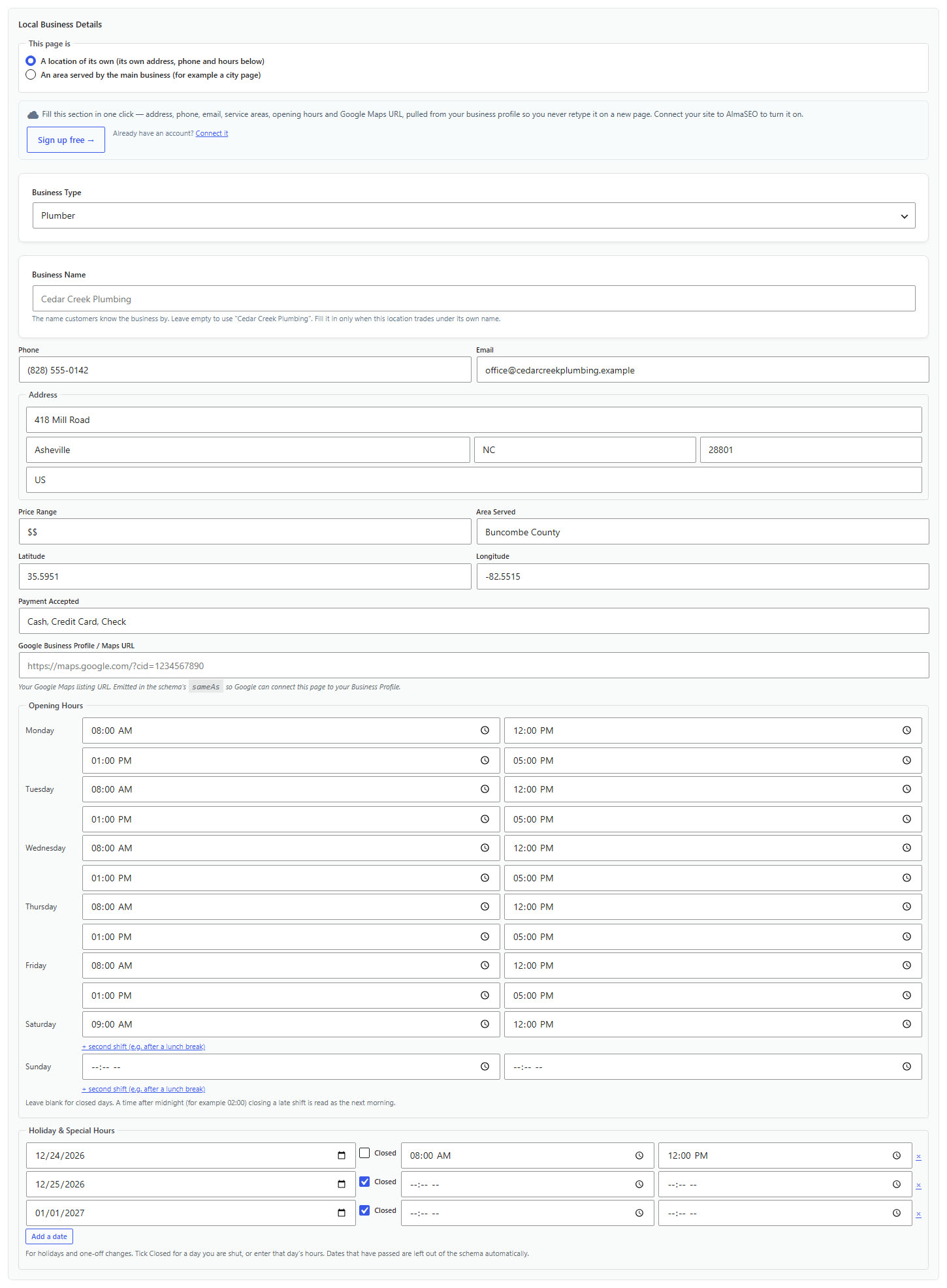
- Pick your Business Type from the list of 154, then fill in what applies: a business name if this location trades under its own (leave it empty to use your site’s name), phone, email, street address, city, state, ZIP and country, price range, the area you serve, latitude and longitude, payment methods, your Google Business Profile URL, your opening hours for each day (with a second shift if you close for lunch), and any holiday dates.
- Update the page, then test it. Paste the address into Google’s Rich Results Test or the schema.org validator to see exactly what search engines read.
What goes into the markup
Only the fields you fill in are published. Leave one empty and it is left out, rather than shipped as a blank that validators complain about.
- Name, address and phone
The core of local search, written as a proper schema.org
PostalAddressandtelephone, plus an email address if you want one published.- Opening hours, including split days
An opening and closing time for each day of the week, with an optional second shift for a business that closes for lunch, written as structured opening-hours data with full day names, which is the form the schema.org validator accepts. Days left blank are simply left out.
- Holiday and special hours
Add a date, then tick Closed or enter that day’s hours: Christmas Eve mornings only, closed on New Year’s Day. They are published as special opening hours, and dates that have passed drop out of the markup on their own, so last year’s closure never lingers.
- Map coordinates
Latitude and longitude, published as
GeoCoordinatesonly when both are filled in, so a half-entered location never goes out.- Your Google Business Profile
Paste your Business Profile or Maps link and AlmaSEO publishes it as
sameAs, the standard way to say that this page and that listing are the same business.- Area served, price range and payment
The town or region you cover, a price range such as
$$, and the payment methods you accept.- Description and image
Taken from the page’s SEO description and its social sharing image, or its featured image, so there is nothing extra to fill in.
A local business schema example
This is the shape of what AlmaSEO publishes for a plumber’s page with every field filled in. The business is made up; the structure is what the plugin writes.
{
  "@type": "Plumber",
  "@id": "https://example.com/#business",
  "name": "Harbor Plumbing & Heating",
  "description": "Licensed plumbers serving Greater Boston since 1998.",
  "url": "https://example.com/",
  "image": "https://example.com/wp-content/uploads/van.jpg",
  "address": {
    "@type": "PostalAddress",
    "streetAddress": "120 Dorchester Ave",
    "addressLocality": "Boston",
    "addressRegion": "MA",
    "postalCode": "02127",
    "addressCountry": "US"
  },
  "telephone": "+1 617-555-0142",
  "priceRange": "$$",
  "geo": {
    "@type": "GeoCoordinates",
    "latitude": 42.3389,
    "longitude": -71.0571
  },
  "openingHoursSpecification": [
    {
      "@type": "OpeningHoursSpecification",
      "dayOfWeek": "Monday",
      "opens": "08:00",
      "closes": "18:00"
    }
  ],
  "areaServed": "Greater Boston",
  "paymentAccepted": "Cash, Credit Card",
  "sameAs": ["https://maps.google.com/?cid=1234567890"],
  "parentOrganization": { "@id": "https://example.com/#identity" }
}
Only Monday is shown to keep it short; each day you fill in gets its own entry. On your site this sits inside the same block as the rest of your structured data, alongside the site-wide entry for your organization, and parentOrganization links the two, so search engines can see your location pages describe one business rather than several unrelated ones. (That link is left out when the site is set up to represent a person.)
Multiple locations, and the limits worth knowing
- One location per page. Each page carries one business. For several locations, give each its own page with its own address, phone and hours, which is also how search engines expect multi-location businesses to be laid out.
- City pages without a city office. If you serve a town but have no address there, set its page to An area served by the main business. That page then describes your main business, with its real address, instead of inventing a second one. Search engines see one business serving many places, not many businesses at one address.
- Keep your Business Profile in step. Google takes opening times for Search and Maps from your Google Business Profile, so change holiday hours there too.
- Visible details should match. The address and phone in the markup should be the ones on the page and in your Business Profile. Structured data that disagrees with what visitors see does more harm than none.
With an AlmaSEO account: filled in for you
Connected to an AlmaSEO account, the panel adds a Fill from AlmaSEO button that pulls a location’s address, phone, service area and opening hours from its AlmaSEO profile, with hours coming from the connected Google Business Profile, instead of typing them into every page. Typing them yourself stays free. Running local SEO for clients? That side of AlmaSEO is described on the local SEO software page.
Questions about local business schema
- Is local business schema free in AlmaSEO?
Yes. The business types, address, phone, hours, coordinates and Google Business Profile link are all part of the free AlmaSEO plugin, with no account. Only the Fill from AlmaSEO button, which pulls the details from an AlmaSEO profile, needs an account.
- Which page should carry local business schema?
The page that represents the business: usually the homepage for a single-location business, or each location’s own page for several. It should be a page that shows the same address and phone visibly.
- Do I need a local business schema generator?
No. AlmaSEO writes the markup from a form in the page editor, so there is no code to generate or paste, and when you change your hours or phone number the markup changes with the page.
- Will local business schema get me into the Google map pack?
Not on its own. Map rankings come mostly from your Google Business Profile, your reviews and how close the searcher is. The schema makes sure your website states your details clearly and consistently with that profile, which supports it.
- Can I add split hours or holiday hours?
Yes. Each day can have a second shift, for a business that closes for lunch, and you can list holiday dates as closed or with their own hours. Dates that have passed drop out of the markup on their own. Update the same hours in your Google Business Profile, which Google uses for opening times in Search and Maps.
- Does it work with Elementor, Divi or the Classic editor?
Yes. The business fields are in AlmaSEO’s SEO panel under the content, not in a block, so they work with any editor or page builder.
Tell search engines exactly what your business is.
Local business schema comes with the free AlmaSEO plugin, along with FAQ schema, sitemaps, redirects and 404 tracking, and the import from whatever you’re running now.